33

I would like to generate a multi-column table that wraps within columns of the document, and splits across pages. There are a couple of similar questions here

How do I create a really long table in a two column layout?

Two-column longtable or tabular

But neither seem really to resolve the problem.

Criteria:

The table/list will be generated with a loop, with an arbitrary number of rows. It should split over pages. It should be usable in a multicols environment.

The closest solution seems to be to use a list instead of a table, but this has the problem of lining up the top rows when the list is wrapped in a multicols environment. Below is a sample document:

\documentclass[12pt]{article}
\usepackage[margin=1in]{geometry}
\usepackage{xcolor,array}
\usepackage{multicol}
\usepackage{ifthen,enumitem}
\def\stnum{30} % number of items
\newcolumntype{C}{>{\centering}p{.5in}}

\setlist{nolistsep}
\pagestyle{empty}
\begin{document}

\enlargethispage{3\baselineskip}
\begin{multicols*}{2}
\begin{enumerate}[label={\bfseries\arabic*.\qquad},leftmargin=1.3in]
\item[Item \#]
\whiledo{\value{enumi}<\stnum}{
\item \begin{tabular}{CC}T & F\end{tabular}
\item[]{\color{black!20}\rule{1.5in}{3ex}}
}
\end{enumerate}
\end{multicols*}
\end{document}

The main problem is how to line up the rows properly (as if this were a table.) A secondary problem would be to have the equivalent of a repeated column header when the columns wrap.

Here's a partial picture of the output of the document above:
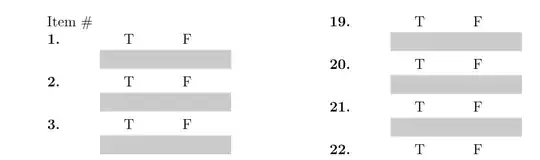
output of code

Alan Munn
  • 218,180
  • I don't understand what "line up the rows properly " means, or how your example fails to do so. – lockstep Apr 02 '11 at 21:19
  • If this were a table, then the 19 (the top of the second column) would line up with the 1 (the top of the first column.) If I take out the "Item #" line, that will happen for the first page of the example, but is not guranteed to happen in subsequent pages. Is that clearer? – Alan Munn Apr 02 '11 at 21:22
  • "Is not guaranteed" -- do you mean that a new multicol column could start with a grey-colored rule? – lockstep Apr 02 '11 at 21:33
  • @lockstep Yes, exactly. But that just gave me an idea for a solution. – Alan Munn Apr 02 '11 at 21:39

2 Answers2

31

It's possible to trick supertabular to work inside a multicols environment by redefining \newpage to be \columnbreak in the first column and \newpage in the second. I also needed to stick a height 0, width \linewidth rule at the bottom of the first column. Strange things happen without it.

\documentclass{article}
\usepackage[margin=1in]{geometry}
\usepackage{xcolor,supertabular,multicol}
\newcount\n
\n=0
\def\tablebody{}
\makeatletter
\loop\ifnum\n<300
        \advance\n by1
        \protected@edef\tablebody{\tablebody
                \textbf{\number\n.}&
                \hfill T\hfill\hfill F\hfill\hskip0pt\endgraf
                \vskip.5\baselineskip
                \color@begingroup
                \color{black!20}
                \hrule height3ex
                \color@endgroup
                \tabularnewline
        }
\repeat
\makeatother
\pagestyle{empty}
\begin{document}
\begin{multicols*}{2}
\let\mcnewpage=\newpage
\makeatletter
\renewcommand\newpage{%
        \if@firstcolumn
                \hrule width\linewidth height0pt
                \columnbreak
        \else
                \mcnewpage
        \fi
}
\makeatother
\tablehead{Item \#&\\}
\begin{supertabular}{lp{1.5in}}
\tablebody
\end{supertabular}
\end{multicols*}
\end{document}

I'm not actually sure that this is the best way to generate the body, but it works. enter image description here

TH.
  • 62,639
  • Very nice. Thanks. Deciding on who gets the bounty is going to be tough! – Alan Munn Apr 03 '11 at 00:31
  • Playing around with this, it seems that the table is shorter than it needs to be (by about 2 rows) This can be fixed by adding \shrinkheight{-.3em} to the table body command. – Alan Munn Apr 03 '11 at 02:31
  • 1
    I've decided to accept this answer over lockstep's because it works using a tabular environment, which allows for more flexibility in formatting columns, and also allows a repeatable header row. Thanks for a great solution! – Alan Munn Apr 07 '11 at 01:04
  • 1
    @Alan: No problem. This is actually not the first time I've hacked on supertabular. Someone on irc wanted something that I cannot quite recall at the moment--maybe extending into the outside margin on twosided documents--a month or so back. I've never actually used it myself in a document (I've never needed long tables), but it seems pretty good. I hope Johannes and Theo continue working on it, providing built in support for things like multicols. The bits of the code I've had to look at seem pretty well written and easy enough to follow. – TH. Apr 07 '11 at 03:33
  • Very nice. A minor problem: If you set \columnseprule you notice that the last column has a height of \textheight. Is there any way around that? – Martin Schröder Oct 25 '11 at 16:48
  • It works also from within LyX, though using TeX code inside an ERT box. Wonder if it is easy enough to trick LyX to use begin{supertabular} instead of begin{tabular}and, thus, create the table with LyX' respective GUI tools. – Nikos Alexandris Nov 13 '11 at 13:17
  • @TH.: This works pretty well, but it seems to break if a caption is added. That is, if a top caption is added then it is added in the first left column and the rest of that column is left empty. If a bottom caption is added then it is added at the bottom, but the first left column is left empty as well. Is there any way to circumvent this behaviour? I would like the caption to be printed at the bottom, while still filling the first column. – Roelof Spijker Nov 21 '11 at 11:05
10

What follows is a very crude solution to your main problem (lining up the rows properly): Use a tabbing environment. IIRC, there's no easy way to center the contents of a tabbing "cell", but column/page breaks inside a tabbing environment are permitted. The trick is to use \\* to forbid breaks after certain rows.

\documentclass[12pt]{article}

\usepackage[margin=1in]{geometry}

\usepackage{multicol,xcolor}

\usepackage{ifthen}
\def\stnum{30} % number of items

\newcounter{mytabbing}

\begin{document}

\begin{multicols*}{2}
\setcounter{mytabbing}{0}
\begin{tabbing}
\rule{0.7in}{1pt} \= \rule{0.7in}{1pt} \= \rule{0.7in}{1pt} \kill
\whiledo{\value{mytabbing}<\stnum}{%
  \stepcounter{mytabbing}%
  \themytabbing  \> T \> F \\* % "\\" would produce an incorrect column break
  \> {\color{black!20}\rule{1.4in}{2.8ex}} \\
}
\end{tabbing}
\end{multicols*}

\end{document}
David Carlisle
  • 757,742
lockstep
  • 250,273
  • Thanks! I've never before found a use for the tabbing environment. As for centering the T's and F's, that can be done by embedding them in a tabular environment: \begin{tabular}{>{\centering}p{.5in}}T\end{tabular} will do the trick. Since there's a bounty, I'll wait a few days to see if any other solutions show up, but this is a pretty good solution to begin with. – Alan Munn Apr 03 '11 at 00:26
  • Thanks for your solution, lockstep. I've decided to accept TH's answer, since it allows for more flexibility in the formatting of the table, and also allows a header. But the \\* was a very clever way of solving the problem. – Alan Munn Apr 07 '11 at 01:06