I would like to add enumerated lists to a Beamer presentation. Here is a minimal example:
\documentclass{beamer}

\setbeamertemplate{enumerate subitem}{\Alph{enumii}}
\setbeamerfont{itemize/enumerate subbody}{size=\normalsize}

\begin{document}

\begin{frame}

\begin{enumerate}
\item First level item
\begin{enumerate}
\item Second level item 1
\item Second level item 2
\item Second level item 3
\item Second level item 4
\item Second level item 5
\item Second level item 6
\item Second level item 7
\item Second level item 8
\item Second level item 9
\item Second level item 10
\item Second level item 11
\end{enumerate}
\end{enumerate}

\end{frame}
\end{document}
If you look at the pdf output you can see that the alignment of the alphabetical labels A, B, C etc. looks ugly. Especially the D below C, and I and J between H and K. Here is an image of the output:
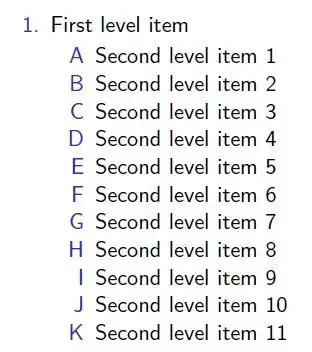
I would like the to center the labels horizontally (within \labelwidth). That is, the horizontal centers of the letters would be placed on a vertical line. How can I do it in Beamer?
I would like to avoid enumitem package as it does not work well with Beamer. Previously I had errors with enumitem in Beamer similar to those reported here:
Dealing with long description environment items
! TeX capacity exceeded, sorry [grouping levels=255]. errors


