5

sub items of unequal spacing

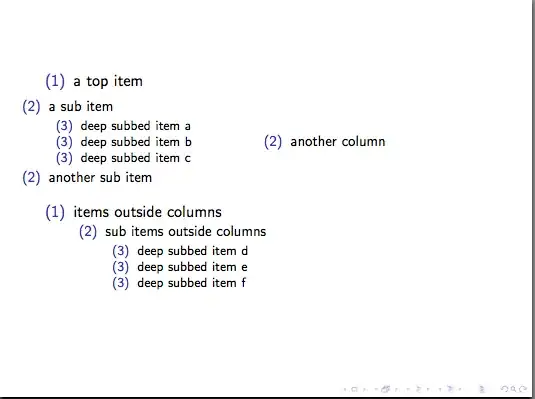
As seen in the picture, the sub-sub-items within the column are vertically spaced significantly wider than their counterparts outside any column. As I replaced the bullet points with depth numbers for better recognition, it can be clearly seen that they are on the same level. Here is the code.

\documentclass{beamer}
\setbeamertemplate{itemize item}{(1)}
\setbeamertemplate{itemize subitem}{(2)}
\setbeamertemplate{itemize subsubitem}{(3)}
\begin{document}
\begin{frame}
  \begin{itemize}
    \item a top item
      \begin{itemize}
        \begin{columns}
          \begin{column}{.5\linewidth}
            \item a sub item
              \begin{itemize}
                \item deep subbed item a
                \item deep subbed item b
                \item deep subbed item c
              \end{itemize}
            \item another sub item
          \end{column}
          \begin{column}{.5\linewidth}
            \item another column
          \end{column}
        \end{columns}
      \end{itemize}
  \end{itemize}
  \begin{itemize}
    \item items outside columns
      \begin{itemize}
        \item sub items outside columns
          \begin{itemize}
            \item deep subbed item d
            \item deep subbed item e
            \item deep subbed item f
          \end{itemize}
      \end{itemize}
  \end{itemize}
\end{frame}
\end{document}

What causes the spacing to be modified in the column environment and how can it be corrected?

karlkoeller
  • 124,410
XZS
  • 2,953

2 Answers2

3

A column is essentially a minipage and one of the things minipage do when they start is reset the list depth; they are really designed for the way you are trying to nest them.

In an ordinary document you can reset the list depth as follows simply by changing \@listdepth appropriately encapsulated in \makeatletter / \makeatother:

Sample minipage output

\documentclass{article}

\begin{document}

\begin{itemize}
\item a top item
  \begin{itemize}
    \begin{minipage}{.8\linewidth}
    \item a sub item
      \begin{itemize}
      \item deep subbed item a wrongly spaced
      \item deep subbed item b
      \item deep subbed item c
      \end{itemize}
    \item another sub item
    \end{minipage}
  \end{itemize}
\end{itemize}

\begin{itemize}
\item a top item
  \begin{itemize}
    \begin{minipage}{.8\linewidth}\makeatletter\@listdepth2\makeatother
    \item a sub item 
      \begin{itemize}
      \item deep subbed item a correctly space
      \item deep subbed item b
      \item deep subbed item c
      \end{itemize}
    \item another sub item
    \end{minipage}
  \end{itemize}
\end{itemize}

\begin{itemize}
\item a top item
  \begin{itemize}
    \item a sub item 
      \begin{itemize}
      \item deep subbed item a no minipage
      \item deep subbed item b
      \item deep subbed item c
      \end{itemize}
    \item another sub item
  \end{itemize}
\end{itemize}

\end{document}

In beamer you can't change catcodes in a frame without adding the fragile option. Often that is not desirable, so it is better to define a new command to do the setting of \@listdepth:

Sample beamer output

\documentclass{beamer}
\setbeamertemplate{itemize item}{(1)}
\setbeamertemplate{itemize subitem}{(2)}
\setbeamertemplate{itemize subsubitem}{(3)}

\makeatletter
\newcommand{\setlistdepth}[1]{\expandafter\@listdepth#1}
\makeatother

\begin{document}
\begin{frame}
  \begin{itemize}
    \item a top item
      \begin{itemize}
        \begin{columns}
          \begin{column}{.5\linewidth}
            \item a sub item\setlistdepth{2}
              \begin{itemize}
                \item deep subbed item a
                \item deep subbed item b
                \item deep subbed item c
              \end{itemize}
            \item another sub item
          \end{column}
          \begin{column}{.5\linewidth}
            \item another column
          \end{column}
        \end{columns}
      \end{itemize}
  \end{itemize}
  \begin{itemize}
    \item items outside columns
      \begin{itemize}
        \item sub items outside columns
          \begin{itemize}
            \item deep subbed item d
            \item deep subbed item e
            \item deep subbed item f
          \end{itemize}
      \end{itemize}
  \end{itemize}
\end{frame}
\end{document}

Incidentally bemear is giving you the expected labels because it keeps track of those with \@itemdepth and not \@listdepth.

Andrew Swann
  • 95,762
0

When you add a column, it is is aligned with the center of the page, not to the itemize.

You need change the column position and vspace manually.

I add a column to the left (and adjust the width) and modify the vspace:

with new column and vspace

\documentclass{beamer}
\setbeamertemplate{itemize item}{(1)}
\setbeamertemplate{itemize subitem}{(2)}
\setbeamertemplate{itemize subsubitem}{(3)}

\begin{document}
\begin{frame}
  \begin{itemize}
  { %%% to vspace affect only inside this block
    \item a top item
      \begin{itemize}

      \vspace{-3pt}

      \setbeamertemplate{itemize/enumerate subsubbody begin}{\vspace{-2pt}}
      \setbeamertemplate{itemize/enumerate subsubbody end}{\vspace{-2pt}}

      \newlength{\wideitemsep}
      \setlength{\wideitemsep}{\itemsep}
      \addtolength{\wideitemsep}{-2pt}
      \let\olditem\item
      \renewcommand{\item}{\setlength{\itemsep}{\wideitemsep}\olditem}

      \begin{columns}
        \begin{column}{.083\linewidth}
        \end{column}
        \begin{column}{.417\linewidth}
          \item a sub item
            \begin{itemize}
              \item deep subbed item a
              \item deep subbed item b
              \item deep subbed item c
            \end{itemize}
          \item another sub item
        \end{column}
        \begin{column}{.5\linewidth}
          \item another column
        \end{column}
      \end{columns}
    \end{itemize}
  }
  \end{itemize}
  \begin{itemize}
    \item items outside columns
      \begin{itemize}
        \item sub items outside columns
          \begin{itemize}
            \item deep subbed item d
            \item deep subbed item e
            \item deep subbed item f
          \end{itemize}
      \end{itemize}
  \end{itemize}
\end{frame}
\end{document}
Anderson
  • 2,333
  • 4
  • 17
  • 19
  • 1
    Indeed, this makes it look better. But I am trying to adjust the vertical spacing, meaning the space between "deep subbed item a" and "deep subbed item b" should be as wide as the space between "deep subbed item d" and "deep subbed item e". – XZS Oct 18 '13 at 07:45
  • The column resets some properties of itemize. You need adjust this properties. I add some code to adjust vspace into a block {...} – Anderson Oct 18 '13 at 15:23