I assume that your target is not to remove all bottom numbers in a document, but to remove those bottom numbers associated with the particular pages that are listed on the table of contents (with page numbers intact).
The \fancypagestyle{nopagenum}{...} command is used to define a new page style, and then issue the command \thispagestyle{nopagenum} right below those commands that will write contents to TOC.
To demonstrate, I write up a test.tex using typical fancy header setting
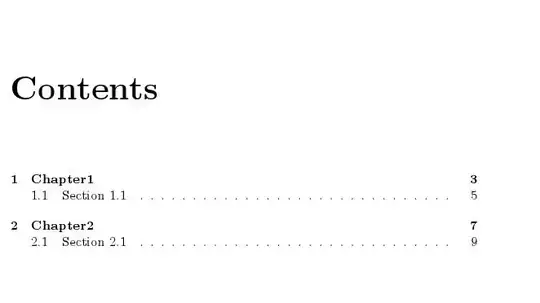
You will see that pages 3, 5, 7 and 9 are removed if the file is complied. (Sorry there are a total of 9 pages and I did not post them all to save space.)
Code:
\documentclass[]{book}
\usepackage{lipsum}
\usepackage{fancyhdr}
\pagestyle{fancy}
\fancyhead{} % clear all header fields
\fancyhead[LE]{\footnotesize{\scshape\nouppercase{\leftmark}}}
\fancyhead[RO]{\footnotesize{\scshape\nouppercase{\rightmark}}}
\fancyfoot{} % clear all footer fields
\fancyfoot[C]{\thepage}
\renewcommand{\headrulewidth}{1 pt}
\renewcommand{\footrulewidth}{1 pt}
%
\fancypagestyle{nopagenum}{%         % This is what you need
\fancyfoot[C]{}                      % page number at center is assumed
}

\begin{document}

\tableofcontents

\chapter{Chapter1}
\thispagestyle{nopagenum}            % called to remove bottom page number
\lipsum[1-5]
\newpage
\section{Section 1.1}
\thispagestyle{nopagenum}            %
\lipsum[1]
\newpage
\lipsum[1]
\chapter{Chapter2}
\thispagestyle{nopagenum}            %
\lipsum[1]
\newpage
\lipsum[1]
\newpage
\lipsum[1]
\section{Section 2.1}
\thispagestyle{nopagenum}            %
\lipsum[1]
\end{document}


\pagestyle{empty}? – Guido Oct 18 '13 at 06:11\fancyfoot[C]{}in the definition of your fancy pagestyle... (assuming your page number is in the center? Cf. to the definition of pagestyles e.g. here http://tex.stackexchange.com/questions/24137/fancyhdr-headings-how-to-remove-the-number-of-the-section?rq=1 – Ronny Oct 18 '13 at 06:49