I am trying to use overpic with absolute positioning for a single figure only. The \usepackage[abs]{overpic} sets absolute positioning for all figures. Is there a way to define it for the local overpic environment only? Or is there a way to load both absolute and relative versions of overpic and calling them differently?
Asked
Active
Viewed 1,389 times
6

Markus
- 1,365
3 Answers
2
The options for absolute and relative positioning are evaluated at run time only. But this can be made more flexible.
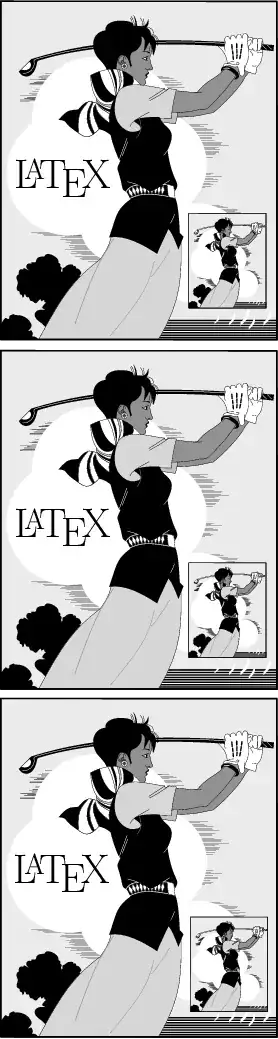
The following example defines keys abs, percent, permille, rel=<number> that can be used in the optional argument of \begin{overpic}[...]. The latter option allows the specification of a different divisor than 100 (percent) or 1000 (permille). The number must be a positive integer.
The example is based on package overpic's examples overpic-abs.pdf and overpic-rel.pdf; golfer.eps comes from the examples of Ghostscript.
\documentclass{article}
\usepackage{overpic}

\makeatletter
\newcommand\OVP@calc@tmp{%
  \setlength{\unitlength}{\@tempdima}%
  \divide\@tempcnta by \unitlength
  \divide\@tempcntb by \unitlength
  \ifnum\count@=\z@\count@=10\fi
}%
\let\OVP@calc@abs=\OVP@calc@tmp

\renewcommand\OVP@calc@tmp{%
  \ifnum\@tempcnta>\@tempcntb
    \divide\@tempcnta by \OVP@scale
    \setlength\unitlength{\@tempcnta sp}%
    \@tempcnta=\OVP@scale
    \divide\@tempcntb by \unitlength
  \else
    \divide\@tempcntb by \OVP@scale
    \setlength\unitlength{\@tempcntb sp}%
    \@tempcntb=\OVP@scale
    \divide\@tempcnta by \unitlength
  \fi
  \ifnum\count@=\z@
    \count@=\OVP@scale\divide\count@ by 10 %
  \fi
}%
\let\OVP@calc@rel\OVP@calc@tmp

\define@key{Gin}{abs}[]{%
  \let\OVP@calc\OVP@calc@abs
}
\define@key{Gin}{percent}[]{%
  \setkeys{Gin}{rel=100}%
}
\define@key{Gin}{permille}[]{%
  \setkeys{Gin}{rel=\@m}%
}
\define@key{Gin}{rel}{%
  \renewcommand{\OVP@scale}{#1}%
  \ifnum\OVP@scale>\z@
    \let\OVP@calc\OVP@calc@rel
  \else
    \PackageError{overpic}{Invalid number for option `rel'}\@ehc
  \fi
}
\makeatother

\begin{document}
  \begin{overpic}[
    scale=.25,
  ]{golfer.eps}
    \put(5,45){\huge \LaTeX}
    \put(55,10){\includegraphics[scale=.07]{golfer.eps}}
  \end{overpic}

  \begin{overpic}[
    scale=.25,
    rel=20,
  ]{golfer.eps}
    \put(1,9){\huge \LaTeX}
    \put(11,2){\includegraphics[scale=.07]{golfer.eps}}
  \end{overpic}

  \begin{overpic}[
    scale=.25,
    unit=1mm,
    abs,
  ]{golfer.eps}
    \put(3,28){\huge \LaTeX}
    \put(34,5){\includegraphics[scale=.07]{golfer.eps}}
  \end{overpic}
\end{document}

Heiko Oberdiek
- 271,626
1
As I suggested in my comment of 6 months ago, the \stackinset macro of the stackengine package provides this capability. You might consider it an alternative to overpic if you want positioning relative to the local figure.
\documentclass{article}
\usepackage{stackengine}
\usepackage{graphicx}
\usepackage{xcolor}
\begin{document}
\stackinset{l}{0.2cm}{t}{0.2cm}{\colorbox{white}{blackbird in the snow}}{%
\stackinset{r}{0.5cm}{t}{0.5cm}{\includegraphics[width=3cm]{blackbird.jpg}}{%
\includegraphics[width=\textwidth]{snow.jpg}%
}}
\end{document}


Steven B. Segletes
- 237,551

stackinsetmacro of thestackenginepackage provide what you need? – Steven B. Segletes Oct 20 '13 at 00:48