I want to include figures generated by inkscape which include transparency. When I change the width of the figures, things get weird.
Have you ever noticed this and is there a better way to do?
% This code works fine
\documentclass{article}
\usepackage{graphicx, xcolor}

\begin{document}

%\centering
%\def\svgwidth{6cm}
\input{test.pdf_tex}

\end{document}
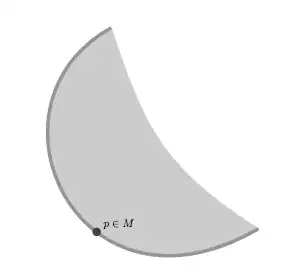
% This code doesn't
\documentclass{article}
\usepackage{graphicx, xcolor}

\begin{document}

%\centering
\def\svgwidth{6cm}
\input{test.pdf_tex}

\end{document}

Here is a link to the files generated by inkscape.
Here is the TeX file created by inkscape.
%% Creator: Inkscape inkscape 0.48.2, www.inkscape.org
%% PDF/EPS/PS + LaTeX output extension by Johan Engelen, 2010
%% Accompanies image file 'test.pdf' (pdf, eps, ps)
%%
%% To include the image in your LaTeX document, write
%%   \input{<filename>.pdf_tex}
%%  instead of
%%   \includegraphics{<filename>.pdf}
%% To scale the image, write
%%   \def\svgwidth{<desired width>}
%%   \input{<filename>.pdf_tex}
%%  instead of
%%   \includegraphics[width=<desired width>]{<filename>.pdf}
%%
%% Images with a different path to the parent latex file can
%% be accessed with the `import' package (which may need to be
%% installed) using
%%   \usepackage{import}
%% in the preamble, and then including the image with
%%   \import{<path to file>}{<filename>.pdf_tex}
%% Alternatively, one can specify
%%   \graphicspath{{<path to file>/}}
%%
%% For more information, please see info/svg-inkscape on CTAN:
%%   http://tug.ctan.org/tex-archive/info/svg-inkscape
%%
\begingroup%
  \makeatletter%
  \providecommand\color[2][]{%
    \errmessage{(Inkscape) Color is used for the text in Inkscape, but the package 'color.sty' is not loaded}%
    \renewcommand\color[2][]{}%
  }%
  \providecommand\transparent[1]{%
    \errmessage{(Inkscape) Transparency is used (non-zero) for the text in Inkscape, but the package 'transparent.sty' is not loaded}%
    \renewcommand\transparent[1]{}%
  }%
  \providecommand\rotatebox[2]{#2}%
  \ifx\svgwidth\undefined%
    \setlength{\unitlength}{476.22402344bp}%
    \ifx\svgscale\undefined%
      \relax%
    \else%
      \setlength{\unitlength}{\unitlength * \real{\svgscale}}%
    \fi%
  \else%
    \setlength{\unitlength}{\svgwidth}%
  \fi%
  \global\let\svgwidth\undefined%
  \global\let\svgscale\undefined%
  \makeatother%
  \begin{picture}(1,1.41427559)%
    \put(0,0){\includegraphics[width=\unitlength]{test.pdf}}%
    \put(0.47641909,0.6172474){\color[rgb]{0,0,0}\makebox(0,0)[lb]{\smash{$p\in M$}}}%
  \end{picture}%
\endgroup%

.pdfin Inkscape and use\includegraphics{}and have had no issues. Is there a reason why you would want to do it this other way? – codeAndStuff Oct 21 '13 at 13:42\def\svgwidth{6cm}uncommented? – Colas Oct 21 '13 at 14:46But I'm wondering, why is there so much space around the figure exported from inkscape? Is it necessary? When I save my figures, I always tell Inkscape only to save the objects without a surrounding frame
– bene Oct 21 '13 at 14:48preview(Apple's pdf previewer), I have the same problem ; when I open it withchromeit is even worse. When I open it withphotoshop, it is also bad. This is a link for chating about that (if you have 5 minutes) http://chat.stackexchange.com/rooms/info/11145/latex-and-inkscape?tab=general. I am curious to see a screenshot of the pdf you got. – Colas Oct 21 '13 at 15:05document propertiesandresize to object? – codeAndStuff Oct 21 '13 at 15:06MacOS X(preview,photoshopandchrome). OnWindows, the bug is also there onphotoshop. On http://view.samurajdata.se, on the contrary, it is ok. – Colas Oct 21 '13 at 15:26