33

Does anyone know of a LaTeX package that implements a visual counter similar to the countdown counter of this context-module? It produces images like this:

countdown counter in context

However, I would like to stick to LaTeX and beamer, so if anyone has used/hacked together something similar, I would appreciate any reference.

I am aware of the progress bar theme, but I would like to add such a circular progressbar to my own theme.

Ingo
  • 20,035
user38931
  • 431

3 Answers3

25

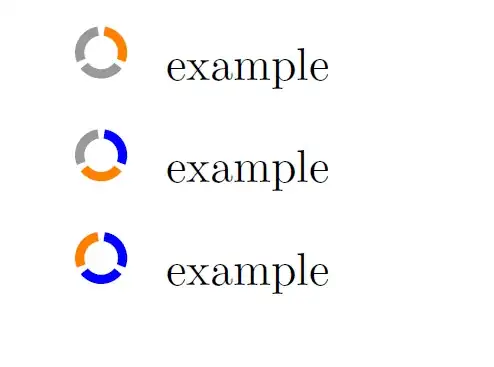
If just want to draw it, you might want to check this. I've just fixed some stuff about it (now it checks the parameters given, and sends warning if necessary).

enter image description here

\documentclass{article}

\usepackage[a6paper]{geometry}

\usepackage{tikz}
    \usetikzlibrary{calc}

\makeatletter
\newcommand\statuslabel[3][]{%
    \def\scale{#1}
    \ifx\scale\empty\def\scale{1}\fi

    \let\no\relax
    \let\n\relax
    \newcommand \no {#2}
    \newcommand \n {#3}
    \def \colorbef {blue}
    \def \colorat {orange}
    \def \coloraft {black!40}

    \let\stop\relax
    \sbox\z@{\@tempcnta=0\no\relax}\ifdim\wd0>\z@\relax\@latex@warning{Not a number (\#2): \no}\def\stop{1}\fi
    \sbox\z@{\@tempcnta=0\n\relax}\ifdim\wd0>\z@\relax\@latex@warning{Not a number (\#3): \n}\def\stop{1}\fi
    \ifx\stop\relax
        \ifnum\no>\n\@latex@warning{Wrong parameter order?}\def\stop{1}\fi
    \fi

    \ifx\stop\relax
    \else
        \def \no {1}
        \def \n {1}
        \def \colorat {red}
        \def \stop {??}
    \fi

    \begin{tikzpicture}[scale=0.1*\scale]

    \def \radiusout {2cm}
    \def \radiusin {1.3cm}
    \ifnum\n=1
        \def \margin {0}
    \else
        \def \margin {25/\n}
    \fi

    \foreach \s in {1,...,\n}
    {
        \node[circle, scale=\scale] at (0,0) {\tiny\stop};
        \fill[\ifnum\s>\no\coloraft\relax\else\ifnum\s<\no\colorbef\else\colorat\fi\fi]
            ({90-360/\n * (\s - 1)-\margin}:\radiusout) arc ({90-360/\n * (\s - 1)-\margin}:{90-360/\n * (\s)+\margin}:\radiusout) --
            ({90-360/\n * (\s)+\margin}:\radiusin) arc ({90-360/\n * (\s)+\margin}:{90-360/\n * (\s - 1)-\margin}:\radiusin);
    }
    \end{tikzpicture}
}
\makeatother

\begin{document}

2/8: \statuslabel{2}{8}

6/6: \statuslabel{6}{6}

4/22: \statuslabel{4}{22}

1/1: \statuslabel{1}{1}

4/2 warning and off: \statuslabel{4}{2}

3/7 scale 2x: \statuslabel[2]{3}{7}

\end{document}

You can also create an enumeration environment (in a bit hack way):

enter image description here

\documentclass{article}

\usepackage[a6paper]{geometry}

\usepackage{enumitem}
\usepackage{refcount}
\usepackage{tikz}
    \usetikzlibrary{calc}

\makeatletter
\newcommand\statuslabel[3][]{%
    \def\scale{#1}
    \ifx\scale\empty\def\scale{1}\fi

    \let\no\relax
    \let\n\relax
    \newcommand \no {#2}
    \newcommand \n {#3}
    \def \colorbef {blue}
    \def \colorat {orange}
    \def \coloraft {black!40}

    \let\stop\relax
    \sbox\z@{\@tempcnta=0\no\relax}\ifdim\wd0>\z@\relax\@latex@warning{Not a number (\#2): \no}\def\stop{1}\fi
    \sbox\z@{\@tempcnta=0\n\relax}\ifdim\wd0>\z@\relax\@latex@warning{Not a number (\#3): \n}\def\stop{1}\fi
    \ifx\stop\relax
        \ifnum\no>\n\@latex@warning{Wrong parameter order?}\def\stop{1}\fi
    \fi

    \ifx\stop\relax
    \else
        \def \no {1}
        \def \n {1}
        \def \colorat {red}
        \def \stop {??}
    \fi

    \begin{tikzpicture}[scale=0.1*\scale]

    \def \radiusout {2cm}
    \def \radiusin {1.3cm}
    \ifnum\n=1
        \def \margin {0}
    \else
        \def \margin {25/\n}
    \fi

    \foreach \s in {1,...,\n}
    {
        \node[circle, scale=\scale] at (0,0) {\tiny\stop};
        \fill[\ifnum\s>\no\coloraft\relax\else\ifnum\s<\no\colorbef\else\colorat\fi\fi]
            ({90-360/\n * (\s - 1)-\margin}:\radiusout) arc ({90-360/\n * (\s - 1)-\margin}:{90-360/\n * (\s)+\margin}:\radiusout) --
            ({90-360/\n * (\s)+\margin}:\radiusin) arc ({90-360/\n * (\s)+\margin}:{90-360/\n * (\s - 1)-\margin}:\radiusin);
    }
    \end{tikzpicture}
}
\makeatother

\makeatletter
\newcounter{myenum} % to create unique labels
\newenvironment{myenum}
  {\stepcounter{myenum}
   \edef\nref{\getrefnumber{myenum@\arabic{myenum}}}
   \edef\nref{\expandafter\@firstofone\nref}
   \begin{enumerate}[
     label=\protect\statuslabel{\arabic*}{\nref},
     ref=\arabic*]}
  {\label{myenum@\arabic{myenum}}%
   \end{enumerate}}
\makeatother

\begin{document}

\begin{myenum}
\item example
\item example
\item example
\end{myenum}
\end{document}

References:

masu
  • 6,571
20

A solution in Beamer (inspired @masu answer, but with clockwise increments).

It actually can be used both in Beamer or in non-presentation documents: the user selects where it is convenient one or the other option via the key beamer. Usually it is set to false allowing the selection of current and total value parameters. When beamer=true, the latter parameters are overridden by the Beamer settings \insertframenumber and \inserttotalframenumber.

\documentclass{beamer}
\usepackage{lmodern}
\usepackage{tikz}
\usetikzlibrary{calc}

\setbeamertemplate{navigation symbols}{}

\makeatletter
\newif\ifbeamer%
\pgfkeys{/visual counter/.cd,
 thickness/.store in=\thickness,
 thickness=0.4ex,
 radius/.store in=\radius,
 radius=1.5ex,
 segment distance/.store in=\segdist,
 segment distance=8,
 color current frame/.store in=\colcurrframe,
 color current frame=orange,
 color old frame/.store in=\cololdframe,
 color old frame=blue,
 color next frame/.store in=\colnextframe,
 color next frame=gray!30,
 current value/.store in=\currentv,
 current value=1,
 total value/.store in=\totalv,
 total value=5,
 beamer/.is if=beamer,
 beamer/.default=false,
 countdown/.code={
    \begin{tikzpicture}[fill color/.style={}]
    \ifbeamer
     \pgfkeys{/visual counter/.cd, 
       current value=\insertframenumber,
       total value=\inserttotalframenumber,
     }
    \fi
    \def\current{\currentv}
    \def\tot{\totalv}
    \def\radiusout{\radius}
    \def\radiusin{\radius-\thickness}

    \foreach \s[] in {1,...,\tot}
    {
      \ifnum\s>\current%
        \tikzset{fill color/.append style={\colnextframe}}%
      \fi%
      \ifnum\s=\current%
        \tikzset{fill color/.append style={\colcurrframe}}%
      \fi%
      \ifnum\s<\current%
        \tikzset{fill color/.append style={\cololdframe}}%
      \fi%
      \fill[fill color]
        ({90-360/\tot * (\s - 1)-\segdist}:\radiusout) arc 
        ({90-360/\tot * (\s - 1)-\segdist}:{90-360/\tot * (\s)+\segdist}:\radiusout) --
        ({90-360/\tot * (\s)+\segdist}:\radiusin) arc 
        ({90-360/\tot * (\s)+\segdist}:{90-360/\tot * (\s - 1)-\segdist}:\radiusin);
    }
    \end{tikzpicture}
 }
}

\newcommand{\setvcoptions}[1]{
\pgfkeys{/visual counter/.cd,#1}
}
\newcommand{\addvisualcounter}{%
\tikz\node[/visual counter/.cd, beamer=true,countdown]{};
}

% new footline with 
\setbeamertemplate{footline}{
\begin{beamercolorbox}[wd=0.95\textwidth, ht=2ex,dp=1ex,sep=1ex]{footline}
\hfill%
\addvisualcounter
\end{beamercolorbox}
}
\makeatother

% Let's change some options:
\setvcoptions{
 segment distance=9,
 thickness=0.5ex
}

\begin{document}

\begin{frame}{Title}
bla bla bla

\begin{center}
\begin{tikzpicture}
\node[/visual counter/.cd, 
current value=3, total value=8,
radius=1.5cm, thickness=0.5cm,color current frame=green!80!black,countdown] at (0,0){};
\end{tikzpicture}
\end{center}

\end{frame}


\begin{frame}{Something else}
This uses the ``beamer'' option so no need to explicitly set the counters:


\begin{center}
\begin{tikzpicture}[yshift=3cm]
\node[/visual counter/.cd, radius=1.25cm, thickness=0.25cm,
beamer=true,
color current frame=green!80!black,
color old frame=magenta!80!violet,
countdown] at (0,0){};
\end{tikzpicture}
\end{center}
\end{frame}

\begin{frame}{Different title}
bla bla bla

\begin{center}
\begin{tikzpicture}
\node[/visual counter/.cd, radius=1cm, thickness=0.1cm,
color current frame=cyan!70!blue,
color old frame=magenta!80!violet,
color next frame=orange!50,
current value=6,
total value=24,
countdown] at (0,0){};
\end{tikzpicture}
\end{center}
\end{frame}

\begin{frame}{Another one}
bla bla bla

\begin{center}
\begin{tikzpicture}
\node[/visual counter/.cd, radius=1.25cm, thickness=0.5cm,
color current frame=red!70!orange,
color old frame=red!70!black,
color next frame=orange!80,
segment distance=3,
current value=6,
total value=10,
countdown] at (0,0){};
\end{tikzpicture}
\end{center}
\end{frame}

\begin{frame}{Final}
bla bla bla

\begin{center}
\begin{tikzpicture}
\node[/visual counter/.cd, radius=1.25cm, thickness=0.25cm,
color current frame=red!70!orange,
color old frame=red!70!black,
beamer=true,
countdown] at (0,0){};
\end{tikzpicture}
\end{center}
\end{frame}

\end{document}

The result:
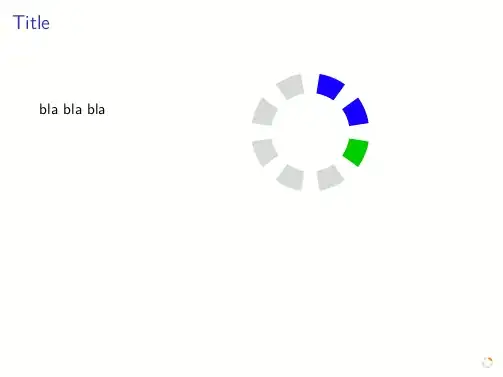
enter image description here

  • 1
    In terms of the interface, this is closest to the visualcounter module. However, the visualcounter module works with any counter (page, section, itemize, enumeration); so that the current and last values are calculated automatically. I don't know if there is an easy way to do that in LaTeX. – Aditya Oct 27 '13 at 05:30
  • 1
    @Aditya: in principle also my solution can work with any counter; in Beamer is easy as it is quite straightforward to access current and total values. With other counters, the problem is only the total value: I guess can be possible to compute it from aux files, but it's just an intuition. – Claudio Fiandrino Oct 27 '13 at 13:11
13

It is just for fun with PSTricks and not a complete solution. The remaining part should be easy to add.

\documentclass[pstricks,border=12pt]{standalone}
\usepackage{multido}
\SpecialCoor
\psset{linewidth=.5}
\def\Atom#1#2{%
    \multido{\i=0+1}{#1}{%
        \psarcn[linecolor=#2](0,0){1.5}{!115 \i\space 60 mul sub}{!65 \i\space 60 mul sub}}}

\begin{document}
\multido{\i=0+1}{7}{%
\begin{pspicture}(-2,-2)(2,2)
    \Atom{6}{lightgray}
    \Atom{\i}{blue}
\end{pspicture}}
\end{document}

enter image description here

  • 4
    Overwriting existing gray cells will blue cells does not look pretty when using transparent colors. Therefore it is better to draw the blue and the gray cells separately. – Aditya Oct 27 '13 at 05:32