2

I am using Linux Libertine and thus far everything has been working flawlessly with regard to the math mode, fonts look very well and match the text perfectly.

However, I found that I do not like the way \overrightarrow is typeset, because the tip of the arrow is very big and touches the letters below. I have found somewhere that the solution to that is to use unicode-math, which is something I should probably do anyways, and turning it on does indeed solve my issue: the arrow changes the tip to something manageable.

The issue is, \setminus disappears; additionally, bold symbols are no longer bold while I do need them for vectors. Therefore, my main question is how can I get a nicer looking arrow without losing \setminus and with working \bm ?

An MWE:

\documentclass{article}

\usepackage{fontspec}
\setmainfont{Linux Libertine}

\usepackage{amsmath}
\usepackage{bm}
\usepackage{unicode-math}

\begin{document}

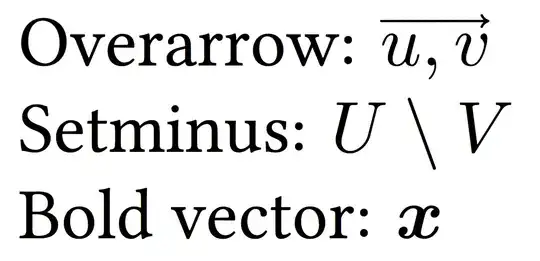
Overarrow: $\overrightarrow{u, v}$

Setminus: $U\setminus V$

Vector: $x$, $\bm{x}$

\end{document}

EDIT: As @egreg pointed out, the issues with missing \setminus are known. However, even when solved, I need bold symbols in my equations. unicode-math effectively precludes using them, apart from the work-around with FakeBold, see here.

Therefore, is there a way of changing the \overrightarrow without the use of unicode-math?

  • See http://tex.stackexchange.com/questions/140279/which-fonts-can-be-used-with-unicode-math-package that shows the same problem – egreg Oct 28 '13 at 17:03
  • Weirdly, the answer \renewcommand{\setminus}{\mathbin{\backslash}} doesn't work in my case. Using a single glyph from Asana works, thanks! – Up-and-coming LaTeX Mastah Oct 28 '13 at 19:57
  • Unfortunately, using unicode-math also causes a bigger problem: my bold fonts disappear because no bold faces are available now. Is there any way of avoiding unicode-math and still getting a nice arrow? – Up-and-coming LaTeX Mastah Oct 28 '13 at 20:27
  • I see no bold in the example – egreg Oct 28 '13 at 21:51
  • I would keep libertine, add the package amssymb then use \smallsetminus, for some reason with the libertine package smallsetminus closely resembles setminus. – doed Oct 28 '13 at 22:27
  • @egreg: now it's there. – Up-and-coming LaTeX Mastah Oct 28 '13 at 23:32
  • @doed: that might work, but I am again left without bold letters. – Up-and-coming LaTeX Mastah Oct 28 '13 at 23:33
  • @Up-and-comingLaTeXMastah why would you be left without bold fonts? Just use \mathbf. Please note, I left everything untouched as in your example. I just added the amssymb with the \smallsetminus. I disagree with egreg's answer in that he chose for you what fonts to have,based in the bm package. Of course, regardless of the similarity between the fonts here. – doed Oct 29 '13 at 00:56
  • Would there be a way to select the glyphs from Linux Libertine to be used in math mode? I saw this done in one of the related questions with the help of mathspec, but when I used them I messed something up. I will be adding a follow-up question. – Up-and-coming LaTeX Mastah Oct 29 '13 at 05:24

1 Answers1

2

Using Latin Modern Math along with Linux Libertine is disputable: they are different fonts.

Notice also that bm doesn't work with unicode-math (at the moment, work is in progress). But you can use \mathbfit.

\documentclass{article}

\usepackage{amsmath}
\usepackage{unicode-math}
\setmainfont[Ligatures=TeX]{TeX Gyre Termes}
\setmathfont{TeX Gyre Termes Math}
% the redefinition for the missing \setminus must be delayed
\AtBeginDocument{\renewcommand{\setminus}{\mathbin{\backslash}}}

\begin{document}

Overarrow: $\overrightarrow{u, v}$

Setminus: $U\setminus V$

Bold vector: $\mathbfit{x}$

\end{document}

enter image description here

The same with Latin Modern for all the document fonts:

enter image description here

The same with Linux Libertine for text and Latin Modern for math:

enter image description here

I see no touching of the arrow, but also visual clash between the text and the math fonts.

egreg
  • 1,121,712
  • Cool, thanks a bunch! Unless a better answer shows up this will have to do. bm was very useful to me in the past because it was able, for example, to get me bold Greek letters.

    You don't see a touching arrow now, but without unicode-math the tip is much wider. Regarding clashing of the fonts, I do notice that LM are thinner than LL, so I might try using characters from LL; unfortunately, that leads to spacing issues.

    – Up-and-coming LaTeX Mastah Oct 29 '13 at 01:52
  • @Up-and-comingLaTeXMastah Producing a math font compatible with Linux Libertine would be a great achievement. – egreg Oct 29 '13 at 07:25
  • I have seen a question here discussing setting Linux Libertine fonts for different ranges, but I found that by doing so I accidentally replaced glyphs that I wanted, like the overrightarrow. More work needed I guess. – Up-and-coming LaTeX Mastah Oct 29 '13 at 15:17