Two problems:
- The
auto option places the nodes by default to the left, you will need to use auto=right (or the swap option which swaps the default side).
- The
auto option snaps to the main compass anchors east, north east, north, …, south and south east.
You want to use circle nodes so that anchors are placed in a circle around the node.
You want to use text depth=+0pt or similar solution to hide the different depths of the subscripts.
And you want to use another auto anchor/angle calculator. This is what this answer has to offer.
By the way, you might be interested in the nodes around center key for the placement of nodes in a chain. One might also add the edge nodes via the join style but that’s for another question.
Code
\documentclass[tikz]{standalone}
\usetikzlibrary{chains}
\pgfmathparse{atan2(0,1)}% the CVS version swaps the arguments so I define new atan
                         % functions that have the order of arguments in their name
\ifdim\pgfmathresult pt=0pt % atan2(y, x)
  \tikzset{declare function={atanXY(\x,\y)=atan2(\y,\x);atanYX(\y,\x)=atan2(\y,\x);}}
\else                       % atan2(x, y)
  \tikzset{declare function={atanXY(\x,\y)=atan2(\x,\y);atanYX(\y,\x)=atan2(\x,\y);}}
\fi
\makeatletter
\let\tikz@auto@anchor@orig      \tikz@auto@anchor
\let\tikz@auto@anchor@prime@orig\tikz@auto@anchor@prime
\tikzset{
  Auto/.code=\pgfkeysalso{/tikz/auto=#1}%
    \let\tikz@auto@anchor      \tikz@Auto@anchor
    \let\tikz@auto@anchor@prime\tikz@Auto@anchor@prime,
  auto/.prefix code=\let\tikz@auto@anchor      \tikz@Auto@anchor@orig
                    \let\tikz@auto@anchor@prime\tikz@Auto@anchor@prime@orig}
\def\tikz@Auto@anchor{%
  \pgfmathatanXY@{\pgf@sys@tonumber\pgf@x}{\pgf@sys@tonumber\pgf@y}%
  \pgfutil@tempdima=\pgfmathresult pt\relax
  \advance\pgfutil@tempdima-90pt\relax
  \edef\tikz@anchor{\pgf@sys@tonumber\pgfutil@tempdima}}
\def\tikz@Auto@anchor@prime{%
  \pgfmathatanXY@{\pgf@sys@tonumber\pgf@x}{\pgf@sys@tonumber\pgf@y}%
  \pgfutil@tempdima=\pgfmathresult pt\relax
  \advance\pgfutil@tempdima90pt\relax
  \edef\tikz@anchor{\pgf@sys@tonumber\pgfutil@tempdima}}
\begin{document}
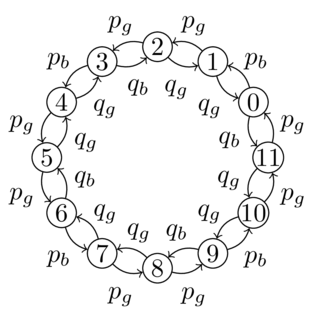
\begin{tikzpicture}[Auto=right,
  start chain=circle placed {at=(\tikzchaincount*30:1.5)},
  regular/.style={draw,circle,inner sep=+0pt,minimum size=+4mm}]
\foreach \i in {0,...,11} \node [on chain, regular] (\i) {\i};
\tikzset{text depth=+0pt, shape=circle, inner sep=+2pt}
\foreach \i [evaluate=\i as \ni using {int(mod(\i+1,12))}] \i in {0,3,6,9}
  {\draw [->] (\i) to [bend right] node {$p_b$} (\ni); }
\foreach \i [evaluate=\i as \ni using {int(Mod(\i-1,12))}] \i in {0,3,6,9}
  {\draw [->] (\i) to [bend right] node {$q_b$} (\ni); }
\foreach \i [evaluate=\i as \ni using {int(mod(\i+1,12))}] \i in {1,2,4,5,7,8,10,11}
  {\draw [->] (\i) to [bend right] node {$p_g$} (\ni); }
\foreach \i [evaluate=\i as \ni using {int(Mod(\i-1,12))}] \i in {1,2,4,5,7,8,10,11}
  {\draw [->] (\i) to [bend right] node {$q_g$} (\ni); }
\end{tikzpicture}
\end{document}
Output



swapthem or useauto=right. The problem withautois that it snaps to the main anchors (multiples of 45). You will need a more sophisticated node setup for such small distances. – Qrrbrbirlbel Oct 29 '13 at 18:59