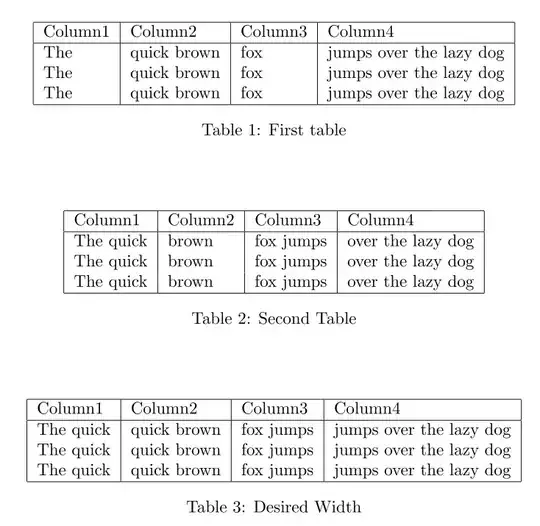
Given Table 1 and Table 2, I want to create a Table 3 whose columns are
Column1(Table3) = max{Column1(Table1), Column1(Table2)}
Column2(Table3) = max{Column2(Table1), Column2(Table2)}
Column3(Table3) = max{Column3(Table1), Column3(Table2)}
Column4(Table3) = max{Column4(Table1), Column4(Table2)}
So, if I copy the elements all from table 1 or all from table 2 to table 3, the layout of table 3 will not change. (The Table 3 below just shows the column width. You can ignore the elements in it.)
\documentclass{article}
\begin{document}


\begin{table}
\centering
\begin{tabular}{|l|l|l|l|}
    \hline
    Column1 & Column2 & Column3 & Column4 \\ \hline
    The & quick brown & fox & jumps over the lazy dog \\
    The & quick brown & fox & jumps over the lazy dog \\
    The & quick brown & fox & jumps over the lazy dog\\
    \hline
\end{tabular}
\caption{First table}
\end{table}


\begin{table}
\centering
\begin{tabular}{|l|l|l|l|}
      \hline
    Column1 & Column2 & Column3 & Column4 \\ \hline
    The  quick & brown & fox  jumps & over the lazy dog \\
    The  quick & brown & fox  jumps & over the lazy dog \\
    The  quick & brown & fox  jumps & over the lazy dog\\
    \hline
\end{tabular}
\caption{Second Table}
\end{table}


\begin{table}
\centering
\begin{tabular}{|l|l|l|l|}
      \hline
    Column1 & Column2 & Column3 & Column4 \\ \hline
    The  quick & quick brown & fox  jumps & jumps over the lazy dog \\
    The  quick & quick brown & fox  jumps & jumps over the lazy dog \\
    The  quick & quick brown & fox  jumps & jumps over the lazy dog\\
    \hline
\end{tabular}
\caption{Desired Width}
\end{table}


\end{document}


p{}columns. – Ruben Nov 02 '13 at 12:26