Since Paulo has already presented a LaTeX3 version, I'll stick to a classical approach. I only add a switch for printing red the marked words in the text, that may reveal useful during document writing.
\documentclass{article}
\usepackage{xcolor}

\newif\ifshowmarked
\makeatletter
\newtoks\mark@toks
\mark@toks={\@gobble}
\newcommand{\mark@comma}{, }
\newcommand{\addmark}[1]{%
  \@ifundefined{addmark@\detokenize{#1}}
   {% New marked word
    \global\@namedef{addmark@\detokenize{#1}}{#1}%
    \global\mark@toks=\expandafter{\the\mark@toks\mark@comma\@nameuse{addmark@\detokenize{#1}}}%
   }
   {
    % Already marked word, do nothing
   }%
   \ifshowmarked
     \textcolor{red}{#1}%
   \else
     #1%
   \fi
}

\newcommand{\printmarks}{%
  \the\mark@toks\relax
  \@ifstar{\global\mark@toks{\@gobble}}{}%
}
\makeatletter

\begin{document}

Hi my name is \addmark{Kris}, I need a \addmark{list} of words
containing all the \addmark{marked words} by the end of the
\addmark{document}.

\begin{itemize}
\item I'm a list of \addmark{items}
\item Ducks are \addmark{cool}
\end{itemize}

\vspace{1em}

\printmarks

\vspace{1em}

Another \addmark{value} here.

\vspace{1em}

\printmarks*

\vspace{1em}

\showmarkedtrue

The starred version cleared the \addmark{sequence}, so now
we can add  new \addmark{entries} again from start.

\vspace{1em}

\printmarks

\end{document}
The argument to \addmark is used to build a control sequence; if this command is already defined, we do nothing, otherwise define the control sequence and add it to a token register preceded by a comma and a space. The token register is initialized to contain \@gobble, so the first comma will not be printed. Finally, the word is printed (in red if the switch is on).
The \printmarked macro works in the same way: the token register's content is delivered; if the *-variant is used, the token register is reinitialized.
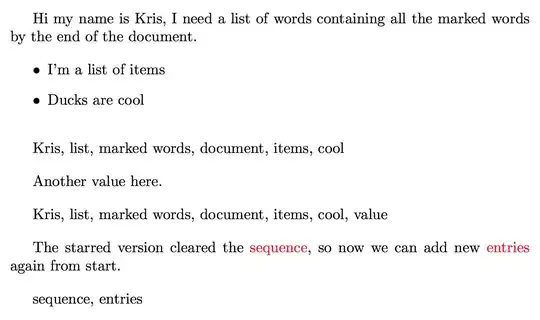
Note that the LaTeX3 is superior, because it allows for using the list of marked words in many different ways. It's doable also in the “classical” version, but reinventing the wheel many times. Also, no \detokenize trick is necessary with LaTeX3 to cope with special characters in the marked words, since the word is simply stored as is.
Just comparing the code clearly shows the superiority of the LaTeX3 approach.
Adding the switch to the LaTeX3 version is easy. Add
\bool_new:N \g_khaurum_highlight_bool
\NewDocumentCommand{\showmarkedtrue}{}
 {
  \bool_gset_true:N \g_khaurum_highlight_bool
 }
\NewDocumentCommand{\showmarkedfalse}{}
 {
  \bool_gset_false:N \g_khaurum_highlight_bool
 }
and change the definition of \addmark to
\NewDocumentCommand{ \addmark }{ m }
 {
  \seq_gput_right:Nn \g_khaurum_wordlist_seq { #1 }
  \bool_if:NTF \g_khaurum_highlight_bool { \textcolor}{red}{#1} } { #1 }
 }


glossariespackage can do something like that for you. – mafp Nov 03 '13 at 08:39glossariespackage only allows predefined terms right? I would like to be able to define the terms for indexing in the text. – Khaurum Nov 03 '13 at 08:45makeidx. – Marco Daniel Nov 03 '13 at 08:48makeidxseems good, but the\makeindexgives a list with index as title and I only need the indexed words in a paragraph as shown in my example - is there any workarround? – Khaurum Nov 03 '13 at 09:07