21

In proximity theory, we use \delta and \ll as binary relations on the power set of a set X. How can one display NOT \delta or NOT \ll similar to how we can do \not\in. Using \not\delta and \not\ll place the strike-through in bad positions over the \delta and \ll.

For NOT \delta, I am currently using

  • \!\!\not\!\delta

For NOT \ll, I am using

  • \hskip 0.4mm \not \hskip -0.4mm \ll

There are a few problems here. Sometimes the placement of the "not" over the "delta" is a little off but it varies throughout the pages. Also, at the end of the line, I may get the \not appearing at the end of the current line and the \delta appearing at the beginning of the next line. I have not noticed this issue with my defininition of NOT \ll.

What is the best way to define these symbols? How can one make sure that the "not" is on the same line as the "delta"?

Hendrik Vogt
  • 37,935

3 Answers3

27

Just use Heiko Oberdiek's centernot package:

\documentclass{article}
\usepackage{centernot}
\usepackage{amsmath}
\begin{document}

$a\centernot\ll b \centernot\Delta c$

$a\centernot\longrightarrow b$

$a\centernot{\xrightarrow{1234567}} b$

\end{document}

enter image description here

Leo Liu
  • 77,365
  • 3
    Are there any drawbacks to \let\not\centernot? – Konrad Rudolph Mar 25 '11 at 10:11
  • 2
    @Knorad: No, I guess. But you'd better \let\oldnot\not first. – Leo Liu Mar 25 '11 at 12:37
  • There seems to be a lot more spacing around a \centernot\delta than a \delta. Is there any way to make them uniform? – Justin J Stark Mar 25 '11 at 22:49
  • 2
    @Justin: \centernot makes the symbol to be a math relation. You can use \mathord{\centernot\delta} or simply {\centernot\delta} to get an ordinary symbol. – Leo Liu Mar 26 '11 at 13:46
  • 1
    @Leo: Thank you. I had no idea there were differences between relations and symbols. I guess I should keep notdelta as relational and instead make delta a binary relation using \mathbin{\delta} – Justin J Stark Mar 28 '11 at 05:22
  • @JustinJStark Actually you should make delta a binary relation using \mathrel{\delta}. \mathbin makes it a binary operation, not a relation. – Ari Brodsky Apr 12 '13 at 06:21
15

Leo Liu told you a great way to define the symbols; I'd like to explain the odd behaviour you observed.

Sometimes the placement of the "not" over the "delta" is a little off but it varies throughout the pages.

The reason for this is that \not is a relational symbol, and TeX inserts a \thickmuskip between an ordinary and a relational symbol (which gives nice spacing). Now \thickmuskip usually is a skip of 5.0mu plus 5.0mu, which means: It's at least 5 mu units wide, but it can stretch an additional 5 mu units, depending on how full the current line is.

For example, if you type $a \!\!\not\!\delta b$, then TeX puts this \thickmuskip before the \not symbol and also before the \delta. The stretchability of this latter skip causes the placement of the "not" over the "delta" to vary throughout the pages.

Also, at the end of the line, I may get the \not appearing at the end of the current line and the \delta appearing at the beginning of the next line.

If a relational symbol (like \not) is followed by a skip like \! (or by an ordinary symbol), TeX allows a line break in between. (TeXnically this is achieved by putting a \penalty 500.)

I have not noticed this issue with my defininition of NOT \ll.

The issue with the undesired line break can also happen with your definition of NOT \ll. The variation of the placement of the "not", however, does not happen: The reason is that both \not and \ll are relational symbols, and TeX doesn't put any space between two relational symbols.

Hendrik Vogt
  • 37,935
5

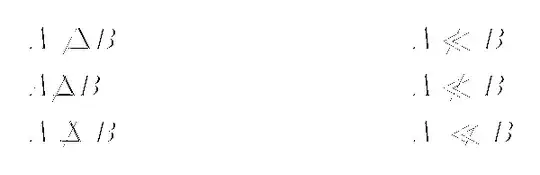
I think you want the macro \mathrlap to overlap the slash on the symbol you are negating:

\documentclass{article}
\usepackage{mathtools}
\newcommand{\NOTDelta}{\!\!\not\!\Delta}
\newcommand{\NOTll}{\hskip 0.4mm \not \hskip -0.4mm \ll}
\newcommand{\notDelta}{\mathrel{\mathrlap{\not}\Delta}}
\newcommand{\notll}{\mathrel{\mathrlap{\;\;\not}\ll}}
\begin{document}

\begin{align*}
    A &\not\Delta B     & A &\not\ll B \\
    A &\NOTDelta  B     & A &\NOTll  B \\
    A &\notDelta  B     & A &\notll  B
\end{align*}

\end{document}

sample code

The \mathrel command spaces your symbol as if it were a binary relation. Without it your symbols get pushed too close together. And the \mathrlap command sets its contents in a box of width zero, with the rest overlapping to the right.

Troy
  • 13,741
Matthew Leingang
  • 44,937
  • 14
  • 131
  • 195