I am having difficulties writing a letter in a specific position in TikZ using the \node command.
This is the command that I am having difficulties with:
\node at (2,5) (nodeS) {S};
I found that this command was used to place letter here. When I run the command, however, I get this:
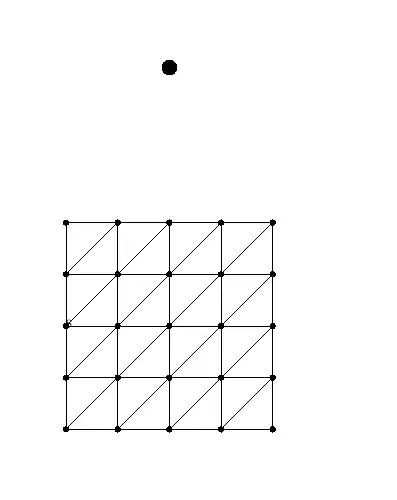
This is what I had originally:

As you can see, there is a black dot that should not be there, and the graph is moved considerably. Furthermore, the 'S' moves with the graph when I change the coordinates of the \node command. Anyone know what is going wrong here?
This is the full code:
\documentclass{article}
\usepackage{tikz}
\usetikzlibrary{calc}
\pagestyle{empty}

\def\rowA{0,1,...,4}
\def\rowB{0,1,...,4}
\def\rowC{0,1,...,4}
\def\rowD{0,1,...,4}
\def\rowE{0,1,...,4}


\begin{document}

\begin{tikzpicture}[x=1.75cm,
                    y=1.75cm,
                    every node/.style={circle,
                                       inner sep=2pt,
                                       fill=black}
                   ]

  \foreach \x in \rowA { \node (A\x) at (\x,2)  {}; }
  \foreach \x in \rowB { \node (B\x) at (\x,1)    {}; }
  \foreach \x in \rowC { \node (C\x) at (\x,0)    {}; }
  \foreach \x in \rowD { \node (D\x) at (\x,-1)   {}; }
  \foreach \x in \rowE { \node (E\x) at (\x,-2)   {}; }

  \foreach \x/\y in {0/0,1/1,2/2,3/3,4/4} {\draw (A\x) -- (E\y) {};}

  \draw (A0) -- (A4);
  \draw (B0) -- (B4);
  \draw (C0) -- (C4);
  \draw (D0) -- (D4);
  \draw (E0) -- (E4);

  \draw (B0) -- (A1);
  \draw (C0) -- (A2);
  \draw (D0) -- (A3);
  \draw (E0) -- (A4);
  \draw (E1) -- (B4);
  \draw (E2) -- (C4);
  \draw (E3) -- (D4);

  \node at (2,5) (nodeS) {S};

\end{tikzpicture}
\end{document}


every node/.stylecommand which also applies to your letter node and masks the letter. – Corentin Nov 05 '13 at 18:22every node/.style={circle, fill=black}. That also applies to thenodecontaining theS, so you just end up with a large black circle. You can say\node [fill=none] at (2,5) (nodeS) {S};to see the letter. I'm not sure what issue you're having with the placement, though: You're telling TikZ to place theSat the coordinate(2,5). The top row of your grid starts at(0,2), so theSis expected to be above the grid. Where do you want theSto go? – Jake Nov 05 '13 at 18:22\tikzset{every node/.style=}. But again: What do you mean by "odd positioning"? TheSis exactly where you tell it to go. – Jake Nov 05 '13 at 18:59Snode is north of the grid, at(2,5), not at(0,2). – Jake Nov 05 '13 at 19:08pdflatexor another compiler? – Jake Nov 05 '13 at 19:19By the way, how do I mark this answered when there are no 'answers'?
– Surculus Nov 05 '13 at 19:32