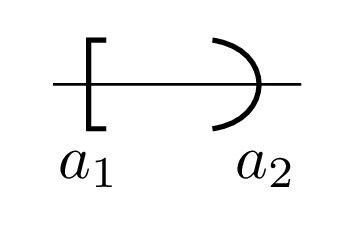
I’d just use arrow tips here.
For bigger arrow tips, you need to increase the line width.
You can also use the decorations.markings library with the \arrow macro customized with a scaling (only yscale or xscale works, too) or other options to place “arrows” on the line.
It is also possible to just add textual content to the line, say a [ and a ) where you have control over font (sizes, series, etc.) and you can also scale the node if necessary.
The arrows.meta library from the CVS version of TikZ (see How to install a current version of TikZ?) allows us to do this very easily with arrows={[scale=2]} (or any option whatsoever). It is also possible to give options to the arrow tip directly, say
\draw [{Bracket[right,red]}-{Arc Barb[arc=270]}] …;
Code
\documentclass[tikz, border={0pt 0pt 0pt 6pt}]{standalone}
\usetikzlibrary{arrows,decorations.markings}
\usetikzlibrary{arrows.meta}% CVS
\begin{document}
\begin{tikzpicture}[inner sep=+0pt]
  \draw (+0pt,+0pt) -- ++(right:+10pt) coordinate (@);
  \draw[[-)] (@) node[below=+6pt] {$a_1$} -- ++ (right:+50pt) node[below=+6pt] {$a_2$} coordinate (@);
  \draw (@) -- ++ (right:+10pt);
\end{tikzpicture}

\tikz[inner sep=+0pt, outer sep=+0pt, nodes={below=+6pt}]
  \draw[decoration={
    markings, mark=at position .2 with {\arrow[line width=.7\pgflinewidth,scale=2]{[}},
              mark=at position .8 with {\arrow[line width=.7\pgflinewidth,scale=2]{)}}},
        postaction=decorate]
    (+0pt,+0pt) -- node[pos=.2, below=+3pt] {$a_1$} node[pos=.8, below=+3pt] {$a_2$} ++(right:+70pt);


\tikz[label position=below, inner sep=+0pt, outer sep=+0pt, every label/.style={font=},
  label distance=+3pt, nodes={font=\bfseries}]
  \draw (+0pt,+0pt) -- node[pos=.2,label=$a_1$] {[} node[pos=.8,label=$a_2$] {)} ++(right:+70pt);

\begin{tikzpicture}[inner sep=+0pt, arrows={[scale=2]}]% CVS
  \draw (+0pt,+0pt) -- ++(right:+10pt) coordinate (@);
  \draw[Bracket-Arc Barb] (@) node[below=+6pt] {$a_1$} -- ++ (right:+50pt) node[below=+6pt] {$a_2$} coordinate (@);
  \draw (@) -- ++ (right:+10pt);
\end{tikzpicture}
\end{document}
Output