How can I append \centering to \begin{subfigure} (from subcaption package)? I tried using the etoolbox , but for some reason it won't work for the subfigure enviroment (only working for the figure enviroment).
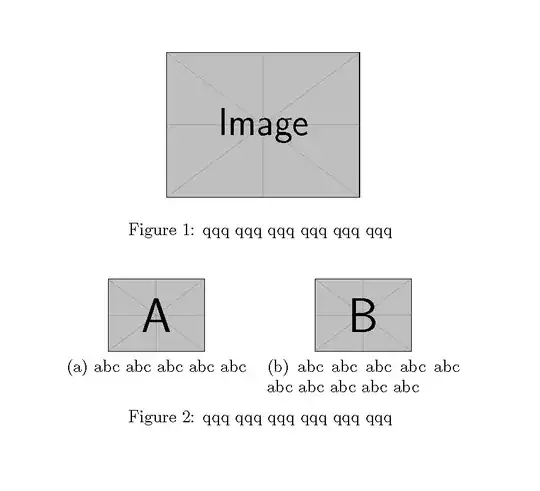
Here a MWE to demonstrate my problem.
\documentclass{article}

\usepackage{etoolbox}
\usepackage[margin=1em]{subcaption}

\usepackage{mwe}


\apptocmd\figure{\centering}
\apptocmd\subfigure{\centering}


\begin{document}

    \begin{figure}
        \includegraphics[width=4cm]{example-image}
        \caption{qqq qqq qqq qqq qqq qqq }
    \end{figure}

    \begin{figure}
        \begin{subfigure}{4cm}
            \includegraphics[width=2cm]{example-image-a}
            \caption{abc abc abc abc abc  }
        \end{subfigure}%
        \begin{subfigure}{4cm}
            \includegraphics[width=2cm]{example-image-b}
            \caption{abc abc abc abc abc abc abc abc abc abc }
        \end{subfigure}
        \caption{qqq qqq qqq qqq qqq qqq }
    \end{figure}
\end{document}
result (with image a, b misplaced):

I also tried \AtBeginEnvironment{subfigure}{\centering} and to manually patch it with \let, but no luck.



\AtBeginEnvironment{subfigure}{\centering}? – cgnieder Nov 29 '13 at 16:38\let, but no luck. (sry, forgot to mention that in the question) – someonr Nov 29 '13 at 16:42\apptocmdhas four arguments (usually the last two are{}{}). – egreg Nov 29 '13 at 17:24