7

I want to include figures and listings in my document and I want them to have the same spacings to text and captions.

\documentclass[a4paper,12pt,openany,parskip,oneside,ngerman,headsepline]{scrbook}
\usepackage{float}
\usepackage{graphicx}
\usepackage{caption}
\captionsetup{font=small,labelfont=bf}
\usepackage{listings}
\lstset{captionpos=b,frame=single}

\begin{document}
Some text

\begin{lstlisting}[caption={Some caption}]
Some code
\end{lstlisting}

Some text

\begin{figure}[H]
    \includegraphics[width=\textwidth]{image.png}
    \caption{Some caption}
    \label{fig:test}
\end{figure}

Some rext
\end{document}

The result is following (I added boxes to show the spacing).
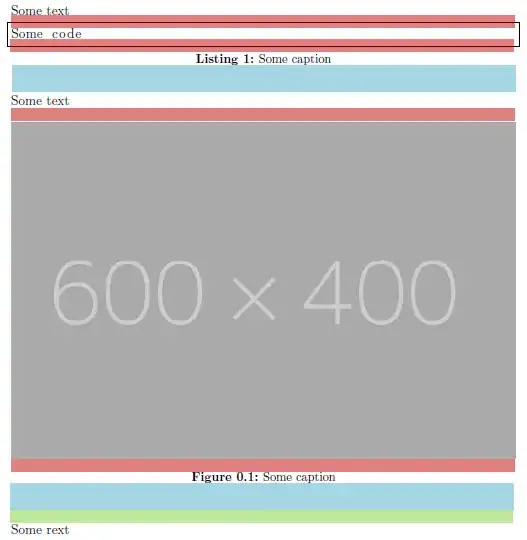
Spacings

  1. As you can see, the red boxes have the same spacing. How can I make the spacing start above/below the frame?

  2. The spacing below the figure is bigger than the listing. How can I make them the same?

mklnwt
  • 73
  • Welcome to TeX.SX! You can have a look at our starter guide to familiarize yourself further with our format. Does http://tex.stackexchange.com/q/39017/15925 help you? Note that as standard some of these separations include stretchable glue rather than being fixed lengths. – Andrew Swann Dec 03 '13 at 14:59
  • Thanks. The other thread you posted does not really me as there is no information on the difference between figure and listing. Also the spacings between figure/listing caption and text are always the same, but different between figure and listing. – mklnwt Dec 03 '13 at 15:32

1 Answers1

6

When the caption is below the float contents, you can adjust the following caption parameters through \captionsetup:

  • aboveskip (space between the float contents and the caption)
  • belowskip (space after the caption)

The default values are, for scrbook class, aboveskip=10pt and belowskip=0pt. Also, a \baselineskip is added by default before the floating object and 1.2\baselineskip after it, IIRC.

The above settings don't work for listings. But you can similarly set these parameters for listings through \lstset:

  • abovecaptionskip (space between the float contents and the caption)
  • belowcaptionskip (space after the caption)
  • aboveskip (space between the float contents and the preceding text)
  • belowskip (space between the float contents and the following text)

So leaving figure parameters untouched and adding in your \lstset something like

abovecaptionskip=10pt,belowcaptionskip=0pt,aboveskip=\baselineskip,belowskip=1.2\baselineskip

should do what you want.

Complete code

\documentclass[a4paper,12pt,parskip]{scrbook}
\usepackage{float}
\usepackage[demo]{graphicx} %option demo only for the example
\usepackage{caption}
\captionsetup{font=small,labelfont=bf}
\usepackage{listings}
\lstset{
  captionpos=b,
  frame=single,
  abovecaptionskip=10pt,
  belowcaptionskip=0pt,
  aboveskip=\baselineskip,
  belowskip=1.2\baselineskip
  }

\begin{document}
Some text

\begin{lstlisting}[caption={Some caption}]
Some code
\end{lstlisting}

Some text

\begin{figure}[H]
    \includegraphics[width=\textwidth]{image.png}
    \caption{Some caption}
    \label{fig:test}
\end{figure}

Some rext
\end{document} 

Output

enter image description here

You can adjust these values if you think they don't meet your needs.

karlkoeller
  • 124,410
  • Thanks, that did the trick. But I have a few additional question to that. 1) How would I change the skip after a float object? 2) Why do those two caption settings not work for listings, as font e.g. works? 3) What does IFIRC mean? – mklnwt Dec 03 '13 at 16:14
  • @mklnwt 1) add belowskip=<lenght> in \captionsetup; 2) listings are not contemplated as floats in document classes but added by the listings package; 3) a typo... it was meant to be IIRC (if I remember correctly) – karlkoeller Dec 03 '13 at 16:28
  • To 1): I meant to reduce the skip, like to set it to \baselineskip instead of 1.2\baselineskip – mklnwt Dec 03 '13 at 16:40
  • @mklnwt belowskip=-.2\baselineskip – karlkoeller Dec 03 '13 at 16:42
  • @mklnwt Glad to help. – karlkoeller Dec 03 '13 at 16:50