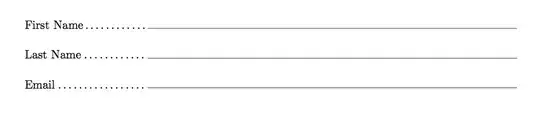
I've used the eforms package, which is used by DANTE for their membership form (which of course I can't now locate in .tex format!). You'll probably have to download and unpack eforms from CTAN yourself, as it's not in TeX Live (unpack eforms, insdljs and taborder, all in the eforms bundle). A short example from a registration form I've done:
\documentclass{article}
\usepackage[pdftex]{eforms}

% From DANTE's registration form!

\newcounter{infoLineNum}
\setcounter{infoLineNum}{0}
\newcommand{\infoInput}[2][4in]{%
  \stepcounter{infoLineNum}%
  \makebox[0pt][l]{%
    \kern 4 pt
    \raisebox{.75ex}
      {\textField[\W0\BC{}\BG{}\TU{#2}]{name\theinfoLineNum}{#1}{12bp}}%
  }
    \dotfill
}

\begin{document}
    \begin{tabular}{lp{4in}}
   Title                 & \infoInput{Title}\\[6pt]
   First name            & \infoInput{Firstname}\\[6pt]
   Last name             & \infoInput{Surname}\\[6pt]
   E-mail address        & \infoInput{Email}\\[6pt]
   Dietary requirements  & \infoInput{Dietary}\\[6pt]
\end{tabular}

\begin{tabular}{ll}
  Student (\pounds60)
    & \raisebox{.75ex}{\radioButton{RegType}{10bp}{10bp}{Student}}
      \\[6pt]
  Academic/post-doc (\pounds120)
    & \raisebox{.75ex}{\radioButton{RegType}{10bp}{10bp}{Academic}}
      \\[6pt]
  Industrial (\pounds180)
    & \raisebox{.75ex}{\radioButton{RegType}{10bp}{10bp}{Industrial}}
      \\[6pt]
\end{tabular}

\end{document}
This gives 'type in' boxes for the text areas and 'tick' boxes for the choices.
I'm not sure what happens about saving form data: according to Adobe Reader it can't be saved in this form. I've never actually seen a PDF form that can have the data saved, so whether even Acrobat can do this I do not know.