12

I'm trying to comply with the following graphical profile in a LaTeX2e document. Ideally, I'd like to specify all these things in a package, which I can then import to instantly comply with the specifications.

Header 0 (document title): Century Gothic Bold, 20 pt, caps
Header 1: Century Gothic Bold, 16 pt
Header 2: Century Gothic, 14 pt
Header 3: Century Gothic Italic, 12 pt
Text: Garamond, 10 pt
Captions: Garamond Italic, 12 pt

I've been looking around to find a way to use the Century Gothic font in LaTeX, but found nothing useful. The only examples I've found require XeTeX, which I don't know and would like to avoid having to learn just for this.

How do I implement these specifications using LaTeX2e?

(Importing more packages is of course completely OK, as long as they are publicly available.)

lockstep
  • 250,273
Tomas Aschan
  • 15,528
  • 3
    This is probably stating the obvious, but URW Gothic (an Avantgarde clone) comes pretty close to Century Gothic. – lockstep Apr 04 '11 at 20:03
  • @lockstep: Coming "pretty close" is unfortunately not good enough, as I'm making an attempt on using LaTeX while still complying with the graphical profile of our organization. Thanks anyway! – Tomas Aschan Jul 19 '11 at 23:08

1 Answers1

11

Assuming you have these fonts installed on your system, by far the easiest way to do this is with XeLaTeX. There is very little to learn about XeLaTeX; it's just regular LaTeX with one package (fontspec) which allows you to load any font on your system. The rest of the problem simply reduces to using a few regular packages to specify the various element formats.

% !TEX TS-program = XeLaTeX      Must use XeLaTeX to compile
% !TEX encoding = UTF-8 Unicode  File must be encoded at UTF-8
\documentclass[10pt]{article}
\usepackage{fontspec}
\usepackage{titlesec}
\usepackage{titling}
\usepackage{caption}
% commands from fontspec
\defaultfontfeatures{Ligatures=TeX}
\setmainfont{Garamond}
\newfontfamily\headingfont{Century Gothic}
% commands from titlesec
\titleformat*{\section}{\headingfont\fontsize{16}{18}\selectfont\bfseries}
\titleformat*{\subsection}{\headingfont\fontsize{14}{16}\selectfont}
\titleformat*{\subsubsection}{\headingfont\itshape}
% commands from titling
\pretitle{\begin{center}\headingfont\fontsize{20}{24}\selectfont\bfseries\MakeUppercase}
\posttitle{\par\end{center}\vskip 0.5em}
% commands from caption
\DeclareCaptionFormat{plain}{\fontsize{12}{14}\selectfont\itshape#1#2#3\par}
% regular make title commands
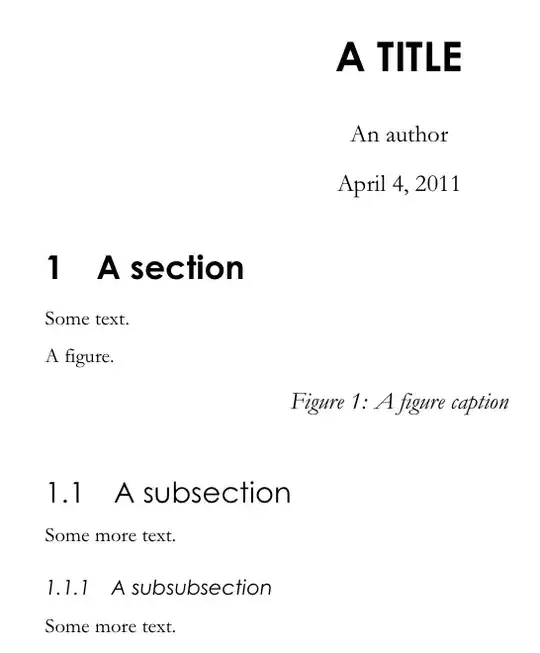
\title{A title}
\author{An author}

\begin{document}
\maketitle
\section{A section}
Some text.
\begin{figure}[h]
A figure.
\caption{A figure caption}
\end{figure}

\subsection{A subsection}
Some more text.
\subsubsection{A subsubsection}
Some more text.

\end{document}

I'll leave putting this into a package as an exercise. (See the clsguide docmentation for all the basics.) I've also added semi-arbitrary values in the second argument of the \fontsize commands; you should adjust them to what you require.

output of code

Alan Munn
  • 218,180
  • Sorry I haven't seen this in a while - I started working on something else, and this fell out of my scope. Now I'm back, and will give this a try. – Tomas Aschan Jul 19 '11 at 23:09
  • I get to \setmainfont{Garamond} where it complains that I don't have the font. I've tried garamond as well, with the same result. Synaptic Package Manager claims that the package texlive-fonts-extra is installed, and that it contains the font garamond. (I haven't been able to find Century Gothic, though...) Do you know where I can obtain these fonts for Ubuntu 11.04? – Tomas Aschan Jul 19 '11 at 23:31
  • Both of these fonts are distributed with Microsoft Office (at least on the Mac, which is how I have them.) I don't think they are free fonts. – Alan Munn Jul 20 '11 at 10:00
  • That does indeed seem to be the case. I tested with some other fonts, that I did have installed, and it worked perfectly - so the problem now boils down to getting access to the fonts themselves, which is another matter than what this question was about. Thanks – Tomas Aschan Jul 20 '11 at 10:41
  • As a note to any future readers of this post: on my system (Ubuntu 12.04) it turned out Garamond was installed as "Garamond-Normal" - when I changed it to that, everything worked. – Tomas Aschan Sep 10 '12 at 16:48