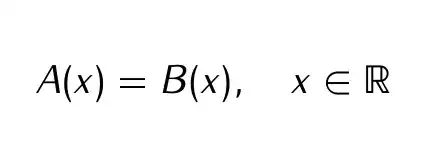
When I use the fonts fourier and iwona at the same time, the equals sign = does not appear. For example, the source
\documentclass{article}
\usepackage{fourier}
\usepackage[math]{iwona}
\begin{document}
$A=B$
\end{document}
produces
A B
Question: How can I fix this problem?
(*) I want to use iwona and to replace fonts for \mathbb with ones of fourier.
Remarks:
- If I use the package
fourierfirst, then=appears as usual. But all of the fonts are replaced byfourierfonts, so this is not the solution which I want. The following error could relate to the problem.
LaTeX Font Warning: Font shape
OT1/iwonam/m/n' undefined (Font)OT1/cmr/m/n' instead on input line 5.
usingLaTeX Font Warning: Some font shapes were not available, defaults substituted.
- If I use only
iwonathen the equals sign appears. - If there is a way to satisfy (*), please let me know.


s*[1]doesn't harm, but removing it is more efficient. – egreg Dec 11 '13 at 17:29