24

UPDATE

Well. After a while, I decided to see again about this “problem”, and just discovered that in pdfLaTeX, using \usepackage[utf8]{inputenc} and the (the unicode —, not the ligature ---) it works perfect (at least in what I tried). Minor edit: as @cfr mentions in her answer (I forgot it), it is in fact possible to use --- (the ligature) if you use T1 encoding and \hyphenchar\font=\string"7F. In both methods (wether I use the em-dash or ---) microtype works perfectly.

Now, the problem remains in XeLaTeX. I would like to clear my idea: I want the em-dash to behave correctly; it doesn't matter if I have to type (the unicode em-dash —) or --- (the usual LaTeX way); it should (among others) hyphenate words correctly; be always together to the word; in case it's followed by a comma/period, they should be together; and, microtype should work, e.g., the hyphen should still hang in the margin.

Of course, there is a basic solution (which works in any engine): indicate to XeLaTeX the breaking points, for instance ocur\-recone\-stedoc\-umento---. But I'm looking for an automatic solution.

If you have anything to say, please, say it, it's welcomed!


Note: Every you see in the code is an em-dash.

I'writing a paper, and XeLaTeX doesn't hyphenate words which end with (traditional LaTeX ---). After reading the comments, I realized this is a common problem also in LaTeX (not only XeLaTeX). Here it is a minimal working example:

This code (full example at the bottom of the question) outputs

—Hola, esto es un texto absurdo —para ejemplificar lo que ocurreconestedocumento— con algunas palabras más.

enter image description here

If we substitute the last by a comma, for example it hyphenates correctly

—Hola, esto es un texto absurdo —para ejemplificar lo que ocurreconestedocumento, con algunas palabras más.

enter image description here

Moreover, if the phrase ends with —. XeLaTeX (or whoever is doing this) takes the full stop to the next line

—Hola, esto es un texto absurdo —para ejemplificar lo que ocurreconestedocumento—.

enter image description here

Here is a full minimal working example

\documentclass{scrartcl}
\usepackage[hmargin = 4cm]{geometry}
\usepackage{fontspec}

\begin{document}
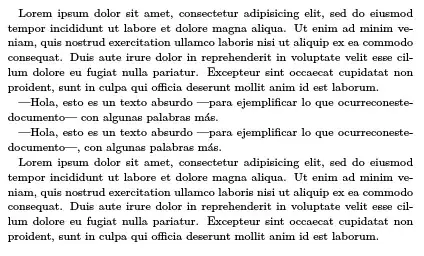
Lorem ipsum dolor sit amet, consectetur adipisicing elit, sed do eiusmod tempor incididunt ut labore et dolore magna aliqua. Ut enim ad minim veniam, quis nostrud exercitation ullamco laboris nisi ut aliquip ex ea commodo consequat. Duis aute irure dolor in reprehenderit in voluptate velit esse cillum dolore eu fugiat nulla pariatur. Excepteur sint occaecat cupidatat non proident, sunt in culpa qui officia deserunt mollit anim id est laborum.

—Hola, esto es un texto absurdo —para ejemplificar lo que ocurreconestedocumento— con algunas palabras más.

Lorem ipsum dolor sit amet, consectetur adipisicing elit, sed do eiusmod tempor incididunt ut labore et dolore magna aliqua. Ut enim ad minim veniam, quis nostrud exercitation ullamco laboris nisi ut aliquip ex ea commodo consequat. Duis aute irure dolor in reprehenderit in voluptate velit esse cillum dolore eu fugiat nulla pariatur. Excepteur sint occaecat cupidatat non proident, sunt in culpa qui officia deserunt mollit anim id est laborum.
\end{document}

Any ideas?

Mico
  • 506,678
Manuel
  • 27,118
  • 1
    As a quick workaround try inserting an optional hyphen before the troublesome dash, to force the hand of the hyphenation routine; for example ocurreconeste\-documento---. – Thruston Dec 16 '13 at 14:21
  • 1
    Would a \doublehyphendemerits=0 help? – morbusg Dec 24 '13 at 12:43
  • @morbusg Where should I put that? If I put it in the preamble, after the fontspec package (see the MWE), it does nothing. – Manuel Dec 24 '13 at 15:58
  • @Manual: Oh, I don't actually know. Maybe after \begindocument? – morbusg Dec 24 '13 at 19:44
  • @morbusg No it doesn't. I get the same result with or without that command. – Manuel Dec 25 '13 at 18:47
  • The comma case works differently because TeX's hyphenation algorithm doesn't have a rule prohibiting hyphenation in words beginning/ending with a comma. The problem is created by a fundamental feature of that hard-coded algorithm, if I understand the issue correctly. (That is, from what I've read about this.) When TeX reads the series of characters, it gets to the first hyphen, then the second etc. It doesn't see the emdash until much later in the process. If you typed an emdash directly (as with JLDiaz's solution), this doesn't apply but if you want to use TeX's --- ligature, it does. – cfr Dec 25 '13 at 21:09
  • @cfr Thank you. In fact I want to use rather than ---. I will edit my question to clarify that. – Manuel Dec 26 '13 at 01:11
  • @Manuel: But you want to type '---' and get an emdash, right? Rather than typing the emdash directly? If you want to type the emdash directly, you need something like JLDiaz's solution. The problem with hyphenation should only occur if you want to type '---'. In that case, you need something (more like) mine. [I corrected the issue with my example code not producing the emdash from '---', by the way so it really should work now.] – cfr Dec 26 '13 at 01:19
  • @Manuel: There are other problems here, too, and I'm no longer sure this is the same question. Some of these do not affect LaTeX - even without the T1-workaround I mention below. For example, XeLaTeX does not want to hyphenate 'verylongunhyphenatedword\textemdash' at all, whereas LaTeX is quite happy so long as it is not already hyphenated. So Xe(La)TeX somehow alters the way in which some punctuation is handled for reasons I'm not sure about. Overall, this seems to be a more extensive and knottier problem for Xe(La)TeX than (La)TeX. – cfr Dec 26 '13 at 02:16
  • @cfr No, I WANT to use (typing the em-dash directly). I just wrote --- in my example because I wanted you to know what I mean (in monospaced font it's difficult —may be impossible— to differentiate between the hyphen -, the en-dash and the em-dash :P). – Manuel Dec 26 '13 at 12:54
  • @Manuel: I updated my answer with an EDIT which combines elements of the \newunicodechar suggestion made by egreg with the solution I'd suggested. Interestingly, this avoids some of the limitations of that solution so the solution should actually work better if you want to type emdashes directly. I am not entirely sure why it has this effect so I was pleasantly surprised by it. – cfr Dec 27 '13 at 00:34
  • the same remark goes for -- – lvaneesbeeck Dec 27 '13 at 19:20
  • @Manuel great question, although my comment deviates from your original question, for you wanted to use LaTeX to your specific needs, have you tried its friend ConTeXt? There are a few exceptions with those kind of words whether in the English or Spanish languages, unless the paper involves other scientific terminology that warrants its usage. Either way, in ConTeXt for example, define it in the preamble as in \def\absurdo{absurdodefinicióncontrario-yopuestoalarazónquenotienesentido} – doed Dec 30 '13 at 00:52
  • @doed In ConTeXt it works perfectly. I'm not really sure what you mean. I know (almost) nothing about ConTeXt, but, I tried the basic (just with \starttext … \stoptext) and it works. So my problem does not exist in ConTeXt. But I don't know why you want me to define \absurdo… :S – Manuel Dec 30 '13 at 10:37
  • @Manuel glad to hear that. The suggestion about defining it, is because of the underlying assumption that the long word will be used several times throughout the document. Of course, you don't have to. – doed Dec 30 '13 at 10:43
  • @doed That was not the case. It's just a long text where author comments or opinion usually go between em-dashes. I just wanted the usual “correct” hyphenation (at least in spanish). In case of ConTeXt it seems to be right. You can add an answer in case someone is interested. – Manuel Dec 30 '13 at 10:51
  • @Manuel I will add an answer later, since you requested it. The ConTeXt suggestion is an alternative that works out of the box. – doed Dec 30 '13 at 11:27
  • 1
    Note that if you are talking latex or pdflatex, you can use --- if you use T1 and the alternate hyphenation character. That is, it isn't necessary to type the unicode emdash directly (although that will of course work). I just mention this as your update suggests that it isn't possible to avoid the problem if you stick to --- but that's not so. – cfr May 03 '14 at 02:13
  • What about microtype? Your update doesn't mention it but that was one of the issues before, wasn't it? – cfr May 03 '14 at 02:17
  • 1
    @cfr I forgot to say it! I will edit now. It's true, with pdfLaTeX (and LaTeX, as you say) you can type --- and get correct output. And, in pdfLaTeX with any of those solutions, microtype works correctly (I think), the punctuation hangs a little bit to the right :D Now the problem is XeLaTeX :P – Manuel May 03 '14 at 10:15

6 Answers6

19

You can read an entry about this problem in my (now abandoned) blog, why it happens, and how it is solved in spanish babel.

But you are using xelatex and polyglossia, and I don't know if some solution is already included in this page. Anyway, it is easy to adapt the ideas and techniques used by babel, and define the following command:

\def\raya{%
\nobreak\hskip0pt\hbox{---}\nobreak\hskip0pt%
}

You have to put \raya{} instead of ---. So, in your example:

\raya{}Hola, esto es un texto absurdo \raya{}para ejemplificar lo que ocurreconestedocumento\raya{} con algunas palabras m
ás.

\raya{}Hola, esto es un texto absurdo \raya{}para ejemplificar lo que ocurreconestedocumento\raya{}, con algunas palabras 
más.

\raya{}Hola, esto es un texto absurdo \raya{}para ejemplificar lo que ocurreconestedocumento\raya{}.

And this is the output:

Result

Update

As requested by the OP,it is possible to make unicode character — active (this is easy in xelatex, since it has native utf8 input), to define as a new Unicode char, and then use instead of \raya [Thanks to egreg for pointing me to package newunicodechar, which is a cleaner solution than my previous attempt changing catcodes, and does not have issues with spaces after the character]:

\documentclass{scrartcl}
\usepackage[hmargin = 4cm]{geometry}
\usepackage{fontspec}
\usepackage{newunicodechar}

\newunicodechar—{%
\leavevmode\nobreak\hskip0pt\hbox{---}\nobreak\hskip0pt\relax%
}

\begin{document}
—Hola, esto es un texto absurdo —para ejemplificar lo que ocurreconestedocumento— con algunas palabras más.

—Hola, esto es un texto absurdo —para ejemplificar lo que ocurreconestedocumento—, con algunas palabras más.

—Hola, esto es un texto absurdo —para ejemplificar lo que ocurreconestedocumento—.
\end{document}

Resulting in:

Result

JLDiaz
  • 55,732
  • 1
    \newunicodechar—{\leavevmode\nobreak\hskip0pt\hbox{---}\nobreak\hskip0pt\relax} (after loading newunicodechar). – egreg Dec 16 '13 at 15:02
  • @egreg Great! Thanks for pointing to newunicodechar package. Updated answer. – JLDiaz Dec 16 '13 at 15:09
  • @JLDiaz With \newunicodechar you just make the character active and define it as desired (actually \protected\def is used, so the active character won't expand in unsafe places); it's an easier wrapper, in my opinion. You can even say \hbox{—} (with an em-dash in the \hbox) instead of \hbox{---}. – egreg Dec 16 '13 at 15:42
  • 3
    Unfortunately, this solution also prevents a line break after the dash if followed by a space. I wonder if the definition can be expanded with something similar to xpace. – Javier Bezos Dec 16 '13 at 16:51
  • @JavierBezos Wouldn't help that line break if we add some zero width “box” or something like that. May be a little tricky but would end the job. – Manuel Dec 26 '13 at 16:29
  • 2
    @Manuel Try the following, but it's mostly untested: \newunicodechar—{% \leavevmode\nobreak\hskip0pt\hbox{---}\nobreak\hskip0pt\relax \futurelet\esptestnext\esptestdo} \def\esptestdo{\ifcat\esptestnext\space\allowbreak\space\ignorespaces\fi} (incidentally, I don't know of any program handling correctly out of the box the em-dash according the Spanish rules). – Javier Bezos Dec 29 '13 at 12:46
  • @JavierBezos At least it works if it's followed by an space. You could add an answer, or JLDiaz could edit, so everyone can see it clearly. At least all the options I figured work with the solution you provided, but since you say it's untested (and you now much more than me about LaTeX) I will leave the question as unanswered during about month to see if anyone contributes. Thank you very much. – Manuel Dec 29 '13 at 15:39
  • @JavierBezos Could you post an answer? Or you, JLDiaz, update yours? So I can accept some? – Manuel Jan 18 '14 at 02:46
11

In regular TeX with the T1 encoding there is a way to avoid this problem which involves redefining the hyphen character. This is possible because T1 encodes two hyphen characters which look identical (in most fonts) but which play different roles.

The beauty of this is that it does not require the use of any special commands in the way the babel solution does. All you do is add a single line of code following \begin{document}:

\hyphenchar\font=\string"7F

after loading T1 with the fontenc package. What this does is tells TeX to use the character is slot 127 as the hyphenation character. That is, when TeX needs to break a word across lines, it will use "7F to hyphenate the word. It does not change the character you get when you type '-', however. That character corresponds to the one in slot 45 of the T1 encoding. So TeX does not see a word which is already hyphenated as hyphenated. Hence the prohibition on hyphenating already hyphenated words does not apply, and TeX breaks the word as appropriate. This also retains ligaturing since it is the character in slot 45 - not the one in slot 127 - which is defined in ligatures such as '--' and '---' in T1. So you can break the norms of English typesetting with impunity!

So I wondered if something similar might be possible with XeLaTeX as well. The documentation for fontspec explains how to redefine the hyphen character. It turns out that this seems to work similarly to the LaTeX trick. That is, it allows hyphenation in words which are themselves hyphenated (right at the end in this case, from TeX's point of view). I wasn't sure how to specify the alternative hyphen character correctly but, thanks to Khaled Hosny's comment, I think that it should be as follows:

\documentclass{scrartcl}
\usepackage[hmargin = 5cm]{geometry}
\usepackage{fontspec}

\begin{document}
\fontspec[Mapping=tex-text]{Latin Modern Roman}%
\addfontfeature{HyphenChar="2010}

Lorem ipsum dolor sit amet, consectetur adipisicing elit, sed do eiusmod tempor incididunt ut labore et dolore magna aliqua. Ut enim ad minim veniam, quis nostrud exercitation ullamco laboris nisi ut aliquip ex ea commodo consequat. Duis aute irure dolor in reprehenderit in voluptate velit esse cillum dolore eu fugiat nulla pariatur. Excepteur sint occaecat cupidatat non proident, sunt in culpa qui officia deserunt mollit anim id est laborum.

---Hola, esto es un texto absurdo ---para ejemplificar lo que ocurreconestedocumento--- con algunas palabras más.

Lorem ipsum dolor sit amet, consectetur adipisicing elit, sed do eiusmod tempor incididunt ut labore et dolore magna aliqua. Ut enim ad minim veniam, quis nostrud exercitation ullamco laboris nisi ut aliquip ex ea commodo consequat. Duis aute irure dolor in reprehenderit in voluptate velit esse cillum dolore eu fugiat nulla pariatur. Excepteur sint occaecat cupidatat non proident, sunt in culpa qui officia deserunt mollit anim id est laborum.
\end{document}

Here's the output:

enter image description here

This is not specific to Latin Modern. Just I couldn't figure out how to add a general font feature for all fonts. It seemed fontspec wanted me to specify a font to add the feature to. It should work for any font which includes U+2010. For example:

\documentclass{scrartcl}
\usepackage[hmargin = 5cm]{geometry}
\usepackage{fontspec}

\begin{document}
\fontspec[Mapping=tex-text]{Brill Roman}%
\addfontfeature{HyphenChar="2010}

Lorem ipsum dolor sit amet, consectetur adipisicing elit, sed do eiusmod tempor incididunt ut labore et dolore magna aliqua. Ut enim ad minim veniam, quis nostrud exercitation ullamco laboris nisi ut aliquip ex ea commodo consequat. Duis aute irure dolor in reprehenderit in voluptate velit esse cillum dolore eu fugiat nulla pariatur. Excepteur sint occaecat cupidatat non proident, sunt in culpa qui officia deserunt mollit anim id est laborum.

---Hola, esto es un texto absurdo ---para ejemplificar lo que ocurreconestedocumento--- con algunas palabras más.

Lorem ipsum dolor sit amet, consectetur adipisicing elit, sed do eiusmod tempor incididunt ut labore et dolore magna aliqua. Ut enim ad minim veniam, quis nostrud exercitation ullamco laboris nisi ut aliquip ex ea commodo consequat. Duis aute irure dolor in reprehenderit in voluptate velit esse cillum dolore eu fugiat nulla pariatur. Excepteur sint occaecat cupidatat non proident, sunt in culpa qui officia deserunt mollit anim id est laborum.
\end{document}

produces:

enter image description here

This solution is not as general as the LaTeX solution. The LaTeX solution can be made to work for any font which includes any hyphen character at all because you can use a single hyphen character twice when setting up the font for use with LaTeX. That is, you can just repeat the hyphen in slot 127 if the font doesn't have a second hyphen character itself. From TeX's point of view, the characters in slots 45 and 127 really are then different.

The solution I've given, in contrast, requires that the font actually have a second hyphen character in a suitable slot. (And the soft hyphen in U+00AD will not, it seems, work.) Nonetheless, it should work well for many fonts, especially fonts which are more likely to be used with TeX to typeset body text rather than, say, just a fancy heading where a font with very limited coverage might work. But in the case of a fancy heading, say, hyphenation is less likely to be a problem.

It would be nice to have a perfectly general solution but I'm not sure that is possible without re-engineering the core of TeX itself since, as I understand it, the prohibition on breaking already-hyphenated words is hard-coded and not alterable at the macro level. That is, you'd have to rewrite the relevant part of TeX's hyphenation algorithm to alter this.

EDIT: If you would like to type the emdash directly rather than typing ---, the following combines egreg's suggestion in the comments to JLDiaz's answer with the specification of hyphenchar suggested here:

\documentclass{scrartcl}
\usepackage[hmargin = 4cm]{geometry}
\usepackage{fontspec}
\usepackage{newunicodechar}

\newunicodechar—{{---}}

\begin{document}
\fontspec[Mapping=tex-text]{Latin Modern Roman}%
\addfontfeature{HyphenChar="2010}

Lorem ipsum dolor sit amet, consectetur adipisicing elit, sed do eiusmod tempor incididunt ut labore et dolore magna aliqua. Ut enim ad minim veniam, quis nostrud exercitation ullamco laboris nisi ut aliquip ex ea commodo consequat. Duis aute irure dolor in reprehenderit in voluptate velit esse cillum dolore eu fugiat nulla pariatur. Excepteur sint occaecat cupidatat non proident, sunt in culpa qui officia deserunt mollit anim id est laborum.

—Hola, esto es un texto absurdo —para ejemplificar lo que ocurreconestedocumento— con algunas palabras más.

—Hola, esto es un texto absurdo —para ejemplificar lo que ocurreconestedocumento—, con algunas palabras más.

Lorem ipsum dolor sit amet, consectetur adipisicing elit, sed do eiusmod tempor incididunt ut labore et dolore magna aliqua. Ut enim ad minim veniam, quis nostrud exercitation ullamco laboris nisi ut aliquip ex ea commodo consequat. Duis aute irure dolor in reprehenderit in voluptate velit esse cillum dolore eu fugiat nulla pariatur. Excepteur sint occaecat cupidatat non proident, sunt in culpa qui officia deserunt mollit anim id est laborum.
\end{document}

Output:
enter image description here

This also allows hyphenation where the emdash is directly followed by a comma, for example, as well as a line break where the emdash is directly followed by a space.

cfr
  • 198,882
  • What does it do? How does it work. It seems to work right BUT it's not available —the alternative hyphen char— in many fonts. If you could explain what exactly happens, then may be there's a hack for those fonts which are missing that symbol. – Manuel Dec 23 '13 at 00:47
  • OK. I don't know exactly what it is doing because I don't understand XeLaTeX well enough. Here is the reference which gave me the idea http://tex.stackexchange.com/questions/63232/why-can-words-with-hyphen-char-not-be-hyphenated/63234#63234, combined with the fontspec documentation. I think most fonts define a second hyphen of some kind which is essentially just like the first one e.g. non-breaking hyphen etc. I'll see if I can think of anything better, though. Is there a way using fontspec to replicate a character to an empty slot? That would allow a perfectly general solution as with T1. – cfr Dec 23 '13 at 01:52
  • That's not the right glyph name... – cfr Dec 23 '13 at 02:19
  • The problem I ran into was that I'm not sure how to map what I see in Fontforge to a unicode specification which fontspec will like. Also Fontforge is currently very buggy on my system (just hung X completely). But often there is a repeated hyphen (e.g. uni 2010 or 2011 or similar) even though fonts don't typically include as many as Latin Modern. But the replication solution would be the best. I know how to do that installing fonts for LaTeX but I don't for XeLaTeX. – cfr Dec 23 '13 at 02:28
  • That's the same question as mine! So the only thing we need is to make that change available for all fonts in XeLaTeX and (if it's not general in LaTeX, it would be also great). But, is it possible to do it (the general solution) through LaTeX? Without touching the font itself. – Manuel Dec 23 '13 at 09:51
  • The solution depends on the availability of 2 identical glyphs in different slots. Basically, you tell LaTeX to use the character in slot A for \hyphenchar and use the character in slot B when you type -. That keeps ligaturing etc. but TeX doesn't see the - as \hyphenchar so it doesn't invoke the don't-hyphenate-already-hyphenated-words rule. For LaTeX, it works provided the encoding includes the hyphen in 2 slots. True for T1; false for OT1. But XeLaTeX doesn't use encodings in the same way, I don't think, so I used the fontspec feature but this depends on the font's own encoding. Any ideas? – cfr Dec 23 '13 at 15:44
  • Incidentally, I've just found https://www.tug.org/pipermail/xetex/2009-January.txt [search for 00AD to find the relevant message] which sounds related although I don't understand it all and don't know what the upshot was, if any. – cfr Dec 25 '13 at 04:09
  • 1
    https://www.tug.org/mailman/htdig/xetex/2006-November/005435.html is interesting, too. – cfr Dec 25 '13 at 04:21
  • U+00AD is soft hyphen character, and it is a control character in Unicode that can be used to manually indicate possible hyphenation points but have no visible rendering by itself, à la \-, but AFAIK XeTeX just sends it to the text layout engine which will render nothing for control characters. I think what you are looking for is U+2010. – خالد حسني Dec 25 '13 at 10:35
  • @KhaledHosny: Thanks! I will look into that. I was just going by how it looked in the font, where it is an actual glyph. I think (Xe)TeX must define it somehow as a control character - that makes a lot more sense of what I'm seeing (which was really confusing me). I'll look at U+2010. Manuel: Sorry. I'm probably being confusing because I'm confused. I was posting stuff hoping somebody would suggest something or give me a clue. If I figure something out, I'll definitely tidy up. Right now, the LM solution is the best I've got, I'm afraid. (But it seems a shame not to use fontspec's facility!) – cfr Dec 25 '13 at 17:22
  • @Manuel: I've updated the solution to use U+2010 as Khaled Hosny suggested and this seems to work well. I've also incorporated a little more explanation into my answer and explained the limitations of this solution in comparison with the LaTeX one. I hope this is of some use, at least, even though it is certainly not perfect. – cfr Dec 25 '13 at 18:38
  • Mmm… It doesn't work, in the document with fontspec you have --- which doesn't translate into . If you manually replace all the three hyphens by an em-dash it doesn't work. I haven't checked how the LaTeX solution works, but at least the XeLaTeX doesn't. Since there isn't any solution you are getting the bounty, but I will leave the question as unanswered. – Manuel Dec 25 '13 at 19:06
  • I've updated the solution to correct this. I think when you don't specify a font Mapping=tex-text is enabled by default but, when you do, it seems you need to specify that explicitly. Doing so gets the --- ligature working properly again. Note that this issue is independent of the hyphenation problem and my solution. Just adding a font specification to the MWE breaks ligaturing in the same way if you don't specify Mapping=tex-text. – cfr Dec 25 '13 at 21:03
  • @Manuel: Note that this solution does not address the problem of --- followed by another punctuation mark such as a comma or full-stop. That problem doesn't occur in LaTeX - once you solve the basic hyphenation problem, adding a comma or full stop after --- doesn't break it. So I'm not sure what is affecting the hyphenation algorithm differently in XeTeX. – cfr Dec 26 '13 at 01:31
  • @Manuel: That problem is avoided if you type the emdash directly having defined it as a new character as suggested by egreg above. – cfr Dec 27 '13 at 00:35
  • 1
    Well, after some testing, the last example you provided works perfectly (same as the solution of Javier Bezos) BUT if I use microtype the new HyphenChar doesn't go into the margin… If you solve that, I don't know what answer should I accept. Thank you so much. – Manuel Dec 29 '13 at 15:52
  • This is possible but seems not straightforward. Again, in LaTeX it "just works". There seems no simple way to tell microtype to use the protrusion settings for X also for Y which would be ideal. You could use inheritance but that seems to overwrite existing inheritance sets. So you'd need to also load those which will get rather complicated. Since protrusion doesn't work for the emdash anyway with either solution, I don't know how bad its loss for the hyphen is but if the emdash is always midline and you don't need to e.g. hyphenate hyphenated words, Javier Bezos' ans. may work better for you. – cfr Dec 30 '13 at 00:12
  • After some minutes trying this, a few comments: (1) this is not global (works with Minion Pro, but not with Hoefler Text, for instance), and we knew that; (2) if you use the usual ---, then the case where it ends with a comma (---,) is still wrong (you need to enclose it in braces {---},, or use the em-dash an the newunicodechar trick); (3) when it works, if you use microtype, then the new “hyphenchar” doesn't have correct protrusion, but may be it is easy to tell teach microtype. So, apart from (2) (which is a “minor bug”), the real problem with this solution is (1). – Manuel May 03 '14 at 10:54
  • @Manuel (2) yes but I thought you were looking for a solution which used --- or typed the emdash directly and the second solution I posted avoids (2). I can't remember but perhaps in this case you can also drop the change of hyphenation character which would avoid (1). (3) is likely to be a problem as I note above. However, what I wasn't clear about from your updated question was (a) whether microtype was still in the desiderata and (b) what the problem with JLDiaz's solution is, given that that answer seemed to avoid the issues raised by mine. Why doesn't JLDiaz's tick all the boxes? – cfr May 03 '14 at 14:16
  • @Manuel I now see you've edited re. the microtype point and that's a lot clearer. Thanks. I'm still not sure quite what the issue with JLDiaz's solution is, though. – cfr May 03 '14 at 14:20
  • The main problem with JLDiaz's solution is this. And the solution that Javier Bezos presented worked well in that example, but after compiling a long text (more than a thousand pages), I've seen many problems (which I don't remember right now, but it's not perfect). – Manuel May 03 '14 at 14:29
  • With (2) I was just pointing out that it didn't work correctly with --- in case you thought that, it works perfect with the em-dash . And (3)… what would be the problem? Can't you teach Microtype the correct protrusion for a single character? I'm not proud of this, but this question has the longest chain of comments (in many answers and even the question) I've seen :( – Manuel May 03 '14 at 14:33
  • @Manuel I really meant the JLDiaz/Javier Bezos combined solution since I had been under the impression that worked but obviously if you saw problems in a longer document, that explains why you are still seeking a solution. Concerning microtype. I looked at this when the problem emerged with my answer before and concluded that it was possible but far from straightforward. See my comment above. – cfr May 03 '14 at 16:47
  • No answer… I give the bounty to you, so it's not lost. – Manuel May 10 '14 at 19:16
  • @Manuel That's a shame (about the answer - I appreciate the bounty even though I did nothing to merit it). It would be nice if there was a solution which worked for Xe/LuaLaTeX as well as the solution for pdfLaTeX. It is frustrating that there are these little things which still don't quite work as well with the newer engines. – cfr May 10 '14 at 21:24
7

You can prepare the following example:

\input ucode
\input lmfonts

\hsize=12cm

—Hola, esto es un texto absurdo —para ejemplificar lo que
ocurreconestedocumento— con algunas palabras más.

\end

and you can try to process it by 1) xetex test and 2) xetex -fmt pdfcsplain test. You will see different results: 1) the long word isn't hyphenated, 2) the long word is hyphenated.

You can study the difference in code settings, hyphenation settings etc. IMHO LuaLaTeX copies the settings from xetex's eplain, no from pdfcsplain. So, you have the problem.

Edit: Where is the difference? We can see the following setting in xetex.ini and in xelatex.ini:

 \XeTeXdashbreakstate=1

Bingo! Here is the problem. Set \XeTeXdashbreakstate=0 and your words will be hyphenated.

wipet
  • 74,238
  • I think you win, after more than a year of unanswered question. – Manuel Apr 19 '15 at 15:02
  • 1
    @Manuel I was not able to solve this problem before "more than a year" because I am monitoring this site less than one year:) – wipet Apr 19 '15 at 18:32
  • It was a general comment. A quite easy answer that did not appear until tons of months after the question (and three small bounties to encourage). – Manuel Apr 19 '15 at 20:56
4

This is for XeLaTeX only, as the behavior of LuaLaTeX when inputting — (U+2014) seems satisfactory.

We want to allow hyphenation in the word preceding the em-dash, so we can add a zero kern before it, which will make the word end, but doesn't create a line break point.

However, we want also to remove the behavior of the em-dash that, for compatibility with classical TeX adds a discretionary. So we typeset the em-dash in a box.

Next we check whether the following token is a space; if it is, we do nothing, otherwise we add \nobreak\hspace{0pt}.

\documentclass{scrartcl}
\usepackage[hmargin = 4cm]{geometry}
\usepackage{amsmath}
\usepackage{fontspec}

\usepackage{newunicodechar}

\ExplSyntaxOn
\xetex_if_engine:T
 {
  \newunicodechar{—}{\fixed_dash:n { — }} % em-dash
  \newunicodechar{–}{\fixed_dash:n { – }} % en-dash
  \cs_new_protected:Npn \fixed_dash:n #1
   {
    \leavevmode\kern0pt~\mbox{ #1 }
    \peek_catcode:NF \c_space_token { \nobreak\hspace{0pt} }
   }
 }
\ExplSyntaxOff

\begin{document}

—Hola, esto es un texto absurdo —para ejemplificar lo que 
ocurreconestedocumento— con algunas palabras más.

—Hola, esto es un texto absurdo —para ejemplificar lo que 
—ocurreconestedocumento— con algunas palabras más.

—Hola, esto es un texto absurdo —para ejemplificar lo que 
—ocurrecon— con algunas palabras más.

—Hola, esto es un texto absurdo —para ejemplificar lo que 
—ocurrecon—, con algunas palabras más.

\end{document}

enter image description here

As you see, hyphenation is allowed also in the word following the em-dash, and the comma is kept in the same line. The output is identical with LuaLaTeX. No protrusion with microtype and XeLaTeX, of course.

egreg
  • 1,121,712
  • If no one finds a problem here, I will accept it. I wish I could remove all comments from this question (which is rather messed up). It's a pity that no microtype-compatible solution exists. By the way, could you add an explanation of why \kern0pt (because JLDiaz had \nobreak\hskip0pt, and that seemed not to give any problems). The last \hspace is because \nobreak only acts on skips, so we need to put one there (of zero width)? – Manuel Apr 19 '15 at 00:47
  • A kern is never a line break point, unless it is followed by glue, so you get hyphenation in the preceding word, but the last fragment is not separated by the dash. I added the test for a space; it's not complete, because only an explicit space token allows a line break after the dash (not \quad, for instance). This test is necessary for adding a \nobreak in case a character directly follows. The fact that even —\nobreak, can't inhibit the break is a problem also in standard TeX (with ---,). – egreg Apr 19 '15 at 09:23
2

It is of course not a general solution, and is in the spirit of some other suggestions, but a compensation of a space width gives proper hyphenation. The value depends on font.

\documentclass{scrartcl}
\usepackage[hmargin = 4cm]{geometry}
\usepackage{fontspec}

\begin{document}
Lorem ipsum dolor sit amet, consectetur adipisicing elit, sed do eiusmod tempor incididunt ut labore et dolore magna aliqua. Ut enim ad minim veniam, quis nostrud exercitation ullamco laboris nisi ut aliquip ex ea commodo consequat. Duis aute irure dolor in reprehenderit in voluptate velit esse cillum dolore eu fugiat nulla pariatur. Excepteur sint occaecat cupidatat non proident, sunt in culpa qui officia deserunt mollit anim id est laborum.

---Hola, esto es un texto absurdo ---para ejemplificar lo que ocurreconestedocumento \hspace{-0.33em}--- con algunas palabras más.

Lorem ipsum dolor sit amet, consectetur adipisicing elit, sed do eiusmod tempor incididunt ut labore et dolore magna aliqua. Ut enim ad minim veniam, quis nostrud exercitation ullamco laboris nisi ut aliquip ex ea commodo consequat. Duis aute irure dolor in reprehenderit in voluptate velit esse cillum dolore eu fugiat nulla pariatur. Excepteur sint occaecat cupidatat non proident, sunt in culpa qui officia deserunt mollit anim id est laborum.
\end{document}
  • At first sight I thought this was something manual that I wouldn't like. But may be with some working this could work. Is there a way we could add not -0.33em but the exact width of an space (\widthof{~} or something else)? In that case, may be mixing this solution with the @JLDiaz would work: \newunicodechar—{~\removeonespace—}. That wouldn't touch the hyphenation and could work… I would appreciate a little deeper explanation. – Manuel Dec 26 '13 at 16:25
  • @Manuel In plain TeX \spaceskip is defined as 0.3333em. In ordinary fonts it should be easy to establish the relation between space and em. For advanced fonts I am not sure, alas. And certainly in my suggestion there would be finally a definition replacing ---, but the answer only suggest an idea of changing. – Przemysław Scherwentke Dec 27 '13 at 02:11
  • But the spaces are someting like 0.3333em plus X minus Y so it stretches reasonably. That's why I asked. – Manuel Dec 27 '13 at 11:27
  • \hskip-\lastskip but the method here doesn't remove the breakpoint before the dash – David Carlisle Apr 19 '15 at 16:45
2

Concentrating on the direct use of emdash as control of --- is a bit harder.

The following produces the following in pdflatex, lualatex and xelatex. I think that's the desired outcome.

enter image description here

\documentclass{scrartcl}
\usepackage[hmargin = 4cm]{geometry}

\ifx\Umathchar\undefined
%pdftex
  \usepackage[utf8]{inputenc}
  \let\oldtextemdash\textemdash
  \def\textemdash{%
    \leavevmode\nobreak\hskip0pt\hbox{\oldtextemdash}%
    \nobreak\hskip0pt\special{}}
\else
  \usepackage{fontspec}
  \usepackage{newunicodechar}
  \ifx\directlua\undefined
%xetex
    \newunicodechar―{%
    \leavevmode\nobreak\hskip0pt\hbox{---}%
    \nobreak\hskip0pt\special{}}
  \else
% luatex
  \fi
\fi


    \begin{document}

    \subsection*{hyphenation in word before dash}

    ―Hola, esto es un texto absurdo ―para ejemplificar lo que
    ocurreconestedocumento― con algunas palabras más.


    \subsection*{break at space after dash}

    ―Hola,  absurdo ―para ejemplificar lo que
    aaaaa
    ocurreconestedocumento― con algunas palabras más.

    \subsection*{hyphenation in word after dash}

    ―Hola,  absurdo ―para ejemplificar lo que
    aa
    ocurreconestedocumento―cillum algunas palabras más.


    \end{document}
David Carlisle
  • 757,742