4

I have the following problem: My tables are formatted via caption[title]{long description...}. Now I need to add the sources to some of them as a footnote added to the caption, like in the following example:

enter image description here

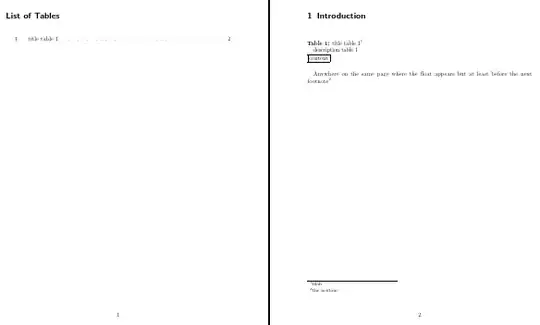
I tried this: Using \footnote in a figure's \caption, but the problem is that the footnotes also show up in the list of tables at the beginning of the document.

Note that 'The red fox - attributes' is the [title] and the rest of the text is the {long description}, used as here: Add table titles from captions in scrreprt class

Also I am not using footnotes for every single caption, so the solution would have to be flexible in that it provides the option to add one (but not mandatory).

Is the above format possible?

Looking for a solution which works safely without undesired results.

MWE:

\documentclass[a4paper, 12pt, headsepline, smallheadings]{scrreprt}
\usepackage[labelfont={small,bf}, textfont=small, labelsep=colon,singlelinecheck=false,format=plain, parindent=1em]{caption}
\newlength\myindention
\setlength\myindention{1em} 
\usepackage{chngcntr}
\counterwithout{table}{chapter}

\let\oldcaption\caption
\renewcommand*\caption[2][]{%
\oldcaption[#1]{#1\\\hspace*{\myindention}#2}%
}

\begin{document}

\listoftables

\chapter{Introduction}
\begin{table}[h]
\caption[title table 1]{description table 1}
\fbox{content}
\end{table}

\end{document} 

Thanks.

TomM
  • 1,694
  • 1
  • 19
  • 31

2 Answers2

4

Not very elegant but it does seem to work:

\documentclass[a4paper, 12pt, headsepline, smallheadings]{scrreprt}
\usepackage[labelfont={small,bf}, textfont=small, labelsep=colon,singlelinecheck=false,format=plain, parindent=1em]{caption}
\newlength\myindention
\setlength\myindention{1em}
\usepackage{chngcntr}
\counterwithout{table}{chapter}
\usepackage{xparse}

\let\oldcaption\caption
\RenewDocumentCommand\caption{D [] {} D [] {} m}{%
  \def\tempa{}%
  \def\tempb{#1}%
  \def\tempc{#2}%
  \ifx\tempa\tempb\def\tempb{#3}\fi%
  \ifx\tempa\tempc\let\tempc\tempb\fi%
  \oldcaption[\tempb]{\tempc\\\hspace*{\myindention}#3}%
  }

\begin{document}

\listoftables

\chapter{Introduction}
\begin{table}[h]
\caption[title table 1][title table 1\footnotemark]{description table 1}
\fbox{content}
\end{table}

Anywhere on the same page where the float appears\footnotetext{blah}
but at least before the next footnote\footnote{the nextone}

\end{document}

enter image description here

I expect that somebody else will be able to suggest something better, though, so I'd only recommend this if time is of the essence!

cfr
  • 198,882
  • Alright thank you. Let's see if there is more coming or not. From your answer I am not sure, is this safe to use? I need a solution for a huge document ;) – TomM Jan 01 '14 at 22:57
  • 1
    I don't think it is probably unsafe. It is much like the other solution you linked to. It is just rather messy to use because you need to type the heading out twice - once with and once without the footnote marker - when you want a footnote mark. I considered trying to avoid this but I wasn't convinced I could do that without introducing fragility which might break in unforeseen ways. That isn't a guarantee, of course, as there is a very great deal I don't know. But it is not doing anything especially hair raising as far as I know. – cfr Jan 01 '14 at 23:38
  • @karlkoeller May I ask for your opinion, as the old solution stems from you :) – TomM Jan 02 '14 at 13:25
  • Do you know that D [] {} = O {}? ;-) Furthermore here the o type in combination with \IfNoValueT seems more appropriate :-) – Tobi Jan 03 '14 at 13:08
  • @cfr Ok I really appreciate your help. Although still looking for a solution which works without doubt ;) – TomM Jan 03 '14 at 13:08
  • And why do you define all the \tmp… and then use #n in \oldcaption? Try \caption[title table 1]{description table 1} – Tobi Jan 03 '14 at 13:13
  • @Tobi Thanks. That was obviously wrong - thanks for pointing it out. As for the D vs. O, I guess I just find it easier to keep track of what I'm doing when I spell it out more. Is there some reason to prefer O? You may be right about o, though. I've never managed to get that to work in the past but perhaps I should have another go. (I haven't tried very often - mostly I've used \def etc. when 2e's macro creation commands weren't sufficient.) – cfr Jan 04 '14 at 04:53
  • @cfr: I prefer O since it is build for that (and shorter) if others read your code they may wonder what trick you use that O is replaced by D[] … You may like to post a new question with one of your sparse “problems” and notify me via @-comment … – Tobi Jan 04 '14 at 22:58
1

If the only difference is that you sometimes need a \footnotemark at the end of the title, you can define a toggle (generalization of the starred macros) + that add it.

\documentclass{scrreprt}

\usepackage[labelfont={small,bf}, textfont=small, labelsep=colon,
    singlelinecheck=false,format=plain, parindent=1em]{caption}


\usepackage{xparse}

\newlength\myindention
\setlength\myindention{1em} 

\let\oldcaption\caption
\RenewDocumentCommand { \caption } { t{+} O{} m } {%
    \oldcaption[#2]{%
        #2%
        \IfBooleanT{#1}{\footnotemark}
        \\%
        \hspace*{\myindention}#3
    }%
}

\begin{document}

\listoftables

\chapter{Introduction}
\begin{table}[h]
\caption[title table 1]{description table 1}
\fbox{content}
\end{table}

\begin{table}[h]
\caption+[title table 2]{description table 2}
\fbox{content}
\end{table}
\footnotetext{Source.}

\end{document}

Then \caption works as in your MWE and \caption+ does the same but adds \footnotemark at the end of the title (that is the \IfBooleanT line). To make it clear:

  • table with source: \caption+[title]{description} and \footnotetext afterwards
  • table without source: \caption[title]{description} only
Tobi
  • 56,353
  • Thanks it works. Did I get this right, I need to use \caption+ for the tables I want to add sources too, and regular \caption for the rest? That is exactly what I needed! – TomM Jan 03 '14 at 13:51
  • Yep I have just seen the + as part of the \caption+ command, which I have missed first ;) See my edited comment. – TomM Jan 03 '14 at 13:57
  • 1
    You get it right :-) See also my edit on the answer (at the end of it) – Tobi Jan 03 '14 at 13:58