To tell biblatex on the fly whose URL to print, try the following.
For this to work, you must not pass url=false to biblatex.
We define a new category (these can be very easily dealt with on the fly and via input in the .tex, not the .bib file): needsurl.
\DeclareBibliographyCategory{needsurl}
We also redefine the URL macro to print the URL only if the entry is in the category needsurl.
% this is basically the standard macro from `biblatex.def`,
% augmented with the logic for `needsurl`
\renewbibmacro*{url+urldate}{%
  \ifcategory{needsurl}
    {\printfield{url}%
     \iffieldundef{urlyear}
       {}
       {\setunit*{\addspace}%
        \printurldate}}
    {}}
Then there is a short command to indicate to biblatex that a certain entry needs its URL displayed.
\newcommand{\entryneedsurl}[1]{\addtocategory{needsurl}{#1}}
You can use it anywhere you like in the document, but keep in mind that \entryneedsurl does not print anything, it just tells biblatex to print the URL, if the entry appears in the bibliography.
It is used as you would expect, if you want the entry markey to have its URL displayed, just issue \entryneedsurl{markey} anywhere in the document.
The \entryneedsurl could also be incorporated into certain \cite macros, so you could have a \citebiburl macro that does everything \cite does, but adds the entry to the category needsurl.
The MWE
\documentclass[UKenglish]{article}
\usepackage[utf8]{inputenc}
\usepackage[T1]{fontenc}
\usepackage{babel}
\usepackage{lmodern}
\usepackage[style=authoryear-comp, hyperref, backend=biber, isbn=false, doi=false, date=year]{biblatex}

\addbibresource{biblatex-examples.bib}

\DeclareBibliographyCategory{needsurl}
\newcommand{\entryneedsurl}[1]{\addtocategory{needsurl}{#1}}
\renewbibmacro*{url+urldate}{%
  \ifcategory{needsurl}
    {\printfield{url}%
     \iffieldundef{urlyear}
       {}
       {\setunit*{\addspace}%
        \printurldate}}
    {}}

\begin{document}
  A\entryneedsurl{markey}B
  \cite{markey,ctan}
  \printbibliography
\end{document}
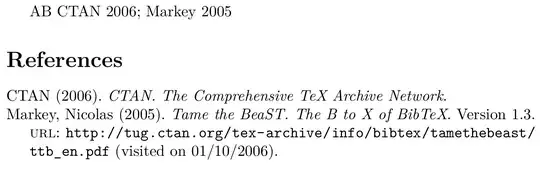
yields


DeclareSourceMapfor this issue. – Marco Daniel Jan 07 '14 at 18:11biblatexwhich URLs not to discard? There are several ways forbiblatexto get rid of the URL but they all require you tellingbiblatexwhich to keep (or not to keep). The best way, obviously, is to remove superfluous URLs from the.bibfile, there is no point in them being there, if they serve no purpose in the bibliography. But of course that is quite tiresome and tedious if your bibliography is compiled by an external programme. You could add a marker (a keyword viakeywords) to entries whose URL is important. – moewe Jan 08 '14 at 07:20urlmacro could then be extended to only print URLs if a particular keyword is set. But of course that also requires a tedious sift through your.bibfile and might be equally time consuming as deleting unnecessary URL fields, so we probably don't win a lot here. The most on-the-fly way would probably be to define a\DeclareBibliographyCategory{needsurl}, use a macro\newcommand{\dispurlinbib}[#1]{\addtocategory{needsurl}{#1}}, and redefine theurlmacro to only print URLs of entries that are inneedsurl. If you are interested in this, I might write up an answer. – moewe Jan 08 '14 at 07:28@onlinemay not work some situations (@ppr's on-line journals), you are correct that it overrides theurl=falseflag. Like @ppr, I am also using zotero and I noticed that when exporting, Web Page entries are classified as@misc(a poor choice IMHO). As I do not use anything specific to the@misccitations, I found it helpful to usesedto replace them with@online:sed -i 's/@misc{/@online{/g' zotero_export.bib– Steven C. Howell Dec 03 '15 at 06:23