Here's a way to do it: the command \sectionauthor must have two different meanings and we accomplish it by changing its definition inside a group when we typeset the table of contents.
\documentclass{article}
\usepackage{etoolbox}

\newrobustcmd{\sectionauthor}[1]{%
  \unskip % remove the space before it
  \\ % go to a new line
  {\normalsize\normalfont #1}%
}
\newcommand{\titlesectionauthor}[1]{%
  {\normalfont (#1)}% section author in parentheses
}


\begin{document}

\begingroup % make the change to \sectionauthor local
\let\sectionauthor\titlesectionauthor
\tableofcontents
\endgroup

\section{First Section \sectionauthor{Me}}
\section{Second Section \sectionauthor{You}}
\end{document}
I use \newrobustcmd from etoolbox because it's more practical than the standard \DeclareRobustCommand. It's necessary to declare \sectionauthor as robust, because this will make LaTeX write it unmodified in the .toc file, so we can use it also for giving it a new meaning.
I have applied some formatting instructions, modify them to suit your needs.

You can implement a “toggle on and off” on the two possibilities:
\documentclass{article}
\usepackage{etoolbox}

% comment the following line if you don't want the author to show in the body
\newtoggle{sectionauthor}
% comment the following line if you don't want the author to show in the TOC
\newtoggle{tocsectionauthor}

\toggletrue{sectionauthor}
\toggletrue{tocsectionauthor}

\newrobustcmd{\sectionauthor}[1]{%
  \iftoggle{sectionauthor}
    {% what to do if the toggle is true
     \unskip % remove the space before it
     \\ % go to a new line
     {\normalsize\normalfont #1}%
    }
    {% what to do if the toggle is false
     \unskip % remove the space before it
    }%
}

\newcommand{\tocsectionauthor}[1]{%
  \iftoggle{tocsectionauthor}
    {% what to do if the toggle is true
     {\normalfont (#1)}% section author in parentheses
    }
    {% what to do if the toggle is false
     \unskip % remove the space before it
    }%
}


\begin{document}

\begingroup % make the change to \sectionauthor local
\let\sectionauthor\tocsectionauthor
\tableofcontents
\endgroup

\section{First Section \sectionauthor{Me}}
\section{Second Section \sectionauthor{You}}
\end{document}
The output without commenting (a % in front of the line suffices) the two lines is the same as above. If we comment only the first line, we get
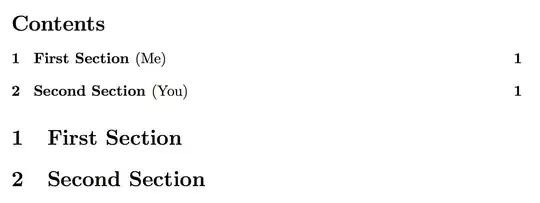
If we comment only the second line we remove the names from the TOC, but leave them in the body. Commenting out both lines the names disappear completely.

