6

I'm trying to create a diagram with pairs of rectangles of different sizes, each separated by a fixed interval. Additionally, I want each pair to be left-aligned at the same point. Here's an example from my current draft in QTikZ:

\documentclass{memoir}
\usepackage{tikz}
\usetikzlibrary{shapes,snakes}
\usetikzlibrary{positioning}

\begin{document}

\begin{tikzpicture}[scale=2]
    \tikzstyle{ann} = [draw=none,fill=none,right]
    \matrix[nodes={draw, thick, fill=blue!20,},column 1/.style={anchor=base west},
        row sep=0.0cm,column sep=0.5cm]  {
    \node[rectangle,fill=green] {Category 1};\\
    \node (1) [rectangle] {Lorem ipsum stuff in a wider text box like gibberish, copypasta, limericks, and bathroom graffiti};\\

    \node[rectangle,fill=green] {Category 2};\\
    \node[rectangle] {Lorem ipsum stuff in a wider text box like gibberish, copypasta, limericks, and bathroom graffiti};\\

    \node[rectangle,fill=green] {Content Delivery};\\
    \node[rectangle] {This one is much longer -- Lorem ipsum stuff in a wider text box like gibberish, copypasta, limericks, and bathroom graffiti};\\
    };
\end{tikzpicture}

\end{document}

pic of example without spacing

This one doesn't have the spacing between each pair that I'm looking for, though. Following this question and this question, I tried three different methods for adding that spacing, but always ended up with something like this:

\documentclass{memoir}
\usepackage{tikz}
\usetikzlibrary{shapes,snakes}
\usetikzlibrary{positioning}

\begin{document}

    \tikzstyle{ann} = [draw=none,fill=none,right]

    \matrix[nodes={draw, thick, fill=blue!20,},column 1/.style={anchor=base west},
        row sep=0.0cm,column sep=0.5cm]  {
    \node[rectangle,fill=green] {Category 1};\\
    \node (1) [rectangle] {Lorem ipsum stuff in a wider text box like gibberish, copypasta, limericks, and bathroom graffiti};\\
    };

    \begin{scope}[yshift=-1cm]
    \matrix[nodes={draw, thick, fill=blue!20,},column 1/.style={anchor=base west},
        row sep=0.0cm,column sep=0.5cm]  {
    \node[rectangle,fill=green] {Category 2};\\
    \node[rectangle] {Lorem ipsum stuff in a wider text box like gibberish, copypasta, limericks, and bathroom graffiti};\\
    };
    \end{scope}

    \begin{scope}[yshift=-2cm]
    \matrix[nodes={draw, thick, fill=blue!20,},column 1/.style={anchor=base west},
        row sep=0.0cm,column sep=0.5cm]  {
    \node[rectangle,fill=green] {Content Delivery};\\
    \node[rectangle] {This one is much longer -- Lorem ipsum stuff in a wider text box like gibberish, copypasta, limericks, and bathroom graffiti};\\
    };
    \end{scope}
\end{tikzpicture}

\end{document}

graph with spacing problems

How do I get the alignments to stay consistent while keeping this heterogeneous spacing?

3 Answers3

5

Specifying a text width seems to do the job:

enter image description here

or you can use the matrix anchor=west:

enter image description here

Code: text width=:

\documentclass{article}
\usepackage{tikz}
\usetikzlibrary{shapes,snakes}
\usetikzlibrary{positioning}

\begin{document} \begin{tikzpicture}[scale=2,text width=9cm]

\tikzstyle{ann} = [draw=none,fill=none,right]

\matrix[nodes={draw, thick, fill=blue!20,},column 1/.style={anchor=base west},
    row sep=0.0cm,column sep=0.5cm]  {
\node[rectangle,fill=green] {Category 1};\\
\node (1) [rectangle] {Lorem ipsum stuff in a wider text box like gibberish, copypasta, limericks, and bathroom graffiti};\\
};

\begin{scope}[yshift=-1cm]
\matrix[nodes={draw, thick, fill=blue!20,},column 1/.style={anchor=base west},
    row sep=0.0cm,column sep=0.5cm]  {
\node[rectangle,fill=green] {Category 2};\\
\node[rectangle] {Lorem ipsum stuff in a wider text box like gibberish, copypasta, limericks, and bathroom graffiti};\\
};
\end{scope}

\begin{scope}[yshift=-2cm]
\matrix[nodes={draw, thick, fill=blue!20,},column 1/.style={anchor=base west},
    row sep=0.0cm,column sep=0.5cm]  {
\node[rectangle,fill=green] {Content Delivery};\\
\node[rectangle] {This one is much longer -- Lorem ipsum stuff in a wider text box like gibberish, copypasta, limericks, and bathroom graffiti};\\
};
\end{scope}

\end{tikzpicture} \end{document}


Code: matrix anchor=:

\documentclass{article}
\usepackage{tikz}
\usetikzlibrary{shapes,snakes}
\usetikzlibrary{positioning}

\begin{document} \begin{tikzpicture}[scale=2, matrix anchor=west]

\tikzstyle{ann} = [draw=none,fill=none,right]

\matrix[nodes={draw, thick, fill=blue!20,},column 1/.style={anchor=base west},
    row sep=0.0cm,column sep=0.5cm]  {
\node[rectangle,fill=green] {Category 1};\\
\node (1) [rectangle] {Lorem ipsum stuff in a wider text box like gibberish, copypasta, limericks, and bathroom graffiti};\\
};

\begin{scope}[yshift=-1cm]
\matrix[nodes={draw, thick, fill=blue!20,},column 1/.style={anchor=base west},
    row sep=0.0cm,column sep=0.5cm]  {
\node[rectangle,fill=green] {Category 2};\\
\node[rectangle] {Lorem ipsum stuff in a wider text box like gibberish, copypasta, limericks, and bathroom graffiti};\\
};
\end{scope}

\begin{scope}[yshift=-2cm]
\matrix[nodes={draw, thick, fill=blue!20,},column 1/.style={anchor=base west}, text width=6cm,
    row sep=0.0cm,column sep=0.5cm]  {
\node[rectangle,fill=green] {Content Delivery};\\
\node[rectangle] {This one is much longer -- Lorem ipsum stuff in a wider text box like gibberish, copypasta, limericks, and bathroom graffiti};\\
};
\end{scope}

\end{tikzpicture} \end{document}

Peter Grill
  • 223,288
  • That looks good. Is there a way to avoid forcing all nodes to have the same fixed width? – bright-star Jan 14 '14 at 22:42
  • 1
    @TrevorAlexander: Use the text width for all longer nodes alone (instead of tikzpicture) like: \node[rectangle,text width=4in] {This one is much longer... –  Jan 14 '14 at 22:49
3

You can force the anchor for the scope itself.

\documentclass[tikz]{standalone}
\usetikzlibrary{matrix}
\begin{document}
\usetikzlibrary{shapes,snakes}
\usetikzlibrary{positioning}
\begin{tikzpicture}[scale=2]

    \tikzset{ann/.style = {draw=none,fill=none,right}}
    \begin{scope}[anchor=west]
    \matrix[nodes={draw, thick, fill=blue!20,},column 1/.style={anchor=base west},
        row sep=0.0cm,column sep=0.5cm]  {
    \node[rectangle,fill=green] {Category 1};\\
    \node (1) [rectangle] {Lorem ipsum stuff in a wider text box like gibberish, copypasta, limericks, and bathroom graffiti};\\
    };
    \end{scope}

    \begin{scope}[yshift=-1cm,anchor=west]
    \matrix[nodes={draw, thick, fill=blue!20,},column 1/.style={anchor=base west},
        row sep=0.0cm,column sep=0.5cm]  {
    \node[rectangle,fill=green] {Category 2};\\
    \node[rectangle] {Lorem ipsum stuff in a wider text box like gibberish, copypasta, limericks, and bathroom graffiti};\\
    };
    \end{scope}

    \begin{scope}[yshift=-2cm,anchor=west]
    \matrix[nodes={draw, thick, fill=blue!20,},column 1/.style={anchor=base west},
        row sep=0.0cm,column sep=0.5cm]  {
    \node[rectangle,fill=green] {Content Delivery};\\
    \node[rectangle] {This one is much longer -- Lorem ipsum stuff in a wider text box like gibberish, copypasta, limericks, and bathroom graffiti};\\
    };
    \end{scope}
\end{tikzpicture}
\end{document}

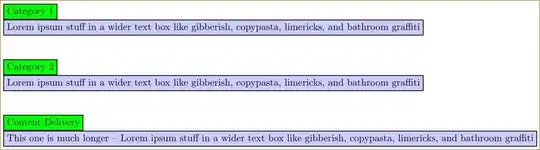
enter image description here

Also, don't use tikzstyle which is deprecated. Use \tikzset instead.

1

Using a matrix to align all nodes is a good solution, but you don't need to divide all the blocks between different matrices (or scopes) to force certain separations between rows. Next text (from pgfmanual) explains an easier solution

The row-end command \\ allows you to provide an optional argument, which must be a dimension. This dimension will be added to the list in row sep. This means that, firstly, any numbers you list in this argument will be added as an extra row separation between the line being ended and the next line [...]

This means that although \\ starts a new rows with row sep from previous row, \\[1cm] starts a new row with row sep+1cm separation from previous one. You can use this option every second row to obtain a certain distance between titled blocks.

Next code uses this solution to provide different distances between rows. It also uses a \matrix of nodes (load matrix library) which saves some typing. And last node shows you how to change node options for a particular one.

\documentclass{memoir}
\usepackage{tikz}
\usetikzlibrary{shapes,snakes}
\usetikzlibrary{matrix,positioning}

\begin{document}

\begin{tikzpicture}[scale=2,   
    title/.style={rectangle,fill=green,draw,anchor=west,},
    block/.style={rectangle,fill=blue!20,draw,thick,anchor=west,text width=\linewidth}
]

    \matrix[matrix of nodes,
             every odd row/.style={nodes={title}},
             every even row/.style={nodes={block}},
            row sep=-\pgflinewidth]  {
    Category 1\\
    Lorem ipsum stuff in a wider text box like gibberish, copypasta, limericks, and bathroom graffiti\\[1cm]
    Category 2\\
    Lorem ipsum stuff in a wider text box like gibberish, copypasta, limericks, and bathroom graffiti\\[1cm]
    Content Delivery\\
    |[text width=.75\linewidth]|This one is much longer -- Lorem ipsum stuff in a wider text box like gibberish, copypasta, limericks, and bathroom graffiti\\
    };
\end{tikzpicture}

\end{document}

enter image description here

Ignasi
  • 136,588