Update... after a update to recent version of siunitx, everything is fine now. Thanks a lot @daleif and @crissov :-)
\documentclass[ngerman,a4paper]{scrartcl}
\usepackage[utf8]{inputenc}
\usepackage[T1]{fontenc}
\usepackage{lmodern}
\usepackage{booktabs}
\usepackage[
decimalsymbol=comma,
range-units = single,alsoload=synchem,separate-uncertainty
]{siunitx}

\begin{document}
\begin{table}[htbp]
    \centering
    \caption{Some table}
    \begin{tabular}{l
    S[table-format = 1.3(4),table-number-alignment=left]}
    \toprule
    Hello world & {some numbers}\\
    \midrule
    Hello world & 1,234\pm 5,678\\
    Hello world & 1,234\\
Hello world & 1,234\pm 5,678\\
    \bottomrule
    \end{tabular}
\end{table}
\end{document}
Results in some bad alignment for the line without uncertainty - see picture:
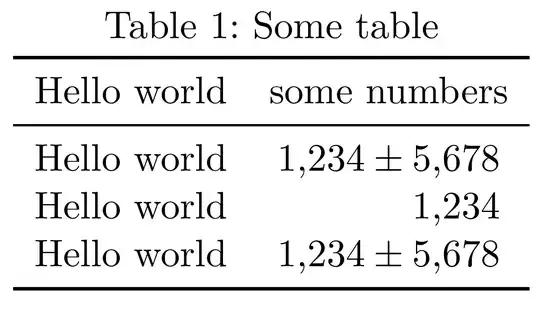
I've tried to get a left-aligned result with the table-number-alignment=left argument, but it didn't work out so far. Is there an option for aligning lines with numbers without uncertainity like numbers with, so the result is like
1,234 +/- 5,678
1,234
1,234 +/- 5,678
(decimalsymbols are vertical aligned)?
Thanks for your help!

siunitxversion are you using? In my version 2013/07/31 v2.5s, the alignment is as expected, the 2nd row 1234 is aligned with the other 1234. – daleif Feb 03 '14 at 16:09\hphantommight provide a hacky solution. – Crissov Feb 03 '14 at 16:12