How can I customize part style like below picture?

How can I customize part style like below picture?
One possibility using TikZ and titlesec:
\documentclass{book}
\usepackage{fourier}% change to lmodern if fourier is no available
\usepackage{tikz}
\usepackage[explicit]{titlesec}

\definecolor{mybluei}{RGB}{0,173,239}
\definecolor{myblueii}{RGB}{63,200,244}
\definecolor{myblueiii}{RGB}{199,234,253}

\renewcommand\thepart{\arabic{part}}

\newcommand\partnumfont{% font specification for the number
  \fontsize{380}{130}\color{myblueii}\selectfont%
}

\newcommand\partnamefont{% font specification for the name "PART"
  \normalfont\color{white}\scshape\small\bfseries
}

\titleformat{\part}
  {\normalfont\huge\filleft}
  {}
  {20pt}
  {\begin{tikzpicture}[remember picture,overlay]
  \fill[myblueiii]
    (current page.north west) rectangle ([yshift=-13cm]current page.north east);
  \node[
      fill=mybluei,
      text width=2\paperwidth,
      rounded corners=6cm,
      text depth=18cm,
      anchor=center,
      inner sep=0pt] at (current page.north east) (parttop)
    {\thepart};%
  \node[
      anchor=south east,
      inner sep=0pt,
      outer sep=0pt] (partnum) at ([xshift=-20pt]parttop.south)
    {\partnumfont\thepart};
  \node[
      anchor=south,
      inner sep=0pt] (partname) at ([yshift=2pt]partnum.south)
  {\partnamefont PART};
  \node[
      anchor=north east,
      align=right,
      inner xsep=0pt] at ([yshift=-0.5cm]partname.east|-partnum.south)
  {\parbox{.7\textwidth}{\raggedleft#1}};
  \end{tikzpicture}%
  }

\begin{document}

\part{Theory and Application of Continuous-Time Signals and Systems}

\end{document}
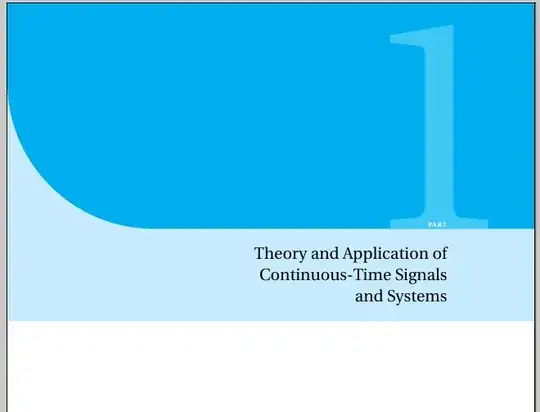
The commands \partnumfont and \partnamefont are used to control the font attributes for the number and the label "Part". Feel free to make adjustments (fonts, sizes) according to your needs.


