7

I have a problem with ligatures in LuaLaTeX when using the font Adobe Minion Pro. The fi ligature displays fine but is neither searchable nor copiable. If I copy it, I get some Asian character.

Minimal example:

\documentclass[]{scrartcl}

\usepackage{fontspec}
\usepackage{xunicode}

\setmainfont[]{Minion Pro}

\begin{document}
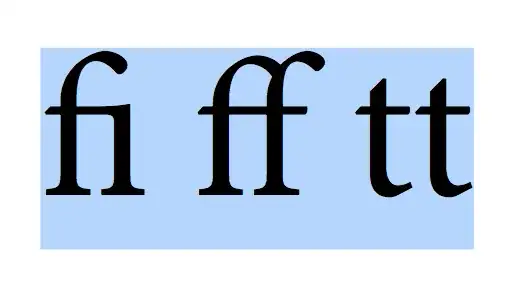
fi ff tt
\end{document}

Any idea on how to fix this?

Edit: This seems to be a persistent Windows problem. Fonts seems to get mixed-up for an unkown reason and it seems that this is not only happening on my machine. See my last comments to egreg's answer.

Edit2: No Windows problem as it also happens on Kubuntu 13.10. This problem might be reproducible with the 4 Minion Pro OTFs from the Adobe Reader package (Linux .deb version but other versions should be concerned too) and using TeXLive 2013 from DVD (not updated). Can anybody try this out? I suspect it's a TeX bug, possibly something with LuaTeX.

Edit3: It's the TeXLive 2013 version from DVD without update. I updated it and the problem is gone.

  • Are you using an OpenType font? I cannot reproduce this problem on my system. – Paul Gessler Feb 21 '14 at 23:40
  • Yes it's an OpenType font. It reads version 2.108. I'm using TeXLive 2013 and TeXstudio on a Windows 7 computer. The problem occurs when I'm copying from Adobe Acrobat 10. These are the symbols I get by copying: "昀ff tt" – Psychic Birdy Feb 21 '14 at 23:45
  • If I copy it including the formating, I get: "昀i ff tt" – Psychic Birdy Feb 21 '14 at 23:51
  • If you use the polyglossia-package (recommendable), there are different language-specific Options. If those are switched on, "| disables the ligature at this Position. f"|i f"|f. But I dont have the problem: this is the copy-paste from my PDF: fiel auffahrt ... – Christof Feb 21 '14 at 23:52
  • From a Windows 7 PC: SumatraPDF: fi ff tt; Adobe Reader 10.1.9: fi ff tt; Adobe Acrobat Pro 10.1.4: fi ff tt. – Paul Gessler Feb 21 '14 at 23:53
  • I get the same stuff with SumatraPDF 2.4 portable: "昀 ff tt" So is it the font version? Do you use TeXLive 2013 and TeXstudio? What does your font version say? – Psychic Birdy Feb 21 '14 at 23:57
  • Works with TeXLive 2013 and Minion Pro 2.030 in Acrobat 11. – Juri Robl Feb 22 '14 at 00:12
  • Alright, very strange. I will check this on another computer tomorrow. – Psychic Birdy Feb 22 '14 at 00:18
  • I'm on MikTeX 2.9 x64, vim (though not relevant), and Minion Pro Version 2.103; PS 2.000; hotconv 1.0.67; makeotf.lib2.5.29150. – Paul Gessler Feb 22 '14 at 00:19

2 Answers2

7

This is what I get when compiling your example (by the way, loading xunicode is not required), copying from the PDF viewer and pasting here

fi ff tt

The Minion Pro font I'm using is the one in Adobe Reader.

Here's a picture where the characters have been selected:

enter image description here

The viewer is Skim, but also Adobe Reader gives the expected result.

Here's an example of search:

enter image description here

So, no problem.

Here's the font version information:

Version 2.110;PS 2.000;hotconv 1.0.68;makeotf.lib2.5.35818

egreg
  • 1,121,712
  • @Christof The problem is not in disabling ligatures. – egreg Feb 21 '14 at 23:52
  • Indeed, I would like to retain the ligatures while being able to search and copy them. – Psychic Birdy Feb 21 '14 at 23:53
  • I know, but just in case ... BTW, did you try another font? Edit: Seems a Problem with Minion Pro. SumatraPDF: ?el auffahrt Acrobat XI: el auffahrt. fi doesnt work, ff does (Windows 8). – Christof Feb 22 '14 at 00:01
  • I tried Arno Pro (also with ligatures) and it copies fine. So it's specific Minion Pro. "Version 2.110;PS 2.000;hotconv 1.0.68;makeotf.lib2.5.35818" is a newer version. Where is this from? Some bundle? – Psychic Birdy Feb 22 '14 at 00:07
  • @PsychicBirdy I just transferred the fonts in the Adobe Reader bundle. – egreg Feb 22 '14 at 00:07
  • I got it. I completely deleted the installed font and reinstalled it. It seems to have been corrupted. Now it's working. Thanks alot for your kind help, everyone! - Edit: No it seems to persist in another document... What is going on?? Let me check this... – Psychic Birdy Feb 22 '14 at 00:35
  • @Psychic Birdy Looks like a problem with cached fonts. After updating Luaotfload it’s advisable to run luaotfload-tool --cache=erase; well it was, anyhow, since recent versions delete the cache automatically if a version change is detected. – Philipp Gesang Feb 22 '14 at 22:08
  • Alright. This seems to be a persistent Windows problem. I did a clean install of Windows with just some Adobe programs and TeXLive installed. The problem persists. It might be caused by some Chinese fonts that are installed by default. Though I don't know why these fonts get mixed up. The bad thing is, it the Chinese characters are coded into the PDF and show up even on other systems. I also did a test on an Ubuntu machine, compiling the PDF there, and no problems with the same font version. – Psychic Birdy Feb 23 '14 at 15:37
  • 1
    Well, seems I'm not the only one with this problem. Look at the manual for selnolig: http://ctan.math.utah.edu/ctan/tex-archive/macros/luatex/latex/selnolig/doc/selnolig.pdf The abstract reads "Other f-ligatures, such as fb, fh, fj and fk, are suppressed globally", copy-paste: "Other f-ligatures, such as 昀, 昀, fj and fk, are suppressed globally" – Psychic Birdy Feb 23 '14 at 15:55
  • @PsychicBirdy - Interesting catch! I hadn't noticed this so far... (FWIW, I compiled the user guide document on a MacBook running MacOS X 10.7.5, MacTeX2013, and Lua(La)TeX 0.76.) What's particularly striking about your example is that two ligated glyphs (fj and fk) are copied correctly whereas two others (fb and fh) are not. – Mico Feb 23 '14 at 16:05
  • Hello Mico! :) Wow, that's scary, you found your way into this thread on your own and in no time... Anyway, your support is much appreciated! - Update: It's not Windows. I had compiled on a (k)ubuntu machine with TeXLive installed via package manager, everything fine. Now I deinstalled and reinstalled from TeXLive 2013 DVD to have a more up-to-date version. And now the problem comes up again. So it's either something with the TeX version (which would concern TeXLive 2013 and MacTeX2013) or it's because of the font, which I also reinstalled. I don't now anymore. But I keep on figuring it out. – Psychic Birdy Feb 23 '14 at 18:47
1

This is some kind of bug. It's not the OS or the font version. It's the TeXLive 2013 version from DVD without update. I updated it and the problem is gone. The bug also showed up in MacTeX 2013, see Mico's comment on egreg's answer.

  • It seems to me that the OP is saying that this is the answer to their question: they upgraded TeXLive and the problem disappeared. –  Aug 19 '15 at 11:34