5

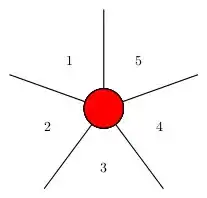
The attached code draws a vertex with five labelled outgoing edges. The labels should all be placed at the same distance from the center, but at least perceptually they are not. How can I fix this?

\tikzstyle{vertex}=[circle,fill=red,draw=black,line width=0.8 pt]
\tikzstyle{none}=[]
\tikzstyle{edge}=[-,draw=black,line width=0.8 pt]
\tikzstyle{label}=[pos=0.4, auto, font=\scriptsize]

\begin{tikzpicture}
    \path [use as bounding box] (-1,-1) rectangle (1,1);
    \node [style=vertex] (0) at (0, 0) {};
    \node [style=none] (1) at (-0, 1) {};
    \node [style=none] (2) at (0.95, 0.31) {};
    \node [style=none] (3) at (0.59, -0.81) {};
    \node [style=none] (4) at (-0.59, -0.81) {};
    \node [style=none] (5) at (-0.95, 0.31) {};

    \draw [style=edge] (0) to node[style=label]{1} (1);
    \draw [style=edge] (0) to node[style=label]{2} (2);
    \draw [style=edge] (0) to node[style=label]{3} (3);
    \draw [style=edge] (0) to node[style=label]{4} (4);
    \draw [style=edge] (0) to node[style=label]{5} (5);
\end{tikzpicture}

Labels not at (visually) equal distances from center

gTcV
  • 1,065
  • 1
    Hint: How did you come up with the node coordinates? – ajeh Feb 28 '14 at 20:16
  • Good point! This definitely can fix the problem, but on the other hand why can't I outsource the math to TikZ? After all, the pos should exactly do what I want. – gTcV Feb 28 '14 at 20:21

3 Answers3

7

The main problem here is to do with anchor, which you currently have set to auto.

There are a few things we can do to improve things:

  • we can use the form (<angle>,<radius>) to specify the end points of your radii, and draw the labels using the same (<angle>,<radius>) idea
  • since we don't need a node at the end of each radii, we can simply use a coordinate
  • we can also use tikzset instead of tikzstyle as discussed in Should \tikzset or \tikzstyle be used to define TikZ styles?

screenshot

I have drawn an additional circle just for demonstration here- you can remove it once you're ready for production.

% arara: pdflatex
% !arara: indent: {overwrite: yes}
\documentclass{standalone}
\usepackage{tikz}

\tikzset{
    vertex/.style={circle,fill=red,draw=black,line width=0.8 pt},
    edge/.style={-,draw=black,line width=0.8 pt},
    label/.style={pos=0.4, inner sep=1pt,font=\scriptsize}
}

\begin{document}
\begin{tikzpicture}
    \path [use as bounding box] (-1,-1) rectangle (1,1);
    \node [style=vertex] (0) at (0, 0) {};
    \coordinate  (1) at (90:1);
    \coordinate  (2) at (18:1) ;
    \coordinate  (3) at (-54:1) ;
    \coordinate  (4) at (-126:1) ;
    \coordinate  (5) at (-198:1) ;

    \foreach \i in {1,...,5}
    {
        \draw [edge] (0) to (\i);
        \node at ({-360/5*(\i-2)}:.5) {\i};
    }
    \draw  (0,0) circle  (.5);
\end{tikzpicture}
\end{document}

As a final comment, there may be reasons not to use label and edge in your own custom styles as these are very meaningful commands already defined in tikz- if you do choose to keep them, proceed with caution!

cmhughes
  • 100,947
4

You could also use pins and use the \foreach iterative procedure extensively:

\documentclass{standalone}
\usepackage{tikz}
\begin{document}
\begin{tikzpicture}
  \foreach [evaluate={\y=90+\x*360/5;\w=\y+36;\z=int(\x+1);}] \x in {0,...,4}{
    \node [circle,draw,line width=0.8 pt,fill=red,minimum size=1cm,
    pin={[pin edge={line width=0.8 pt,black},pin distance=2cm]\y:$$}] (c) at (0,0) {}; 
    \node at (\w:1.5cm) {\z};
  }
\end{tikzpicture}
\end{document}

enter image description here

Pier Paolo
  • 2,790
1

Here is a pstricks implementation:

enter image description here

\documentclass{article}
\usepackage{pstricks,multido}
\begin{document}
\begin{pspicture}(5,5)
  \SpecialCoor
  \psset{linewidth=.5pt,unit=1cm}
  \multido{\iA=90+-72,\iB=1+1}{5}{
    \psline(0,0)(1;\iA)
    \rput(0.5;\number\numexpr\iA-36\relax){\iB}}
  \pscircle[fillcolor=red,fillstyle=solid](0,0){0.2}
\end{pspicture}
\end{document}

Polar coordinates are specified using (<r>;<t>) after setting \SpecialCoor. Cartensian coordinates are specified using (<x>,<y>) and work by default. multido provides the means to iterate over numeric items.

Werner
  • 603,163