21

I recently posted this answer to How to highlight all words of the form [0-9][A-Za-z0-9]* immediately following an equal sign?. It works, but it suffers from (a lot) of code duplication.

What I have at the moment

More specifically, I have to use a line of the form

\lst@DefSaveDef{`<char>}\jubobs@<char>{\jubobs@<char>\foo}

no fewer than 52 times, for <char> in A-Z and a-z. For information, \lst@DefSaveDef is a listings internal macro with the following syntax:

\lst@DefSaveDef{<charcode>}<some-macro>{<replacement-text>}

Using my newfound understanding of \expandafter, I've managed to somewhat reduce the code by defining a macro that takes a letter as argument and performs the same thing as the line show above:

\makeatletter
\newcommand\addtoletterdef[1]
{%
  \expandafter\expandafter\expandafter\lst@DefSaveDef%
  \expandafter\expandafter\expandafter{%
  \expandafter\expandafter\expandafter`%
  \expandafter\expandafter\expandafter#1%
  \expandafter\expandafter\expandafter}%
  \expandafter\csname jubobs@#1\expandafter\endcsname%
  \expandafter{\csname jubobs@#1\endcsname\foo}%
}
\makeatother

However, that didn't help much in reducing code duplication: I still have to invoke \addtoletterdef 52 times... ;...(

What I want

I would like to define a macro similar to my \addtoletterdef but that would accept a charcode instead of a character. That way, it would be easy to loop through charcodes 65 to 90 (A-Z) and 97 to 122 (a-z) and perform all those 52 operations without any code duplication.

I've got a feeling that the answer lies in using the \begingroup\lccode trick, but that trick is very new to me, and I'm far from mastering it.

How can I redefine \addtoletterdef to accept a charcode instead of a character?


MWE:

\documentclass{article}

\usepackage{listings}

% dummy macro
\def\foo{foo}

\makeatletter
\newcommand\addtoletterdef[1]
{%
  \expandafter\expandafter\expandafter\lst@DefSaveDef%
  \expandafter\expandafter\expandafter{%
  \expandafter\expandafter\expandafter`%
  \expandafter\expandafter\expandafter#1%
  \expandafter\expandafter\expandafter}%
  \expandafter\csname jubobs@#1\expandafter\endcsname%
  \expandafter{\csname jubobs@#1\endcsname\foo}%
}
\makeatother

\lstdefinestyle{mycode}
{
  language=C,
  SelectCharTable=
      \addtoletterdef{A}
      % ...
      \addtoletterdef{Z}
      \addtoletterdef{a}
      % ...
      \addtoletterdef{z}
}

\begin{document}
\begin{lstlisting}[style=mycode]
a1 = 6.12234Z
a2 = Z1324124
\end{lstlisting}
\end{document}
jub0bs
  • 58,916
  • 2
    So you are doing lot of digging with listings. It is really good. I see many packages (like matlab prettifier) as the out come. Keep it up and all the best :) –  Mar 08 '14 at 23:39
  • @HarishKumar Thanks for the encouragement! I really appreciate it. For the record, it's not that I love Matlab so much; it's just a good case study to learn about the listings package, and further, compiler construction. – jub0bs Mar 08 '14 at 23:43

2 Answers2

13

You can build your \lstdefine in pieces, adding to a token register:

\documentclass{article}

\usepackage{xcolor} \usepackage{textcomp} \usepackage{listings}

\makeatletter

\newif\iffirstchar\firstchartrue \newif\ifstartedbyadigit \newif\ifprecededbyequalsign

\newcommand\processletter {% \ifnum\lst@mode=\lst@Pmode% \iffirstchar% \global\startedbyadigitfalse% \fi \global\firstcharfalse% \fi }

\newcommand\processdigit {% \ifnum\lst@mode=\lst@Pmode% \iffirstchar% \global\startedbyadigittrue% \fi \global\firstcharfalse% \fi }

\lst@AddToHook{OutputOther}% {% \lst@IfLastOtherOneOf{=} {\global\precededbyequalsigntrue} {}% }

\lst@AddToHook{Output}% {% \ifprecededbyequalsign% \ifstartedbyadigit% \def\lst@thestyle{\color{Numbers}}% \fi \fi \global\firstchartrue% \global\startedbyadigitfalse% \global\precededbyequalsignfalse% }

\definecolor{Code}{RGB}{0,0,0} \definecolor{Keywords}{RGB}{255,0,0} \definecolor{Strings}{RGB}{255,0,255} \definecolor{Comments}{RGB}{0,0,255} \definecolor{Numbers}{RGB}{255,128,0}

\newtoks\jubo@toks \jubo@toks={ language=C, commentstyle=\color{Comments}\slshape, stringstyle=\color{Strings}, keywordstyle={\color{Keywords}\bfseries}, alsoletter=0123456789, SelectCharTable=% } \def\add@savedef#1#2{% \begingroup\lccode?=#1\relax \lowercase{\endgroup \edef\@temp{% \noexpand\lst@DefSaveDef{\number#1}% \expandafter\noexpand\csname lsts@?\endcsname{% \expandafter\noexpand\csname lsts@?\endcsname\noexpand#2}% }}% \jubo@toks=\expandafter{\the\expandafter\jubo@toks\@temp}% } \count@=0 \loop \add@savedef\count@\processdigit \ifnum\count@<9 \advance\count@\@ne \repeat \count@=A \loop \add@savedef\count@\processletter \ifnum\count@<Z \advance\count@\@ne \repeat \count@=a \loop \add@savedef\count@\processletter \ifnum\count@<`z \advance\count@@ne \repeat %\showthe\jubo@toks % for debugging \begingroup\edef\x{\endgroup \noexpand\lstdefinestyle{mycode}{\the\jubo@toks} }\x

\makeatother

\begin{document}

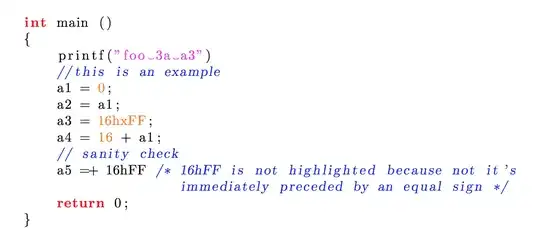
\begin{lstlisting}[style=mycode] int main () { printf("foo 3a a3") //this is an example a1 = 0; a2 = a1; a3 = 16hxFF; a4 = 16 + a1; // sanity check a5 =+ 16hFF /* 16hFF is not highlighted because not it's immediately preceded by an equal sign */ return 0; } \end{lstlisting}

\end{document}

enter image description here

Just for checking, here's the value of \jubo@toks prior to step 6

language=C, commentstyle=\color {Comments}\slshape , stringstyle=\color {Str
ings}, keywordstyle={\color {Keywords}\bfseries }, alsoletter=0123456789, Selec
tCharTable=\lst@DefSaveDef {48}\lsts@0 {\lsts@0 \processdigit }\lst@DefSaveDef 
{49}\lsts@1 {\lsts@1 \processdigit }\lst@DefSaveDef {50}\lsts@2 {\lsts@2 \proce
ssdigit }\lst@DefSaveDef {51}\lsts@3 {\lsts@3 \processdigit }\lst@DefSaveDef {5
2}\lsts@4 {\lsts@4 \processdigit }\lst@DefSaveDef {53}\lsts@5 {\lsts@5 \process
digit }\lst@DefSaveDef {54}\lsts@6 {\lsts@6 \processdigit }\lst@DefSaveDef {55}
\lsts@7 {\lsts@7 \processdigit }\lst@DefSaveDef {56}\lsts@8 {\lsts@8 \processdi
git }\lst@DefSaveDef {57}\lsts@9 {\lsts@9 \processdigit }\lst@DefSaveDef {65}\l
sts@A {\lsts@A \processletter }\lst@DefSaveDef {66}\lsts@B {\lsts@B \processlet
ter }\lst@DefSaveDef {67}\lsts@C {\lsts@C \processletter }\lst@DefSaveDef {68}\
lsts@D {\lsts@D \processletter }\lst@DefSaveDef {69}\lsts@E {\lsts@E \processle
tter }\lst@DefSaveDef {70}\lsts@F {\lsts@F \processletter }\lst@DefSaveDef {71}
\lsts@G {\lsts@G \processletter }\lst@DefSaveDef {72}\lsts@H {\lsts@H \processl
etter }\lst@DefSaveDef {73}\lsts@I {\lsts@I \processletter }\lst@DefSaveDef {74
}\lsts@J {\lsts@J \processletter }\lst@DefSaveDef {75}\lsts@K {\lsts@K \process
letter }\lst@DefSaveDef {76}\lsts@L {\lsts@L \processletter }\lst@DefSaveDef {7
7}\lsts@M {\lsts@M \processletter }\lst@DefSaveDef {78}\lsts@N {\lsts@N \proces
sletter }\lst@DefSaveDef {79}\lsts@O {\lsts@O \processletter }\lst@DefSaveDef {
80}\lsts@P {\lsts@P \processletter }\lst@DefSaveDef {81}\lsts@Q {\lsts@Q \proce
ssletter }\lst@DefSaveDef {82}\lsts@R {\lsts@R \processletter }\lst@DefSaveDef 
{83}\lsts@S {\lsts@S \processletter }\lst@DefSaveDef {84}\lsts@T {\lsts@T \proc
essletter }\lst@DefSaveDef {85}\lsts@U {\lsts@U \processletter }\lst@DefSaveDef
 {86}\lsts@V {\lsts@V \processletter }\lst@DefSaveDef {87}\lsts@W {\lsts@W \pro
cessletter }\lst@DefSaveDef {88}\lsts@X {\lsts@X \processletter }\lst@DefSaveDe
f {89}\lsts@Y {\lsts@Y \processletter }\lst@DefSaveDef {90}\lsts@Z {\lsts@Z \pr
ocessletter }\lst@DefSaveDef {97}\lsts@a {\lsts@a \processletter }\lst@DefSaveD
ef {98}\lsts@b {\lsts@b \processletter }\lst@DefSaveDef {99}\lsts@c {\lsts@c \p
rocessletter }\lst@DefSaveDef {100}\lsts@d {\lsts@d \processletter }\lst@DefSav
eDef {101}\lsts@e {\lsts@e \processletter }\lst@DefSaveDef {102}\lsts@f {\lsts@
f \processletter }\lst@DefSaveDef {103}\lsts@g {\lsts@g \processletter }\lst@De
fSaveDef {104}\lsts@h {\lsts@h \processletter }\lst@DefSaveDef {105}\lsts@i {\l
sts@i \processletter }\lst@DefSaveDef {106}\lsts@j {\lsts@j \processletter }\ls
t@DefSaveDef {107}\lsts@k {\lsts@k \processletter }\lst@DefSaveDef {108}\lsts@l
 {\lsts@l \processletter }\lst@DefSaveDef {109}\lsts@m {\lsts@m \processletter 
}\lst@DefSaveDef {110}\lsts@n {\lsts@n \processletter }\lst@DefSaveDef {111}\ls
ts@o {\lsts@o \processletter }\lst@DefSaveDef {112}\lsts@p {\lsts@p \processlet
ter }\lst@DefSaveDef {113}\lsts@q {\lsts@q \processletter }\lst@DefSaveDef {114
}\lsts@r {\lsts@r \processletter }\lst@DefSaveDef {115}\lsts@s {\lsts@s \proces
sletter }\lst@DefSaveDef {116}\lsts@t {\lsts@t \processletter }\lst@DefSaveDef 
{117}\lsts@u {\lsts@u \processletter }\lst@DefSaveDef {118}\lsts@v {\lsts@v \pr
ocessletter }\lst@DefSaveDef {119}\lsts@w {\lsts@w \processletter }\lst@DefSave
Def {120}\lsts@x {\lsts@x \processletter }\lst@DefSaveDef {121}\lsts@y {\lsts@y
 \processletter }\lst@DefSaveDef {122}\lsts@z {\lsts@z \processletter }.
egreg
  • 1,121,712
13

It is definitely worthwile to study the loops in egreg's answer, but you can also use existing tools:

loop for listing

The code copies all the set-up from your review, and then it uses \xintApplyInline to do the loops (non-expandably, it goes through here; else one could use\xintApplyUnbraced which prepares expandably the totality of the material before re-injecting it in the token stream, but not needed here).

Update: I notice only now that there were some extra \expandafter in the copied-pasted \addtoletterdef from the OP. One didn't notice them because when \csname is used the macro has meaning \relax hence the second level of \expandafter's did nothing bad anyhow. (and I also remove some unnecessary %'s)

\documentclass{article}
\usepackage{xinttools}% for expandable and non-expandable loops
\usepackage{listings}
\usepackage{xcolor}
\usepackage{textcomp}

%%%%%%%%%%%%%%%%%%%%%%%%%%%%%%%%%%%%%%%%%%%%%%%%%%%%%%%%%%%%%%%%%%
%% TAKEN OVER VERBATIM https://tex.stackexchange.com/a/164297/4686
%% (and egreg's answer)

\definecolor{Code}{rgb}{0,0,0}
\definecolor{Keywords}{rgb}{255,0,0}
\definecolor{Strings}{rgb}{255,0,255}
\definecolor{Comments}{rgb}{0,0,255}
\definecolor{Numbers}{rgb}{255,128,0}

\makeatletter

\newif\iffirstchar\firstchartrue
\newif\ifstartedbyadigit
\newif\ifprecededbyequalsign

\lst@AddToHook{OutputOther}%
{%
  \lst@IfLastOtherOneOf{=}
    {\global\precededbyequalsigntrue}
    {}%
}

\lst@AddToHook{Output}%
{%
  \ifprecededbyequalsign
      \ifstartedbyadigit
        \def\lst@thestyle{\color{orange}}%
      \fi
    \fi
  \global\firstchartrue
  \global\startedbyadigitfalse
  \global\precededbyequalsignfalse
}

\newcommand\processletter
{%
  \ifnum\lst@mode=\lst@Pmode
    \iffirstchar%
        \global\startedbyadigitfalse
      \fi
      \global\firstcharfalse
    \fi
}
\newcommand\processdigit
{%
  \ifnum\lst@mode=\lst@Pmode
      \iffirstchar
        \global\startedbyadigittrue
      \fi
      \global\firstcharfalse
  \fi
}

%%%%%%%%%%%%%%%%%%%%%%%%%%%%%%%%%%%%%%%%%%%%%%%%%%%%%%%%%%%%%%%%%%
%%%% \addtoletterdef. Some \expandafter's removed!!

\newcommand\addtoletterdef[2]
{%
  \expandafter\lst@DefSaveDef
  \expandafter{%
  \expandafter`%
  \expandafter#2%
  \expandafter}%
  \csname jubobs@#2\expandafter\endcsname
  \expandafter{\csname jubobs@#2\endcsname #1}%
}
\makeatother

%%%%%%%%%%%%%%%%%%%%%%%%%%%%%%%%%%%%%%%%%%%%%%%%%%%%%%%%%%%%%%%%%%
%%% USE OF \xintApplyUnbraced to loop over letters or digits

\lstdefinestyle{mycode}
{
  language=C,
  commentstyle=\color{Comments}\slshape,
  stringstyle=\color{Strings},
  keywordstyle={\color{Keywords}\bfseries},
  alsoletter=0123456789,
  SelectCharTable=%
      \xintApplyInline{\addtoletterdef\processdigit}{0123456789}%
      \xintApplyInline{\addtoletterdef\processletter}
      {abcdefghijklmnopqrstuvwxyzABCDEFGHIJKLMNOPQRSTUVWXYZ}%
}

%% this is it!
%%%%%%%%%%%%%%%%%%%%%%%%%%%%%%%%%%%%%%%%%%%%%%%%%%%%%%%%%%%%%%%%%%


\begin{document}\thispagestyle{empty}
\begin{lstlisting}[style=mycode]
int main ()
{
    printf("foo 3a a3")
    //this is an example
    a1 = 0;
    a2 = a1;
    a3 = 16hxFF;
    a4 = 16 + a1;
    // sanity check
    a5 =+ 16hFF /* 16hFF is not highlighted because not it's
                   immediately preceded by an equal sign */
    return 0;
}
\end{lstlisting}
\end{document}
  • I had never heard of the xinttools package, but I'm going to check it out. Thanks! – jub0bs Mar 08 '14 at 19:27
  • The idea of the answer is a bit different from egreg's: there is no preparation of a token list, rather all the 62 instances of \addtoletterdef are created "live", so to speak. Turns out one can do this non-expandably, hence I used \xintApplyInline (non expandability here basically means that \xintApplyInline does some definitions of its own in the process; for example the \loop of LaTeX as used by egreg is also non-expandable as it makes a definition of \iterate). It is also possible but not needed here to use \xintApplyUnbraced which is an expandable iteration. –  Mar 08 '14 at 19:49
  • @Jubobs what... you never heard of xinttools of \xintFor fame ?!?! .. with all the shameless propaganda I have been doing here for months now... ;-) –  Mar 08 '14 at 20:15
  • 2
    You need to take the propanganda up a notch ;-p – jub0bs Mar 08 '14 at 20:16