The following aligned equation gives an error 'Extra }, or forgotten \right.':
\begin{equation}
\begin{aligned}
U&=\mathbb{R}^{M N}\\
V&=\mathbb{R}^{2 M N}\\
W&=\mathbb{R}^{4 M N}\\
\min_{v\in V} \left\{E_p(v)&=\|\nabla v\|_{W,1}+\lambda \|\rho(v)\|_{U,1} \right\}
\end{aligned}
\end{equation}
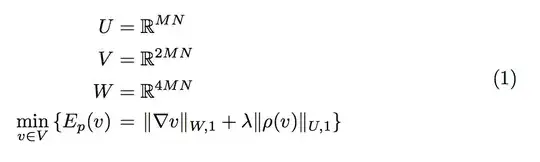
Removing the \left and \right commands avoids the error:
\begin{equation}
\begin{aligned}
U&=\mathbb{R}^{M N}\\
V&=\mathbb{R}^{2 M N}\\
W&=\mathbb{R}^{4 M N}\\
\min_{v\in V} \{E_p(v)&=\|\nabla v\|_{W,1}+\lambda \|\rho(v)\|_{U,1} \}
\end{aligned}
\end{equation}
I don't understand why having the alignment marker inside a \left \right command is an error. How do I align an equation with the alignment inside a \left \right command?




\left(&\right)aroundamsmath's align delimiter (“&”)). You can get around it though, either by using\big-like delimiters, or following the guidelines in Left/Right across multiline equation. – Werner Mar 14 '14 at 05:34