6

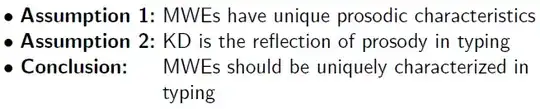
I am attempting to indent text, as below. enter image description here

To get the alignment right (and it's far from perfect right now), I've been using trial and error with a linebreak \\ and \hspace{3.1cm}. Is there a legitimate way to get the results in the image above?

As a minimum working example, I have

    \documentclass[12pt,mathserif]{beamer} 
    \usetheme{Berkeley}
    \usecolortheme{dove}
    \useinnertheme{default}
    \setbeamertemplate{navigation symbols}{} 
    \setbeamertemplate{itemize items}[default]
    \setbeamertemplate{enumerate items}[default]

    \beamertemplatenavigationsymbolsempty
    \setbeamerfont{footline}{size=\fontsize{9}{11}\selectfont}
    \setbeamertemplate{footline}[page number]

    \begin{document}
    \frame{\frametitle{Detecting MWEs in Typed Text}
    \begin{itemize}
    \item $\mathbf{Assumption \;1}$: MWEs have unique prosodic\\
        \hspace{3.1cm}characteristics
    \item $\mathbf{Assumption \;2}$: KD is the reflection of prosody in\\
        \hspace{3.1cm}typing
    \item $\mathbf{Conclusion}$: \hspace{0.5cm}MWEs should be uniquely\\
        \hspace{3.1cm}characterized in typing
    \end{itemize}
    }
\end{document}
Werner
  • 603,163
Adam_G
  • 816
  • Similar to http://tex.stackexchange.com/questions/163643/description-environment-options-in-lyx/ I guess, though that is for LyX. – Torbjørn T. Mar 17 '14 at 14:02

3 Answers3

5

Such an alignment is easy when using a tabular:

enter image description here

\documentclass{beamer}% http://ctan.org/pkg/beamer
\begin{document}
\begin{frame}
\begin{tabular}{@{\textbullet~}l@{\ }p{2in}}
  \bfseries Assumption 1: & MWEs have unique prosodic characteristics \\
  \bfseries Assumption 2: & KD is the reflection of prosody in typing \\
  \bfseries Conclusion:   & MWEs should be uniquely characterized in typing
\end{tabular}
\end{frame}
\end{document}

If you don't want to measure the right column width (currently fixed at 2in), then you can use a tabularx instead. Also, array could be used to aid in formatting the first column to \bfseries automatically, if needed. Here's an example incorporating both with a raggedright second column:

enter image description here

\documentclass{beamer}% http://ctan.org/pkg/beamer
\usepackage{array,tabularx}% http://ctan.org/pkg/{array,tabularx}
\begin{document}
\begin{frame}
\begin{tabularx}{\linewidth}{@{\textbullet~}>{\bfseries}l@{\ }>{\raggedright\arraybackslash}X@{}}
  Assumption 1: & MWEs have unique prosodic characteristics \\
  Assumption 2: & KD is the reflection of prosody in typing \\
  Conclusion:   & MWEs should be uniquely characterized in typing
\end{tabularx}
\end{frame}
\end{document}
Werner
  • 603,163
3

You can use the method described in https://tex.stackexchange.com/a/163733/586, changing to a description environment.

\documentclass[12pt,mathserif]{beamer} 
\usetheme{Berkeley}
\usecolortheme{dove}
\useinnertheme{default}
\setbeamertemplate{navigation symbols}{} 
\setbeamertemplate{itemize items}[default]
\setbeamertemplate{enumerate items}[default]

\beamertemplatenavigationsymbolsempty
\setbeamerfont{footline}{size=\fontsize{9}{11}\selectfont}
\setbeamertemplate{footline}[page number]

% new additions
\defbeamertemplate{description item}{align left}{$\blacktriangleright$ \bfseries\insertdescriptionitem\hfill}
\setbeamertemplate{description item}[align left]

\begin{document}
\frame{\frametitle{Detecting MWEs in Typed Text}
\begin{description}[Assumption 2:]
\item [Assumption 1:] MWEs have unique prosodic
characteristics
\item [Assumption 2:] KD is the reflection of prosody in
typing
\item [Conclusion:] MWEs should be uniquely
characterized in typing
\end{description}
}
\end{document}

enter image description here

Torbjørn T.
  • 206,688
1

There could be better ways, but here is one way with a stack. I used \bullet because I didn't know the name of the right-pointing triangle symbol. Also, for some reason, I had to change the stacking end-of-line (EOL) symbol fromt he default \\ to something else, in this case \#. The stacktabbedgap sets the gap between the columns.

\documentclass{beamer}
\usepackage{tabstackengine}
\newcommand\pparbox[2]{\protect\parbox[t]{#1}{#2\strut}}
\setstacktabbedgap{1ex}
\setstackEOL{\#}
\begin{document}
\begin{frame}
\tabbedShortstack[l]{
 \bfseries $\bullet$ Assumption 1: & \pparbox{2in}{%
    MWEs have unique prosodic characteristics}\#
 \bfseries $\bullet$ Assumption 2: & \pparbox{2in}{%
    KD is the reflection of prosody in typing}\#
 \bfseries $\bullet$ Conclusion: & \pparbox{2in}{%
    MWEs should be uniquely characterized in typing}
}
\end{frame}
\end{document}

enter image description here

If you were going to use the technique often, much of the syntax could be put into macros:

\documentclass{beamer}
\usepackage{tabstackengine}
\newcommand\pparbox[2]{\protect\parbox[t]{#1}{#2\strut}}
\def\secondcolwidth{2in}%DEFAULT
\newcommand\firstcol[1]{\bfseries$\bullet$ #1:}
\newcommand\secondcol[1]{\pparbox{\secondcolwidth}{#1}}
\setstacktabbedgap{1ex}
\setstackEOL{\#}
\begin{document}
\begin{frame}
\def\secondcolwidth{2in}
\tabbedShortstack[l]{
 \firstcol{Assumption 1} & \secondcol{MWEs have unique prosodic characteristics}\#
 \firstcol{Assumption 2} & \secondcol{KD is the reflection of prosody in typing}\#
 \firstcol{Conclusion}   & \secondcol{MWEs should be uniquely characterized in typing}
}
\end{frame}
\end{document}