4

How can I create the symbol shown below so that it be insertable as letter into text in LaTeX?

enter image description here

I found it in a book and I tried to reverse engineer it, but I failed:

% does not compile {}[\bf{п}]^(\bf{п}){}[\bf{м}]^(\bf{у})
% does not compile {}^{\bf{п}}_{\bf{п}}\mathbf{C}^{\bf{м}}_{\bf{у}}
jub0bs
  • 58,916
Kabumbus
  • 1,805
  • Something like this? – Werner Mar 18 '14 at 03:35
  • Are any of the elements fixed/dynamic or does the "symbol" always the way you present it in your post? Also, when you mention "indices", are you referring to the "top part" as being a superscript and the "bottom part" as being a subscript? – Werner Mar 18 '14 at 05:27
  • This is a good opportunity for stackengine probably. – percusse Mar 18 '14 at 05:54
  • Or a simple use of \shortstack{<top>\\<bottom>}.... (Which is not to say that stackengine is pretty awesome.) – jon Mar 18 '14 at 06:08
  • What is the purpose of the dot(s) in the image at the right side? Where is the base line of the symbol? What is its height? – Heiko Oberdiek Mar 18 '14 at 11:37

3 Answers3

2

Some low level programming can help:

\documentclass{article}
\usepackage[T2A,T1]{fontenc}

\makeatletter
\newcommand{\pmpu}{%
  \leavevmode\vbox{
    \check@mathfonts %% we want to know what's the subsubscript size
    \fontencoding{T2A}\fontsize{\ssf@size}{0}\selectfont
    \offinterlineskip
    \lineskip=0pt
    \ialign{%
      &\hfil##\hfil\cr
      \CYRP&\CYRM\cr
      \noalign{\vskip.1ex}
      \CYRP&\CYRU\cr
    }%
  }%
}
\makeatother

\begin{document}
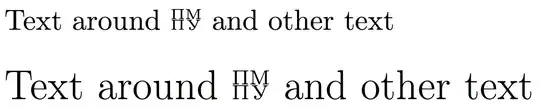
Text around \pmpu\ and other text

\bigskip

{\Large Text around \pmpu\ and other text}

\end{document}

enter image description here

egreg
  • 1,121,712
1

whatsis

Change scale factor to change font size.

\documentclass{standalone}
\usepackage{mathtools}
\usepackage{graphics}

\newcommand{\whatsis}[1]% scale factor - 0.4 is normalsize
{\scalebox{#1}{\normalsize\raisebox{8pt}{$\Pi$M }\hspace{-20pt}%
{$\Pi$\hspace{1pt}\raisebox{1.65pt}{\large y.}}}}%

\begin{document}
\huge text \whatsis{0.8} text
\end{document}
John Kormylo
  • 79,712
  • 3
  • 50
  • 120
0

You can adjust the .15ex if you wish to change the distance between the stacked lines. In this MWE, the symbol is made to fit to 1.95ex in vertical extent, which can also be adjusted.

\documentclass{article}
\usepackage[utf8]{inputenc}
\usepackage[russian,english]{babel}
\usepackage{scalerel,tabstackengine,graphicx}
\def\mysym{\foreignlanguage{russian}{%
  \setstackgap{S}{.15ex}\scaleto{$\tabbedShortstack{п&м\\п&у}$}{1.95ex}}}
\def\test{a\mysym b}
\begin{document}
{\Large\test}\par\test\par{\footnotesize\test}
\end{document}

enter image description here

And if one prefers the symbol in bold, as the OP's graphic might indicate, a one-word change to the MWE accomplishes that:

\documentclass{article}
\usepackage[utf8]{inputenc}
\usepackage[russian,english]{babel}
\usepackage{scalerel,tabstackengine,graphicx}
\def\mysym{\foreignlanguage{russian}{%
  \setstackgap{S}{.15ex}\scaleto{$\bfseries\tabbedShortstack{п&м\\п&у}$}{1.95ex}}}
\def\test{a\mysym b}
\begin{document}
{\Large\test}\par\test\par{\footnotesize\test}
\end{document}

enter image description here