2

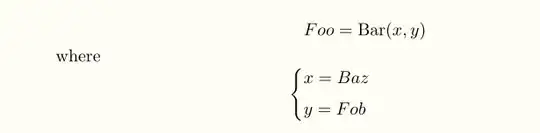
I need to define a rather complex operation. Hence I want to use the classical "where" definition style, i.e.

Foo = Bar(x,y) 
WHERE
x = Baz
y = Fob

My attempt so far in latex is:

\begin{align*}
\text{Foo} = \text{Bar}(x,y) && \mathbf{where} \\
x = \text{Baz}
\end{align*}

I am not really satisfied with the result, though:

  • The where keyword does not really stand out from the layout
  • The helper definitions are on the same level as the main definition

So instead of fiddling around with it, is there some kind of (semi-) canonical way to layout such definitions?

choeger
  • 915
  • Is that maths you're writing? Or some code? If the latter, you should use a package for typesetting source code, such as listings or minted. – jub0bs Mar 24 '14 at 09:26
  • its pure math, code would be easy... – choeger Mar 24 '14 at 09:27
  • As Bernard mentioned in his answer, \intertext from amsmath (and \shortintertext from mathtools) seem sufficient: https://gist.github.com/9741278 (This is more or less just a simplification of the existing answer, thus this comment.) – Sean Allred Mar 24 '14 at 14:39

4 Answers4

3

I'm guessing you're using the \text macro to typeset stuff in roman font, but that's bad pratice because semantically incorrect: the \text macro should be reserved for typesetting phrases such as "where", "for all", "subject to", etc. within display math environments (e.g. equation, align, etc.), not for variables or function names. You should use the \mathrm macro, instead, here.

Here's how I would write your equations:

enter image description here

\documentclass{article}

\usepackage{amsmath}

\newcommand\Foo{\mathrm{Foo}}
\newcommand\Barfun{\mathrm{Bar}}
\newcommand\Baz{\mathrm{Baz}}
\newcommand\Fob{\mathrm{Fob}}

\begin{document}
%
\begin{align*}
  \Foo &= \Barfun(x,y) \\
  \intertext{where}    
  x    &= \Baz         \\
  y    &= \Fob
\end{align*}
%
\end{document}
jub0bs
  • 58,916
  • Usually function names with more than one letter are typeset upright. Still, if you think it's better in italics, at least, put it in \mathit so it has better spacing. – Manuel Mar 24 '14 at 09:52
  • To your last edit, don't think of \operatorname as something that defines an operator, rather as something like \mathrmwithfinespacing. – Manuel Mar 24 '14 at 10:10
  • 2
    @Manuel You're wrong: \operatorname *does* build an operator atom. – egreg Mar 24 '14 at 10:12
  • @egreg I know. I was just pointing out that I see no benefit from defining with \mathrm because with \operatorname you get “the same” but with better spacing in some cases. – Manuel Mar 24 '14 at 10:14
  • @Manuel That's not what \operatorname is meant for; what you're suggesting is semantically incorrect. – jub0bs Mar 24 '14 at 10:15
  • @Manuel No, you get *wrong* spacing; unless, of course, you need an operator. – egreg Mar 24 '14 at 10:15
  • @egreg May be I look for different spacing, could you give me an example? And Jubobs, it's true, it's “semantically incorrect”. – Manuel Mar 24 '14 at 10:16
  • 1
    @Manuel Try $\operatorname{A}+\operatorname{B}$ and compare with $\mathrm{A}+\mathrm{B}$. The first is wrong, the second is correct. – egreg Mar 24 '14 at 10:18
  • 1
    @egreg You are right, that's something I wasn't aware of. – Manuel Mar 24 '14 at 10:22
  • If this looks wrong to you, consider the fleqn document class option (available on most common derivates of the standard classes, afaik). – Raphael Mar 24 '14 at 10:51
1
\documentclass{article}
\usepackage{amsmath}

\begin{document}

\begin{align*}
  f &= f(x,y)\\
  \makebox[0.6em][l]{where} & \\
  x &= g(z)\\
  y &= h(z,x)
\end{align*}

\end{document}

enter image description here

1

With another alignment and a smaller vertical spacing:

\documentclass{article}

\usepackage{mathtools}
\DeclareMathOperator{\Barr}{Bar}

\begin{document}
\begin{align*}
  &  Foo   = \Barr(x,y)\\
  \shortintertext{where}
  \begin{cases}
    {} \\ {}
  \end{cases}
  \hspace{-1.1em}
  &
  \begin{array}{@{}l}
    x= Baz\\[6pt]
    y= Fob
  \end{array}
\end{align*}
\end{document} 

enter image description here

Sean Allred
  • 27,421
Bernard
  • 271,350
  • caveat lector: it's not important to the core layout approach, but care should be taken for Foo's, Baz's, and Bar's kerning in math mode. – Sean Allred Mar 24 '14 at 14:26
0

Another option.

If the function name has more than one letter, it is usually typeset upright. If you are only using it once or twice, you can use \operatorname{Foo}, but if you are using it more times, may be it's worth defining a new command for them:

\documentclass{scrartcl}

\usepackage{mathtools}
\DeclareMathOperator\Fo{Foo}
\DeclareMathOperator\Ba{Bar}
\DeclareMathOperator\Bz{Baz}
\DeclareMathOperator\Fb{Fob}

\begin{document}

\begin{align*}
  \Fo &= \Ba(x,y) \\ \intertext{where}
  x &= \Bz \\
  y &= \Fb
\end{align*}

\end{document}

After a little discussion it was shown that \operatorname{A}+\operatorname{B} and \mathrm{A}+\mathrm{B} give different results (which I didn't know). So, my answer is not necessarily right (probably not).

I leave it here in case they are, in fact, operators.

Manuel
  • 27,118
  • Those are not math operators. – jub0bs Mar 24 '14 at 10:03
  • I don't know what I would call an operator. – Manuel Mar 24 '14 at 10:05
  • @jub0bs What TeX calls “Operator” formatting is appropriate for some notations that are not technically operators. (DEK, for example, does this in Concrete Mathematics.) And some math operators, like \nabla or \partial, should be typeset as \mathord in TeX. So it’s a slight misnomer. – Davislor Sep 24 '20 at 02:25
  • @jub0bs You would not want to typeset the product of du and mass as dumass. You’d either want operator-like spacing, or to insert \cdot consistently. – Davislor Sep 24 '20 at 02:28