3

Consider following tex and bib files. As you see the second bib item is not rendered correctly. Is there any solution?

The squares are not the only problem, indeed all character of Persian item have not been rendered correctly. The out put should be similar to what you can see in the source code. Using tex.stackexchange.com/a/97304/13747 I can add Persian in the body of document but I don not know how to apply that solution to Persian bibliography items.

main.tex

\documentclass{article}
\usepackage{fontspec}
\usepackage{bidi}
\setmainfont{Times New Roman}
\begin{document}
Test \cite{noormags145485,cour71}
\bibliography{main}
\bibliographystyle{plain}
\end{document}

main.bib

@ARTICLE{noormags145485,
  author = { شعار,جعفر },
  title = { اصلاح املای فارسی را از کجا شروع کنیم: به مناسبت تشکیل فرهنگستان
},
  journal = { یغما },
  year = { 1350 },
  pages = { 157--161 },
  number = { 273 },
  url = { http://www.noormags.com/view/fa/articlepage/145485 }
}
@ARTICLE{cour71,
  author = { Cour,Jaafar },
  title = {Sluh e mlu e Fursi ru az koju corooa kon'im: be monusebat e tackil
    e Farhangestun},
  journal = { Yaqmu },
  year = { 1971 },
  pages = { 157--161 },
  number = { 273 },
  url = { http://www.noormags.com/view/fa/articlepage/145485 }
}

output
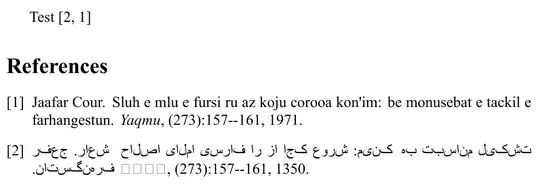
enter image description here

Real Dreams
  • 8,298
  • 12
  • 56
  • 78
  • Did you compile your .bib file with biber? – Bernard Mar 24 '14 at 19:40
  • @Bernard No, I compiled it with bibtex. I do not work with biber ever. How should I use it? – Real Dreams Mar 24 '14 at 19:43
  • Maybe you should save your .bib file in utf8-format (as your .tex file). JabRef knows utf8, and saves in that format if you choose so in Options -> Preferences -> General. Bibtex understands only 7-bit encoding, bibtex8 8-bit encoding. As your bibliography shows a mix of latin and arabic scripts, you should use biber, as it understands utf8. – Bernard Mar 24 '14 at 19:58
  • My bib file is already in utf8 format. – Real Dreams Mar 24 '14 at 20:29
  • I've just tested your.bib file, changing the main font to the font of my editor (which displays the name of the journal), used biber, modified the code to have the correct syntax with biblatex and I have the same result as you… – Bernard Mar 24 '14 at 21:18
  • This may be helpful: http://tex.stackexchange.com/a/106888/12277 – ClintEastwood Mar 25 '14 at 08:26

1 Answers1

1

The reason the name of the journal for noormags145485 is written as four empty boxes even though the rest of the test works is because it is put in italics, which is lacking from your fonts. I've understood that that is normal, as italics (or slanted text) isn't used much for Arabic script.

Bibtex uses \em for this, and this example shows that redefining \em makes the journal title appear. I exchanged the font for one that I have access to.

% -*- TeX-engine: xetex; -*-% 
\documentclass{article}
\usepackage{fontspec}
\usepackage{bidi}
\setmainfont{DejaVu Sans}
\begin{document}
Test \cite{noormags145485,cour71}
\let\em\relax
\bibliography{main}
\bibliographystyle{plain}
\end{document}

I think the right solution is to use some font commands to set it up so that something suitable is used for replacement of italic Arabic script, so it will be used both for this, and for other occurences in the text, but I can't help you with that.

(If you instead need the bibliography part use different markup for different magazine titles I would suggest going over from BibTeX to Biblatex for improved flexibility. With Biblatex you would use biber instead of bibtex, so that's where that comes in.)

pst
  • 4,674
  • Thanks. The squares are not the only problem, indeed all character of Persian item have not been rendered correctly. The out put should be similar to what you can see in the source code. Using http://tex.stackexchange.com/a/97304/13747 I can add Persian in the body of document but I don not know how to apply that solution to Persian bibliography items. – Real Dreams Mar 25 '14 at 03:01