UPDATE i've since published a LaTeX style file based on the below finds, CXLTX Position Absolute, part of the (incipient) CXLTX Style Collection, which makes it easier to precisely position one-liners on the page. pull requests: awesome!
i'm trying to position text à la CSS position: absolute and found the textpos package which basically works great. in the documentation they say (p4) that "the box that is positioned by the \textblock environment is a tight fit to the block of text (or other material) inside it`, but when i try
\documentclass[a5paper]{memoir}
\usepackage{polyglossia}
\setdefaultlanguage{english}
\setlength{\parskip}{\baselineskip}
\setlength{\parindent}{0pt}

\usepackage[absolute]{textpos}
\setlength{\TPHorizModule}{0.1mm}
\setlength{\TPVertModule}{0.1mm}
\textblockorigin{0mm}{0mm}

% not needed, but makes for easier measuring:
\usepackage[top-left]{pagegrid}

\begin{document}

\TPshowboxestrue
\begin{textblock}{150}[1,0](500,000)\flushright helo\end{textblock}
\begin{textblock}{150}[1,0](500,200)\flushright world\end{textblock}
\begin{textblock}{150}[1,0](500,400)\flushright gX\end{textblock}
\begin{textblock}{150}[1,0](700,400)\flushright .\end{textblock}

\end{document}


\setlength{\parskip}{0pt}

\setlength{\parskip}{-\baselineskip}
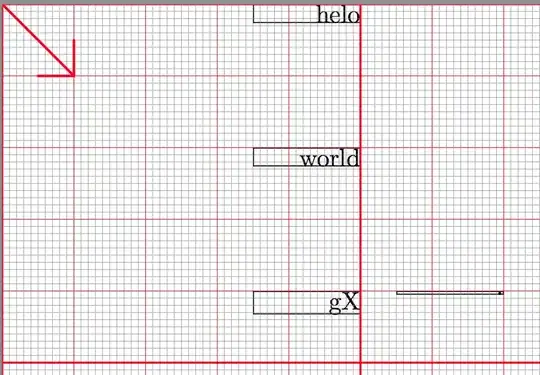
what i get is

so while the right edges of the boxes is correctly positioned at 500 (tenths mm) and the top edges as such correctly at, respectively, 0, 200, and 400, and the lower edges of the boxes do wrap tightly around the descenders as advertised, the boxes are still 8mm high – how can i have them wrap as advertised?

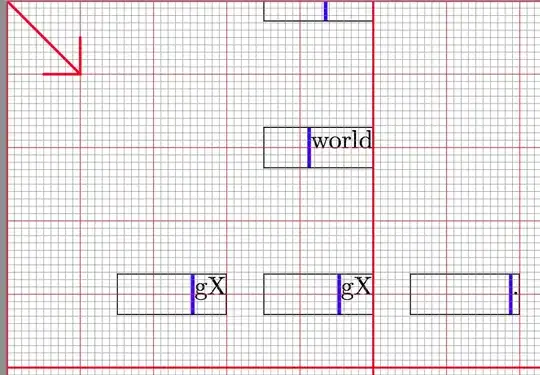
\parskipto a non zero value: have mercy of your readers.;-)– egreg Mar 25 '14 at 17:41