3

When I use \vdots within the align environment, its size is bigger than of the rest of characters. I want to get rid of the gap (purple colour on the picture below) or somehow move \vdots upward (\vspace{-Xmm} didn't work at all).

My code is

\documentclass[12pt]{article}
\usepackage{amsfonts, amsmath}

\begin{document} \begin{align} A &= B \nonumber\ &= C \nonumber \ &= \vdots \nonumber \ &= Z \nonumber \end{align}

\end{document}

which gives you
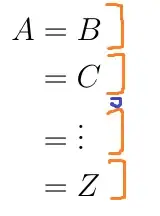
enter image description here

Cheers!

Vochmelka
  • 965

1 Answers1

5

Taken from the hack here:

\documentclass{article}
\usepackage{amsmath}
\makeatletter
\DeclareRobustCommand{\rvdots}{%
  \vbox{
    \baselineskip4\p@\lineskiplimit\z@
    \kern-\p@
    \hbox{.}\hbox{.}\hbox{.}
  }}
\makeatother

\begin{document}
\begin{align}
    A &= B \nonumber\\
      &=  C \nonumber \\
      &=  \rvdots \nonumber \\
      &=  Z \nonumber
\end{align}
\end{document}

enter image description here

LaRiFaRi
  • 43,807
  • Works fine. I'll wait for accepting the answer just in case that someone comes up with simpler solution. – Vochmelka Apr 05 '14 at 05:09