I'd like to include Chinese characters in listings. Can it be done, and, if so, how?
Asked
Active
Viewed 1,331 times
12


-
This a starting point tip for you: http://tex.stackexchange.com/questions/24528/having-problems-with-listings-and-utf-8-can-it-be-fixed?rq=1 – Malipivo Apr 08 '14 at 12:15
3 Answers
7
I enclose an example with a help of the listingsutf8 package and the CODE2000 font. I ran xelatex and lualatex, the result looks all the same.
%! {xe|lua}latex mal-cjkv.tex
\documentclass{article}
\pagestyle{empty}
\usepackage{listingsutf8}
\usepackage{fontspec}
\usepackage{filecontents}
\begin{filecontents*}{mal-code.tex}
My source code and Good bye! in Japanese:  さよなら。
A greeting in Chinese: 你怎么样?
\end{filecontents*}
\begin{document}
% http://web.archive.org/web/20101122142710/http://code2000.net/code2000_page.htm
\setmainfont{CODE2000.TTF}
\lstinputlisting{mal-code.tex}
\end{document}


Malipivo
- 13,287
-
-
@Jubobs I hope I did that in shebang, I ran both engines (xelatex, lualatex), the output looks all the same. – Malipivo Apr 08 '14 at 13:25
5
\documentclass{article}
\usepackage{fontspec}
\usepackage{libertine}
\newfontfamily\cjk{Code2000}
\usepackage{fancyvrb}

\begin{document}
Some nonsense text with the  Libertine font.

\begin{Verbatim}[codes=\cjk,numbers=left,frame=single,label=Chinese test]
My source code and Good bye! in Japanese:  さよなら。
A greeting in Chinese: 你怎么样?
\end{Verbatim}

\end{document}

0
listings package is rather special, Malipivo's solution works wrong when
We use syntax highlighting;
We mix CJK characters and Latin characters.
Here is an example which shows the problem.
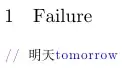
% !TeX program = XeLaTeX
% !TeX encoding = UTF-8
\documentclass{article}

\usepackage{xcolor}
\usepackage{listings}
\lstset{commentstyle=\color{blue},morecomment=[l]{//}}

\usepackage{fontspec}
\setmainfont{FandolSong-Regular.otf}

\begin{document}

\section{Failure}
\begin{lstlisting}
// tomorrow明天
\end{lstlisting}

\end{document}
And here is the solution, using xeCJK:

% !TeX program = XeLaTeX
% !TeX encoding = UTF-8
\documentclass{article}

\usepackage{xcolor}
\usepackage{listings}
\lstset{commentstyle=\color{blue},morecomment=[l]{//}}

\usepackage{xeCJK}
\setCJKmainfont{FandolSong-Regular.otf}

\begin{document}

\section{Success}
\begin{lstlisting}
// tomorrow明天
\end{lstlisting}

\end{document}

Leo Liu
- 77,365
-
Here is a bug: There is a space between
明and天. I don't think xeCJK wants to insert space between CJK characters, does it? – Cyker Jun 21 '20 at 19:03 -
It is more likely a bug in
listings: Addingcolumns=fullflexiblein\lstsetremoved the extra spaces. Not sure why it would insert spaces between CJK but not latin characters. – Cyker Jun 21 '20 at 19:42