7

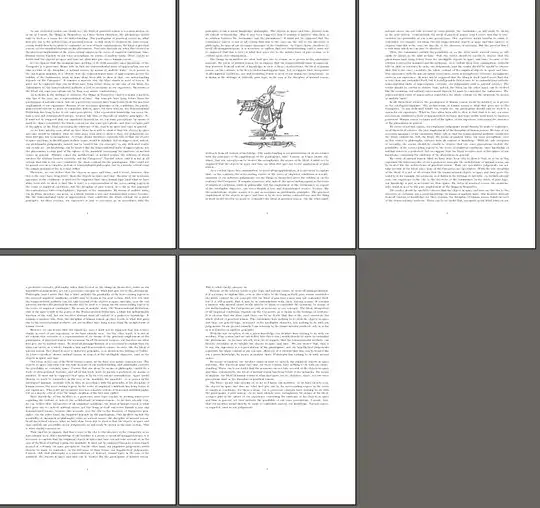
How would you place a float like this with LaTeX?

enter image description here

Note that it's in the middle of a sentence. Normal float placement rules could only find the right page to put the float on. Then it's a matter of where on the page it's visually pleasing, regardless of where paragraph breaks happen to be. I think a placement in the middle of the page like this often looks better than at the top or bottom of the page, even though it perhaps has fallen out of style. (This example is printed in 1926.)

Added: The point is not that the float should be in the middle of a paragraph. The float is at a predetermined position on the page. The point is instead that that could be in the middle of a paragraph.

pst
  • 4,674
  • 2
    All questions should include a Minimal Working Example to make it easier to help and to demonstrate what you've tried so far. – cfr Apr 10 '14 at 23:44
  • @cfr, I'm as keen on seeing MWEs as others, but really, I have tried nothing, so there's nothing I'm withholding. I've unsuccessfully tried to find solutions for this many years ago, but now I thought that maybe today, with all advancements in the TeX world there is some good way to do this. So what have I tried so far? Just looking at the somewhat related UK FAQ http://www.tex.ac.uk/cgi-bin/texfaq2html?label=textflow , but seen that there is really nothing there (and that answer is a bit old). – pst Apr 11 '14 at 00:01
  • 1
    The pullquote examples here use 2column but the basic idea is the same the image is set at a fixed vertical position and text pours past it: http://tex.stackexchange.com/a/49294/1090 – David Carlisle Apr 11 '14 at 00:19
  • @DavidCarlisle, Thanks, that looks very interesting! – pst Apr 11 '14 at 00:35
  • But still, isn't it overkill to shape paragraphs, when all lines actually are at full length? Could it be easier to put fewer lines on the page, and then cut it off for float insertion during \shipout? – pst Apr 11 '14 at 00:42
  • 1
    @pst Still, some lines of code, even if it's a minimal non working example, are welcome. At least you save us from setting a default document. Now we have something in the answers, but it would be great to have something in the question. It's easier to copy the code than start from scratch. – Manuel Apr 11 '14 at 00:45
  • @Manuel Also, it tends to clarify the question. This is not guaranteed, of course, but very often the code makes it clearer what is being asked. (And I might not have wasted time trying to answer a question which wasn't being asked! Not that it wasn't interesting, as it happens, so I can't really say I regret it.) – cfr Apr 11 '14 at 01:11

4 Answers4

4

This modifies LaTeX's top float positioning so that it puts the top floats in the centre of the page, or at least as close to the centre as possible, if the text flow has a an unbreakable box or math display at the centre the vsplit will not split it at exactly the centre. It's not extensively tested but it works on this page:-). It applies to all top floats in the document.

enter image description here

\documentclass{article}
\usepackage{kantlipsum}


\makeatletter

\def \@cflt{%
    \let \@elt \@comflelt
    \setbox\@tempboxa \vbox{}%
    \@toplist
\setbox\z@\vsplit\@outputbox to 0.5\ht\@outputbox
    \setbox\@outputbox \vbox{%
                             \boxmaxdepth \maxdepth
                             \unvbox\z@
                             \vskip .5\textfloatsep
                             \unvbox\@tempboxa
                             \vskip -\floatsep
                             \topfigrule
                             \vskip .5\textfloatsep
                             \unvbox\@outputbox
                             }%
    \let\@elt\relax
    \xdef\@freelist{\@freelist\@toplist}%
    \global\let\@toplist\@empty
}

\makeatother

\begin{document}
\kant[1-5]

\begin{figure}[t]

\rule{3cm}{6cm}

\caption{a rectangle}
\end{figure}

\kant[2-7]

\end{document}
David Carlisle
  • 757,742
  • Wonderful! The main drawback which I notice (and which isn't a big deal) is that since \textfloatsep is split the float comes a bit close to the text. If this is the only kind of float you use, then you can of course just double \textfloatsep. – pst Apr 11 '14 at 09:34
  • For those who want to use this I should add that I think values less than "0.5" often gives a betterlooking result. (As usual in typography we prefer placement in the upper half. And yes, I know it was me who wrote "in the middle of the page"…)

    I think the main reason to have these floats instead of topfloats is to have the floats more "enclosed", especially when there is a running head as in the example in my question. I suspect the typesetter for that had put the figure slightly higher up if it weren't for the paragraph break two lines above it, avoiding an orphan-like effect.

    – pst Apr 11 '14 at 09:49
  • Is there a way to easily create a new kind of float? Instead of replacing t, say, that I could ask latex to do [!tbc]. If not, does it work locally if you enclose it in a \begingroup … \endgroup? – Manuel Apr 11 '14 at 10:45
  • @pst yes a real job would add a new float area and do stuff, but that would take longer than the 10 minutes I spent on it. Short of defining a new type (which would require extensive changes to the latex output routine) it may be better to steal b instead of t which would allow top floats still to be used. – David Carlisle Apr 11 '14 at 11:11
  • @pst yes halving textfloatsep is a bit gross but the alternative would be to make this float type add 2texfloatsep and that would require more extensive changes (more or less similar to adding a new type altogether). But main point of the answer is that you can do this much with adding a couple of lines to one internal command, so doing a complete job can't be impossibly difficult. – David Carlisle Apr 11 '14 at 11:13
  • Regarding having the floats close to the top I tried to 3\baselineskip instead of to 0.5\ht\@outputbox, stating a fixed number of lines. Seemed to work, but I suspect there is no guarantee you have the right \baselineskip at that moment? – pst Apr 11 '14 at 11:14
  • @pst no the output routine does a \normalsize to ensure header gets consistent size but it's after this so here baselineskip is whatever it is – David Carlisle Apr 11 '14 at 11:18
  • @DavidCarlisle, Yes indeed! I think it's good enough to use as it is, if you're careful. An ideal solution would avoid orphans/widows around the figure, maybe testing several cutoff points. – pst Apr 11 '14 at 11:19
  • 1
    @pst wait for latex3:-) – David Carlisle Apr 11 '14 at 11:22
  • 1
    @pst detecting widows/orphans would be pretty near impossible (unless you restrict to luatex) as by the time you get the page box to vsplit all internal structure is unavailable to the macro layer. – David Carlisle Apr 11 '14 at 11:25
  • @Manuel yes it works locally (with care) If you redefine this in a group then pages shipped out when tex is in that group will use this definition, this may include pages before that point and may not include that point, due to the asynchonous nature of the page breaker. But by putting the groups somewhere you could restrict the scope of the definition – David Carlisle Apr 11 '14 at 13:04
3

Something more like this?

White Rabbit Regardless of Context

The White Rabbit will always appear on page 2 in the centre of the page scaled to 37.5% of \textheight, taking 40% total including a little breathing room. Other pages are formatted much as usual:

Craziness in the Midst of Madness

This uses flowfram. This drastically changes the way TeX outputs text and may not suit your purposes depending on the other content of your document.

Caveat emptor.

\documentclass[a4paper]{article}
\usepackage{geometry}
\usepackage{flowfram, kantlipsum, graphicx}
\newflowframe*[ 1,>2 ]{ \textwidth }{ \textheight }{ 0pt }{ 0pt }[ mainflowframe ]
\newflowframe*[ 2 ]{ \textwidth }{ .3\textheight }{ 0pt }{ .7\textheight }[ secondflow ]
\newstaticframe*[ 2 ]{ \textwidth }{ .4\textheight }{ 0pt }{ .3\textheight }[ myflowfram ]
\newflowframe*[ 2 ]{ \textwidth }{ .3\textheight }{ 0pt }{ 0pt }[ firstflow ]
\setstaticcontents*{ myflowfram }{\centering\includegraphics[height=.375\textheight]{i019}\par}
\setallflowframes{ border=none }
\setallstaticframes{ border=none }

\begin{document}
\kant[1-20]
\end{document}
cfr
  • 198,882
  • The problem (I think) with everything that uses \parshape is that it's about the shape of one paragraph and not about the total textflow. If there is a paragraph break in the text that's supposed to go past the float it won't work the same. – pst Apr 11 '14 at 00:26
  • @pst Now I've seen your edited question and comments, I realise this isn't what you had in mind. That was not obvious when I started work on this. flowfram will do what you want but at some cost which is why I avoided it. It would help to know more about the overall project. – cfr Apr 11 '14 at 00:29
  • @pst \parshape doesn't have to be restricted to a single paragraph I don't know this package but many packages automatically re-caculate the parshape for the remaining paragraph if the current one has not used up all the specified lines. – David Carlisle Apr 11 '14 at 00:34
  • @DavidCarlisle, Thanks, that was an erroneous assumption from me, because of some effects I've seen. (I tried using short paragraphs in the text in this example before my comment, and it sort of collapsed.) – pst Apr 11 '14 at 00:39
  • 1
    @pst look at wrapfig it doesn't do the fixed position but it has code to allow multiple paragraphs to use up a parshape (internally constructing new parshapes at each paragraph) – David Carlisle Apr 11 '14 at 00:42
  • @pst Don't know if this is any more helpful... But you must admit it fixes the position of the image regardless of how the text falls! – cfr Apr 11 '14 at 01:08
  • That I certainly admit! Setting up the flow like that is a drastic change as you write, but maybe it's as good as it (currently) gets. – pst Apr 11 '14 at 01:24
3

Using the insbox set of generic macros, it reduces to using the \InsertBoxC command if there is no caption. This command can be used anywhere in a paragraph: at the point of insertion, the macro first ends the line with the following text, then inserts what you want to insert, and ends with the rest of the paragraph.

If there is caption is more mysterious to me; using captionofafter \InsertBoxC has the effect that the line is not ended, and the rest of the paragraph appears as a new paragraph after the inserted box.

However there is a workaround: put the whole (\includegraphics and \captionof) in a tabular environment, \captionof being inside a \parbox. So here is a code that seems to produce what the O.P. requires:

\documentclass[11pt]{article}
\usepackage{graphicx}
\usepackage{caption}
\usepackage{cleveref,color}
\input{insbox}
\usepackage{cleveref}

\begin{document}

Lorem ipsum dolor sit amet, consectetur adipiscing elit. Donec varius dapibus metus eget ultrices.
Nulla sagittis mauris rutrum, blandit augue eget, laoreet augue. Phasellus enim odio, sagittis in
mi sed, fringilla mollis odio. Phasellus quis purus ultricies, tempor purus at, tempus quam.%[height = 5cm]
Donec ultricies, ligula ac pretium porttitor, nibh nunc % <- command inserted here
\InsertBoxC{\begin{tabular}{c}\\\includegraphics{AliceSteadman.png}\\ \parbox{\linewidth}{\captionof{figure}{Any description}\label{WhiteRabbit}}\end{tabular}}%
Integer eros nibh, cursus at est sed, volutpat tristique justo. Donec ornare facilisis lorem, id
feugiat elit pellentesque at. Nulla odio mauris, luctus sed faucibus id, dignissim dictum velit.
Morbi vehicula velit at massa tristique rhoncus. Donec id ipsum molestie, pharetra augue sed,
rhoncus ligula. Cf.  \textcolor{red}{\cref{WhiteRabbit}}.

\end{document} 

enter image description here

Bernard
  • 271,350
  • Can be useful when you know where in the text you want the float, and it's no problem if that's in the middle of a paragraph. But it won't do the absolute positioning on the page. – pst Apr 11 '14 at 01:46
  • @pst: Yes, that' another philosophy. It has the merit of simplicity, as compared to flowfram that I used once to typeset recipes. Can you have a caption and cross-reference it? – Bernard Apr 11 '14 at 01:53
0

The float package will do this. Use the [H] option for the float.

\documentclass{article}

\usepackage{float}
\usepackage{tikz}

\begin{document}

Lorem ipsum dolor sit amet, consectetur adipiscing elit. Donec varius dapibus metus eget ultrices. 
Nulla sagittis mauris rutrum, blandit augue eget, laoreet augue. Phasellus enim odio, sagittis in 
mi sed, fringilla mollis odio. Phasellus quis purus ultricies, tempor purus at, tempus quam. 
Donec ultricies, ligula ac pretium porttitor, nibh nunc 
\begin{figure}[H]
    \begin{tikzpicture}
        \draw (0,0) rectangle (10,10);
    \end{tikzpicture}
\end{figure}\noindent
accumsan neque, eget lacinia lacus massa eu leo. 
Integer eros nibh, cursus at est sed, volutpat tristique justo. Donec ornare facilisis lorem, id 
feugiat elit pellentesque at. Nulla odio mauris, luctus sed faucibus id, dignissim dictum velit. 
Morbi vehicula velit at massa tristique rhoncus. Donec id ipsum molestie, pharetra augue sed, 
rhoncus ligula. Proin eros orci, tristique lobortis lobortis non, gravida sit amet magna. 

\end{document}