
Is it possible to align the for statements here, without dropping the equation numbers? \hfill and && mess up the placement of the equation numbers for me.
Edit:
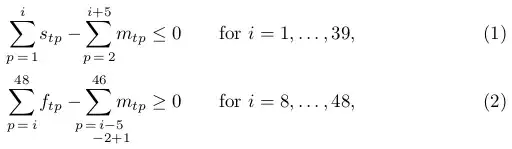
Picture of what I get after I tried what was posted as answer

Is it possible to align the for statements here, without dropping the equation numbers? \hfill and && mess up the placement of the equation numbers for me.
Edit:
Picture of what I get after I tried what was posted as answer

Here is a possible solution (if I understand your request correct):
\documentclass{article}

\usepackage{mathtools}

\begin{document}

\begin{alignat}{2}
  \sum_{\mathclap{p \,=\, 1}}^{i}  s_{tp} - \sum_{\mathclap{p \,=\, 2}}^{i+5}                                       m_{tp} &\leq 0 \qquad
  &&\text{for } i = 1, \dots, 39,\\
  \sum_{\mathclap{p \,=\, i}}^{48} f_{tp} - \sum_{\mathclap{\substack{p \,=\, i-5\\ \hphantom{p \,=\,} -2+1}}}^{46} m_{tp} &\geq 0
  &&\text{for } i = 8, \dots, 48,
\end{alignat}

\end{document}

& \sum_{p=i}^{48} f_{tp} - \sum_{\mathclap{p=i-1-2+1}}^{46} m_{tp} \geq 0 \qquad &&\text{ for } i=9,\dots, 48,\\ & \sum_{p=i}^{48} f_{tp} - \sum_{\mathclap{p=i-5-2+1}}^{46} m_{tp} \leq 0 &&\text{ for } i=9,\dots, 48,\\, but the page numbers then moved to a next line. Do you know what could cause that?
– texfan
Apr 28 '14 at 16:33
mathstools package (so \usepackage[fleqn]{mathtools}). Could that cause the problem?
– texfan
Apr 28 '14 at 16:50
fleqn now, but then I get a rather similar, still incorrect output with the number on the next line.
– texfan
Apr 28 '14 at 16:54
align environment, separate of the other equations, it worked. But I prefer it in the same environment.
– texfan
Apr 28 '14 at 16:57
\left( and \right) that were in one of the lines caused the problem. I changed them now, but now the brackets in that line don't look as nice. Very odd. Do you have any clue what I could do to solve that issue?
– texfan
Apr 28 '14 at 17:42
\left...\right constructions in your example. Please always post complete, minimal working examples (MWEs). You can use \big-like construction to replicate your \left-\right constructions. See Using \left( & \right) around amsmath's align delimiter (“&”), \left/\right across multiline equation but also Is it ever bad to use \left and \right?
– Werner
Apr 28 '14 at 17:46
\left( and right were in an other equation). Thanks for the suggestion about \big, I'll try that out!
– texfan
Apr 28 '14 at 17:48
Although a minimal working example (MWE) would really be helpful here, like Steven B. already stated, I think I got you.
Try to use mathtools instead of amsmath. It uses amsmath and extends it more, so you can use the \mathclap command. The lower sum limits of the second summation is causing the gap you dislike:
\documentclass{scrartcl}
\usepackage{mathtools}

\begin{document}
\begin{align}
  \sum_{p=1}^{i}s_{tp} - \sum_{p=2}^{i+5}m_{tp} \leq 0 for i = 1,\cdots,39,\\
  \sum_{p=1}^{48}f_{tp} - \sum_{\mathclap{p=i-5-2+1}}^{46}m_{tp} \geq 0 for i = 8,\cdots,48,
\end{align}
\end{document}

for as requested? It seems like your post was also cut short.
– Werner
Apr 28 '14 at 16:22
align block, everything works as it should. Just when it is in the same block, it does not. And I don't think it'd be handy to post the whole block of equations
– texfan
Apr 28 '14 at 17:01
\left( and \right) that were in one of the lines caused the problem. I changed them now, but now the brackets in that line don't look as nice. Very odd.
– texfan
Apr 28 '14 at 17:41
\documentclass, helps those trying to help you. – Steven B. Segletes Apr 28 '14 at 13:47