How do I produce the output >> in a LaTeX Beamer presentation?
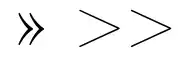
When I write >> or \textgreater\textgreater, I get this symbol, which I believe to be the guillemet(»):

I do not want this symbol. I want literally two greater-than symbols, in the context of
Use >> to append to a file, as in
date >> dates



>>was once a way to obtain\guillemotrightifbabelwas loaded with thefrench(b)option. But the latter consists in only one symbol (», unicode 00187), and you can have it directly in any unicode editor with a suitable keyboard driver. You can obtain something similar in maths with the\ggcommand. – Bernard Apr 28 '14 at 15:25>{}>. – Werner Apr 28 '14 at 18:40\verbcommand. You will need it for other things, like#or similar... compare>{}> \texttt{>{}>} \verb|>>|– Rmano Apr 28 '14 at 19:28