You could use a \vphantom{} which inserts a vertical height equal to the parameter provided but of zero width. So using \vphantom{f} will make the \hat behave as if the hat needs to be on top of an f:

To have more fine tuned control you can use a scaled parameter via \hat{\vphantom{\scalebox{1.1}{x}} x}:

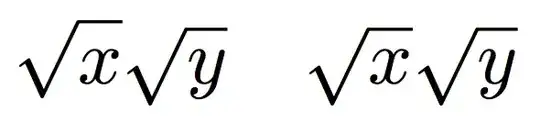
The \vphantom{} trick is useful in other cases such as with \sqrt{x} \sqrt{y} (as below on the left) which looks odd but is better with a \sqrt{x\vphantom{y}} \sqrt{y} (on the right) where both the top and bottom of the \surd are now aligned:
Code:
\documentclass{article}
\usepackage{graphicx}
\begin{document}
    \[
      \hat{\vphantom{f}x}_{t+1} \hat{f}_{t+1}
    \]
    or using \verb|\scalebox{}|
    \[
      \hat{x}_{t+1}
      \hat{\vphantom{\scalebox{1.1}{x}} x}_{t+1}
      \hat{\vphantom{\scalebox{1.2}{x}} x}_{t+1}
     \]
\end{document}


