The super style uses a supertabular table. This is different from the standard description list in the standard style. The table that is created is centered on the page causing the indentation. The bold is lost because the default behavior for description lists is that \item[name] desc will cause name to be bold.
There are a few ways to fix this. I used two methods, one based on a table and one based on a description list.
(Note: I will be using DejaVu Serif (font I have for Cyrillic letters). Also, "Glossary" appears as the header and I assume this has something to do with my local setup, and will appear properly for you)
Table Method
There are a few ways to fix this the first is to change the table style to allow bold and to modify some lengths to get the format you want. In general, the longtable package is used over supertabular and I modified the long style for the custom style you are looking for.
Using the \setglossarystyle{long} and just before \printglossaries adding:
\setlength\LTleft{0pt}
\setlength\LTright{0pt}
\setlength\glsdescwidth{0.8\hsize}
will fix the issue with the centered table, by removing the left and right margins. Setting \glsdescwidth to 0.8\hsize (default 0.6\hsize) gave more room for the description in the table.
To fix the bold issues is a bit more difficult as you have to define a custom style. You can base it off of an existing style such as long and change only the \glossentry by adding the following to the preamble before \setglossarystyle:
\newglossarystyle{mylong}{%
  \setglossarystyle{long}%
  \renewcommand{\glossentry}[2]{%
    \glsentryitem{##1}\glstarget{##1}{\bfseries \glossentryname{##1}} &
    \glossentrydesc{##1}\glspostdescription\space ##2\tabularnewline
  }%
}
In addition you need to set the glossary style with \setglossarystyle{mylong} to use the custom style. The only difference between this and what is defined in glossary-super.sty (part of glossaries) for long is the addition of \bfseries.
Edit: A better method as noted by Nicola Talbot is to simply use long as the table style and \renewcommand{\glsnamefont}[1]{\textbf{#1}} to fix the bold issue.
The full mwe is (with the original bold method commented out) :
\documentclass[12pt, a4paper]{article}
\usepackage{polyglossia}
\setdefaultlanguage{russian}
\setmainfont[Ligatures=TeX]{DejaVu Serif}

\usepackage[xindy={glsnumbers=false}, nonumberlist, nopostdot, nogroupskip]{glossaries}

% Original method for bold
%\newglossarystyle{mylong}{%
%  \setglossarystyle{long}%
%  \renewcommand{\glossentry}[2]{%
%    \glsentryitem{##1}\glstarget{##1}{\bfseries \glossentryname{##1}} &
%    \glossentrydesc{##1}\glspostdescription\space ##2\tabularnewline
%  }%
%}
%\setglossarystyle{mylong}

% Nicola Talbot's suggestion
\setglossarystyle{long}
\renewcommand{\glsnamefont}[1]{\textbf{#1}}

\makeglossaries

\begin{document}

\newacronym{bam}{ДАП}{Двунаправленная Ассоциативная Память}
\newacronym{ai}{ИИ}{Искусственный Интеллект}
\newacronym{am}{АП}{Ассоциативная Память}
\newacronym{ann}{ИНС}{Искусственная Нейронная Сеть}
\newacronym{an}{ИН}{Искусственный Нейрон}
\newacronym{it}{ИТ}{Информационные Технологии}
\glsaddall

\setlength\LTleft{0pt}
\setlength\LTright{0pt}
\setlength\glsdescwidth{0.8\hsize}

\printglossaries

\end{document}
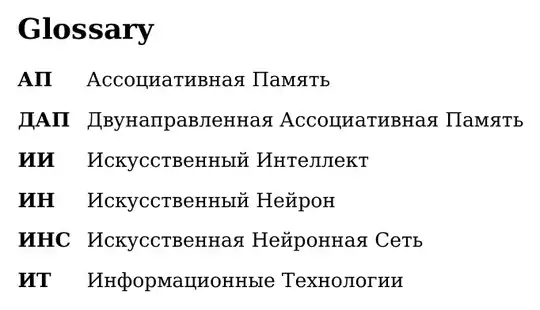
and produces:

Description List Method
My preferred method would be to modify the description list using the enumitem package. Using the \setlist command from enumitem can change the format of all description lists and used as:
\setlist[description]{leftmargin=!, labelwidth=3em} % Change for glossaries
\printglossaries
\setlist[description]{style=standard} % reset settings back to default
By wrapping \printglossaries with \setlist[description], the width of the label can be changed without modifying the style, and can easily be set differently for multiple \printglossary commands. For this example setting labelwidth=3em is appropriate, but may need to be changed depending on the acronyms used.
The full mwe is:
\documentclass[12pt, a4paper]{article}
\usepackage{polyglossia}
\usepackage{enumitem}
\setdefaultlanguage{russian}
\setmainfont[Ligatures=TeX]{DejaVu Serif}

\usepackage[xindy={glsnumbers=false}, nonumberlist, nopostdot, nogroupskip]{glossaries}

\makeglossaries

\begin{document}

\newacronym{bam}{ДАП}{Двунаправленная Ассоциативная Память}
\newacronym{ai}{ИИ}{Искусственный Интеллект}
\newacronym{am}{АП}{Ассоциативная Память}
\newacronym{ann}{ИНС}{Искусственная Нейронная Сеть}
\newacronym{an}{ИН}{Искусственный Нейрон}
\newacronym{it}{ИТ}{Информационные Технологии}
\glsaddall

\setlist[description]{leftmargin=!, labelwidth=3em} % Change for glossaries
\printglossaries
\setlist[description]{style=standard} % reset settings back to default

\end{document}
resulting in:
For more on enumitems description lists see: How to control enumitem's description list via leftmargin and labelwidth keys and Description-like environment with fixed labels width