15

Does anyone have a nice typesetting style for the C# language using listings? I configure it in this way:

\lstset{language=[Sharp]C,,basicstyle=\footnotesize,
  showspaces=false,showtabs=false,,breaklines=true,
  showstringspaces=false,breakatwhitespace=true,
  escapeinside={(*@}{@*)}}

But still it doesn't look fine, T_T. In my configuration I have characters that are too rounded and the code looks like if it was written using a typewriter. I don't want that. I want a modern, clear font, that looks more similar to the what I see in Visual Studio.

Final Election.

Thanks to all you guys, for give me ways to improve the appearance of the code. My final election is from the answer of @PauloCereda, little tuned with one of the comments and a bfseries touch for keywords. Here is the code and how it looks:

\documentclass{article}

\usepackage[T1]{fontenc}
\usepackage[scaled]{beramono}

\usepackage{color}
\definecolor{bluekeywords}{rgb}{0.13,0.13,1}
\definecolor{greencomments}{rgb}{0,0.5,0}
\definecolor{redstrings}{rgb}{0.9,0,0}

\usepackage{listings}
\lstset{language=[Sharp]C,
showspaces=false,
showtabs=false,
breaklines=true,
showstringspaces=false,
breakatwhitespace=true,
escapeinside={(*@}{@*)},
commentstyle=\color{greencomments},
keywordstyle=\color{bluekeywords}\bfseries,
stringstyle=\color{redstrings},
basicstyle=\ttfamily
}

\begin{document}

\begin{lstlisting}
/**
* Prints Hello World.
**/
class Program
{
  public static void Main()
  {
    System.Console.WriteLine("Hello World!");
  }
}
\end{lstlisting}

\end{document}

enter image description here

mjsr
  • 3,425

5 Answers5

14

Based on Thorsten's code, I added colors to keywords, strings and comments and replaced the current typewriter font by Inconsolata.

\documentclass{article}

\usepackage[T1]{fontenc}
\usepackage{inconsolata}

\usepackage{color}
\definecolor{bluekeywords}{rgb}{0.13,0.13,1}
\definecolor{greencomments}{rgb}{0,0.5,0}
\definecolor{redstrings}{rgb}{0.9,0,0}

\usepackage{listings}
\lstset{language=[Sharp]C,
  showspaces=false,
  showtabs=false,
  breaklines=true,
  showstringspaces=false,
  breakatwhitespace=true,
  escapeinside={(*@}{@*)},
  commentstyle=\color{greencomments},
  keywordstyle=\color{bluekeywords},
  stringstyle=\color{redstrings},
  basicstyle=\ttfamily
}

\begin{document}

\begin{lstlisting}
/**
* Prints Hello World.
**/
class Program
{
  public static void Main()
  {
    System.Console.WriteLine("Hello World!");
  }
}
\end{lstlisting}

\end{document}

Resulting in:

Hello world.

According to the Inconsolata documentation, loading it redefines the \tt font.

Paulo Cereda
  • 44,220
  • perhaps the colors looks cool, when i zoom in or zoom out the clarity of the font is lost. – mjsr May 16 '11 at 21:38
  • forget my previous comment, i don't know how but now the fonts looks perfect. One more help please, i try to make the keywords bold but perhaps i put "keywordstyle=\color{bluekeywords}\bfseries" it seems that it ignore the instruction. – mjsr May 16 '11 at 22:27
  • @voodoomsr: Unfortunately, it seems that the Inconsolata font has no bold face. Maybe we can choose another typewriter font. – Paulo Cereda May 16 '11 at 22:46
  • 1
    @voodoomsr: Take a look at beramono, which is a modern-looking (not too Courier-like) pretty good monotype font that includes bold face and slanted versions. – Daniel May 17 '11 at 07:03
  • @Daniel ouuuuu yea with that font and the color configuration that @PauloCereda provide plus the bfseries for the keywords produce the clear and beautiful look that i want :D – mjsr May 17 '11 at 12:11
  • How does writing escapeinside={(*@}{@*)} allow you to use multiple characters for the escape sequence? The manual only says that it takes two characters. Is this something universal to TeX? – palapapa Jan 08 '24 at 09:16
4

You may use basicstyle to customize the font:

\documentclass{minimal}
\usepackage{bold-extra}
\usepackage{listings}
\lstset{language=[Sharp]C,
  showspaces=false,
  showtabs=false,
  breaklines=true,
  showstringspaces=false,
  breakatwhitespace=true,
  escapeinside={(*@}{@*)},
  basicstyle=\ttfamily,
  columns=fullflexible
}
\begin{document}
\begin{lstlisting}
class Program
{
  public static void Main()
  {
    System.Console.WriteLine("Hello World!");
  }
}
\end{lstlisting}
\end{document}

enter image description here

Alternatively you could use lmodern instead of bold-extra as Andrey Vihrov suggested.

Thorsten
  • 12,872
3

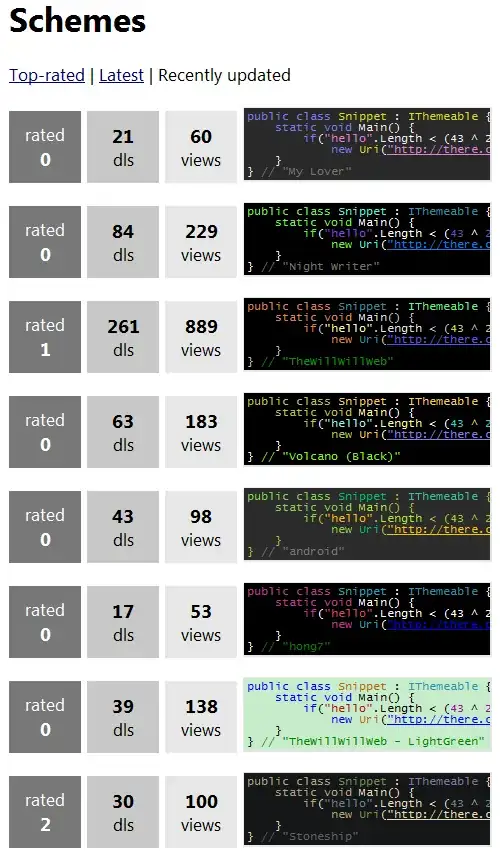
There is a list of Visual Studio styles that you can choose as a reference. The following figure shows some of them.

enter image description here

Afterwards, you need to look up the name of colors, fonts, etc used there to create your own listings style. Creating listings style can be found in What configuration do you propose for listings.sty to make the output look comfortable?.

Display Name
  • 46,933
2

If you don't mind solutions that involve other tools, I like to use Pygments to generate code listings for inclusion in my documents. It can process dozens of programming languages and other markup. Just pipe your code listing through their command-line program and \input the resulting markup in your document.

1

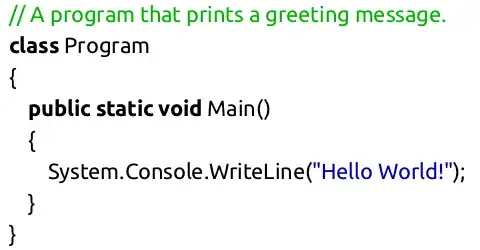
If you compile the document with xelatex or lualatex, you can use any TrueType or OpenType font you want. So you could use for example the font that Visual Studio uses. Just load the fontspec package and use something like \setmonofont{Inconsolata} together with basicstyle=\texttt. Or define a font family explicitly for code, as in the following example.

\documentclass{minimal}
\usepackage{fontspec,xcolor}

% Define \codefont to switch to the font 'Ubuntu'.
% (I find the font size more pleasing when the lower case
% characters are scaled to the size of the lower case of the
% surrounding text.)
\newfontfamily\codefont[Scale=MatchLowercase]{Ubuntu}

\usepackage{listings}
\lstset{language=[Sharp]C,
  showspaces=false,
  showtabs=false,
  breaklines=true,
  showstringspaces=false,
  breakatwhitespace=true,
  escapeinside={(*@}{@*)},
  basicstyle=\codefont,             % use the font defined as \codefont
  stringstyle=\color{blue!70!black},
  commentstyle=\color{green!70!black},
  columns=fullflexible
}
\begin{document}

\begin{lstlisting}
// A program that prints a greeting message.
class Program
{
  public static void Main()
  {
    System.Console.WriteLine("Hello World!");
  }
}
\end{lstlisting}
\end{document}

result

Also see the listings manual for lots of ways to customize the formatting of listings.

Caramdir
  • 89,023
  • 26
  • 255
  • 291
  • Btw, the Ubuntu font is available from http://font.ubuntu.com/ – Caramdir May 16 '11 at 21:40
  • i really like how this look, is it possible to put a working code with inconsolata?...i try what you say but i receive an error. Maybe i'm using bad the xelatex command, is the first time i use it, :D. i always use pdflatex.exe. – mjsr May 17 '11 at 01:42
  • @voo: Did you install the font? It is hard to help you without the error message. – Caramdir May 17 '11 at 03:10
  • @Caramdir yes it is installed, here is the log of the error http://dl.dropbox.com/u/15811510/lol.log – mjsr May 17 '11 at 03:41
  • @voo: It seems you are compiling the example with the Ubuntu font. If you do that you also need to install that font. If you want Inconsolata, try compiling the code I posted in the answer, but with Ubuntu replaced by Inconsolata. Also MikTeX 2.8 might have old versions of XeTeX and fontspec, which might cause problems. – Caramdir May 17 '11 at 03:53
  • @Caramdir I try with both fonts but the same error arise. What distribution do you recommend? Miktex 2.8 is the last version of Miktex so maybe a need to move on to other distribution – mjsr May 17 '11 at 11:40
  • @voo: 2.9 is the latest (was released last October). I'll try later today compiling this on a Windows computer. – Caramdir May 17 '11 at 15:58
  • @Caramdir thanks, you are right i got confused because in "Recent News" in Miktex Homepage appears 2.9 as beta so i do not continue looking further, :D. I'm going to update my Miktex install and see what happend. I'm thinking that the problem comes from other thing, the version of xetex change very very little in 2.8 to 2.9 of Miktex, xetex 0.9995.1->xetex 0.9997.4 – mjsr May 17 '11 at 16:37
  • @voo: The code works fine with MikTeX 2.9. – Caramdir May 17 '11 at 18:24