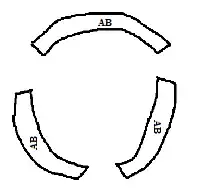
Something to start with
\documentclass[tikz,border=2mm]{standalone}
\usetikzlibrary{decorations.text}

\begin{document}

\begin{tikzpicture}
\draw (120:2cm) arc [start angle = 120, end angle=60, radius=2cm] --++(60:1cm) arc [start angle=60, end angle=120, radius=3cm] --++(120:-1cm)--cycle;
\draw[decorate,decoration={text along path, text=this is a text, text align={align=center}}] (120:2.5cm) arc(120:60:2.5cm);

\draw (269:2cm) arc [start angle = 269, end angle=133, radius=2cm] --++(133:1cm) arc [start angle=133, end angle=269, radius=3cm] --++(269:-1cm)--cycle;
\draw[decorate,decoration={text along path, text=this is a text, text align={align=center}}] (269:2.5cm) arc(269:133:2.5cm);

\draw (55:2cm) arc [start angle = 55, end angle=-80, radius=2cm] --++(-80:1cm) arc [start angle=-80, end angle=55, radius=3cm] --++(55:-1cm)--cycle;
\draw[decorate,decoration={text along path, text=this is a text, text align={align=center}}] (55:2.5cm) arc(55:-80:2.5cm);
\end{tikzpicture}
\end{document}

Update Command \drawsector
I'm not sure to understand your comment but you can always define a command to simplify typping.
Command \drawsector has 5 parameters plus 1 optional.
\drawsector[draw options]{text radius}{width}{start angle}{delta angle}{text}
text radius is supose to be text baseline radius and because sector border is shifted around text center, I've (negative) raised the text. May be some other decoration can place text verticaly aligned to its center, but I don't know how to do it.
delta angle means angular widthness (does exist this word?)
\documentclass[tikz,border=2mm]{standalone}
\usetikzlibrary{decorations.text}

%\drawsector[]{text radius}{width}{start angle}{delta angle}{text}
\newcommand{\drawsector}[6][]{
    \draw[#1] (#4:{#2-.5*#3}) arc [start angle = #4, delta angle=-#5, radius={#2-.5*#3}]--++({#4-#5}:#3) arc [start angle = {#4- #5}, delta angle=#5, radius={#2+.5*#3}] --cycle;
\draw[decorate,decoration={raise=-3pt, text along path, text=#6, text align={align=center}}] (#4:#2) arc(#4:(#4-#5):#2);
}
\begin{document}
\begin{tikzpicture}
\drawsector{2}{1}{130}{100}{this is my text}

\drawsector[draw=green, thick, fill=green!20]{3.2}{.8}{60}{120}{this is another text}

\drawsector[draw=none, fill=blue!30]{2.5}{2}{180}{40}{text}
\end{tikzpicture}
\end{document}

If your question was how to draw a circular sector around a certain circular text, you can try to use Frédéric's answer to How to Intersect an arc with a line without calculating the angle