Friends, consider the following code:
\documentclass{article}

\usepackage{tikz}
\usetikzlibrary{automata}
\usetikzlibrary{positioning}

\begin{document}

\begin{tikzpicture}[shorten >=1pt,,node distance=4cm,on grid,auto, /tikz/initial text={start}]
\node[state, initial, accepting] (q0) {0};
\node[state] (q1) [right=of q0] {1};
\path[->] (q0) edge [bend left] node {on} (q1)
           (q1) edge [bend left] node {off} (q0)
;
\end{tikzpicture}

\end{document}
This code produces the following output:

Pretty straightforward, I guess. :) I was wondering if it would be possible to add a second label to each one of those paths in a way I don't need to calculate their coordinates and hardcode them into the picture. My idea for a second label would is to put the text in the opposite direction of the primary label. :)
As a bonus, I was wondering how challenging would be to make the second label a little different than the first one, say, like this gimp'ed image:

Any hints on how to achieve this? :) I am already happy if a second label is possible, even without these bells and whistles.


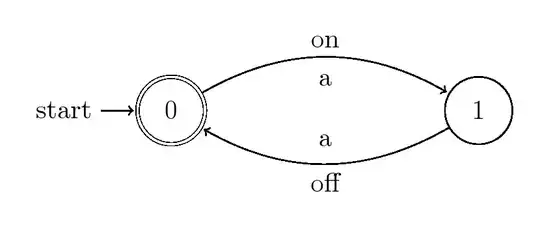


\path[->] (q0) edge [bend left] node[above] {on} node[below] {a} (q1) (q1) edge [bend left] node[below] {off} node[above] {a} (q0);This produces the twoanodes on the inner sides of the edges. – Dave Jun 12 '14 at 22:24node(living and learning)! Perhaps you could convert your comment to an answer? I think it's a valid approach towards solving my question (of course, it's up to you). Thank you! Edit: actually, one the answers use this very approach, oopsie. But I really appreciate your comment!:)– Paulo Cereda Jun 13 '14 at 09:34:)– Paulo Cereda Jun 14 '14 at 13:20