3

I am new in the world of latex . At this time , now I am writing thesis . I want to have tabs in tex document . For this purpose , I have written the following code .

\hspace{2cm}$ \mathbf{a_{11}x_1 + a_{12}x_2 +. . . + a_{1n}x_n = b_1 } $ \newline
                    \hspace{2cm}$\mathbf{a_{21}x_1 + a_{22}x_2 +. . . + a_{2n}x_n = b_2 }$\newline
                    \hspace{2cm} ...     ...     ...   ...    ...  ... \newline
                    \medskip ...     ...     ...   ...    ...  ...\newline
                    \medskip ...     ...     ...   ...    ...  ...\newline
                    \medskip $\mathbf{a_{n1}x_1 + a_{n2}x_2 +. . . + a_{nn}x_n = b_n }   $ \newline 

But this code generates tab in first line and then in the next line the tabs is not generated . Why ? Please help .

Christopher Marlowe
  • 319
  • 2
  • 5
  • 11
  • Welcome to TeX.SE. While code snippets are useful in explanations, it is always best to compose a fully compilable MWE that illustrates the problem including the \documentclass and the appropriate packages so that those trying to help don't have to recreate it. – Peter Grill Jun 18 '14 at 03:20

2 Answers2

4

You can use \hspace*{} to get the desired effect:

enter image description here

However you really should use some sort of math environment such as align:

enter image description here

Notes:

Code:

\documentclass{article}

\usepackage{amsmath}

\begin{document} \noindent \hspace{2cm}$ \mathbf{a_{11}x_1 + a_{12}x_2 +. . . + a_{1n}x_n = b_1 } $ \newline \hspace{2cm}$\mathbf{a_{21}x_1 + a_{22}x_2 +. . . + a_{2n}x_n = b_2 }$\newline \hspace{2cm} ... ... ... ... ... ... \newline \medskip\hspace{2cm} ... ... ... ... ... ...\newline \medskip\hspace{2cm} ... ... ... ... ... ...\newline \medskip\hspace*{2cm} $\mathbf{a_{n1}x_1 + a_{n2}x_2 +. . . + a_{nn}x_n = b_n } $ \newline

But instead you should use \begin{align} a_{11}x_1 + a_{12}x_2 + \dotsb + a_{1n}x_n &= b_1 \ a_{21}x_1 + a_{22}x_2 + \dotsb + a_{2n}x_n &= b_2 \ \end{align} \end{document}

Peter Grill
  • 223,288
1

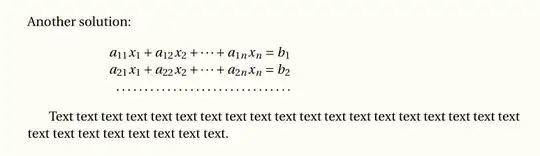
Another solution using array and flalign allows for a better-looking long series of dots with the \hdotsfor command. In this context, a plain \dots will do the same job as \dotsb:

\documentclass{article}
\usepackage[utf8]{inputenc}
\usepackage{fourier}
\usepackage{array}
\usepackage{mathtools, nccmath}

\begin{document}
\noindent Another solution: \useshortskip

\begin{flalign*}
 \hspace{2cm} &
\begin{array}{@{}r@{} >{{}}l} \\
 a_{11}x_1 + a_{12}x_2 + \dots + a_{1n}x_n &{} = b_1\\
 a_{21}x_1 + a_{22}x_2 + \dots + a_{2n}x_n &= b_2 \\
\hdotsfor{2}
\end{array} &
\end{flalign*}

Text text text text text text text text text text text text text text text text text text text text text text text text text text text.
\end{document} 

enter image description here

Bernard
  • 271,350