Originally I thought this might be resolved by using the supported LaTeX syntax of \makebox[0pt][l]{<content>} rather than the plain-TeX \llap, but the behavior is the same. The \Xlap commands cause issues in certain places because they are \hboxes (TeX primitives, not \mboxes (LaTeX macros). See further details here. Might be worth noting in any case.
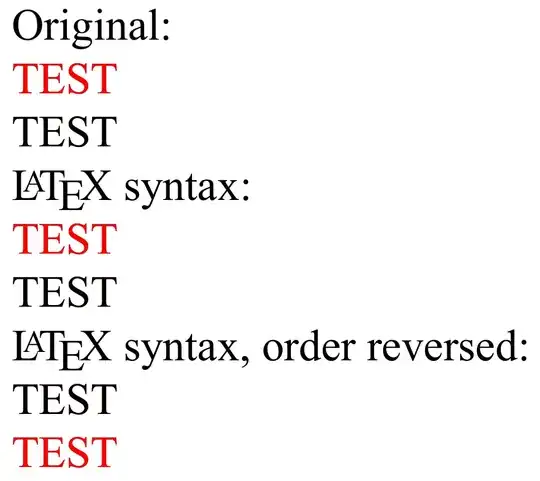
As you can see below, both syntaxes produce the same result. The difference comes from the direction in which LaTeX scans your input. Put simply, in LTR mode, it prints black and then prints red at the same point on the page. So the result is red. Conversely, in RTL mode, it prints red and then prints black at the same point on the page.
We can see this effect by reversing the order of the original text and the overlapping box:
\documentclass{article}
\usepackage{xecolor} % loads fontspec by default
\setmainfont{Times New Roman}
\TeXXeTstate=1
\newcommand{\tk}{\textxecolor{black}{TEST}}
\newcommand{\tr}{\textxecolor{red}{TEST}}

\begin{document}
Original:

\tk\llap{\tr}

\beginR\tk\llap{\tr}\endR

\LaTeX\ syntax:

\tk\makebox[0pt][r]{\tr}

\beginR\tk\makebox[0pt][r]{\tr}\endR

\LaTeX\ syntax, order reversed:

\makebox[0pt][l]{\tr}\tk

\beginR\makebox[0pt][l]{\tr}\tk\endR
\end{document}
Output


e-texbug. – Jul 13 '14 at 02:33