Although not exactly answering the OP's question, and looking at the accepted answer that seems to indicate a possibility via a multi-file solution I wanted to provide exactly such a multi-file solution alternative of managing such issues. If one is using VimTeX, it is quite easy to create differently named pdf files as output from the compilation process workflow of the same .tex file.
Here is an example provided the author of that plugin.
Roughly, have an outer student.tex and professor.tex (with possibly differently defined variables/commands/macros thereby controlling what gets typeset how). Both of these files get to \input{main.tex} the same file -- all three files in the same folder.
Once student.tex and professor.tex are setup, there is little to no need to keep updating them. All work can now happen in main.tex.
On opening main.tex, in Vim, the plugin automatically asks the user to specify which the calling file is -- student.tex or professor.tex. On making the choice, and on issuing the equivalent of the compile command [\ll in VimTeX], compilation occurs and based on the choice made, the output is student.pdf or professor.pdf.
See example (provided by the author of the plugin) below:
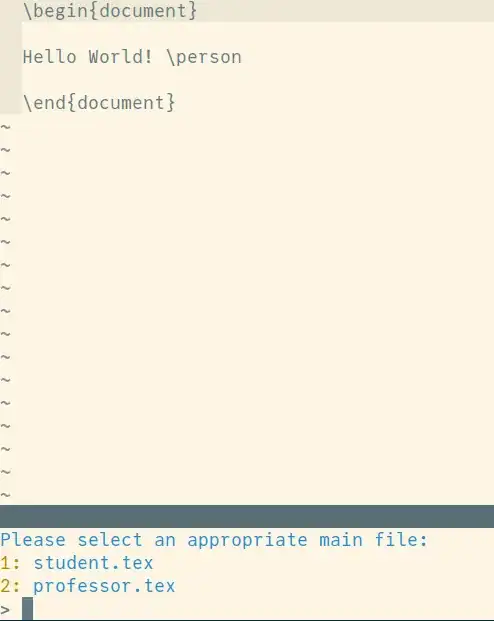
% main.tex
\begin{document}
Hello World! \person
\end{document}
% professor.tex
\documentclass{minimal}
\newcommand{\person}{from professor}
\input{main.tex}
% student.tex
\documentclass{minimal}
\newcommand{\person}{from student}
\input{main.tex}



Makefilescripts to generate my PDFs. If that is your case, too, it's easy to enough to either rename the.texor the.pdfin the process. – raphink May 27 '11 at 07:23Makefileapproach sounds like a good workaround, however I did not use it yet. As I'm using GUI editors it is quite easy to use the keyboard shortcut to run pdflatex. – MostlyHarmless May 27 '11 at 07:28<date>_myfilename.tex, that probably means you aren't using a version control system. I highly recommend you take a few minutes to learn one such as git, it will make your life easier and better in the long run. Once you get the hang of it you'll never go back to manually saving incremental copies of a file. – Caleb Jul 21 '18 at 13:20