The logos can be found on the internet. You can then insert the logos using the includegraphics command.
\section{\includegraphics[scale=0.03]{linkedinLogo.png}}
{linkedin.com/in/yourname}
~
\section{\includegraphics[scale=0.03]{skypeLogo.png}}
{skype:yourname?call}
~
Another possibility is to draw the logos using Tikz. I have created the LinkedIN logo in myFriggeri_cv.sty like this:
\definecolor{linkedinblue}{RGB}{0,122,180}

\newcommand{\linkedInLogoTikz}[1]{
\scalebox{#1}{
\begin{tikzpicture}[y=0.05pt, x=0.05pt,yscale=-1, inner sep=0pt, outer sep=0pt]

  %background square
    \fill[linkedinblue, nonzero rule,rounded corners=5] (19.0,69.4)
  rectangle (724.4,774.8);

    %Draw 'n'
  \path[fill=white] (399.9674,578.3622) ..
    controls (400.6,477.8) and (400.7,475.2) .. (405.9,458.4) ..
    controls (413.8,432.5) and (431.9,419.8) .. (461.0,419.8) ..
    controls (491.6,419.7) and (505.9,432.7) .. (512.5,466.4) ..
    controls (514.1,474.4) and (514.3,485.5) .. (514.8,573.9) --
    (515.4,672.4) -- (567.7,672.6) .. controls (606.7,672.8) and
    (620.5,672.6) .. (621.5,671.7) .. controls (622.8,670.7) and
    (622.9,654.4) .. (622.6,559.9) .. controls (622.2,439.6) and
    (622.2,440.6) .. (616.2,413.9) .. controls (603.1,355.2) and
    (567.5,326.8) .. (503.9,324.2) .. controls (474.9,323.0) and
    (451.8,328.6) .. (430.0,342.1) .. controls (420.6,347.9) and
    (404.1,363.5) .. (399.9,370.6) .. controls (398.5,372.9) and
    (397.0,374.8) .. (396.6,374.8) .. controls (396.2,374.9) and
    (395.9,365.7) .. (395.9,354.6) .. controls (395.9,340.1) and
    (395.5,333.9) .. (394.7,333.1) .. controls (393.8,332.2) and
    (381.2,331.9) .. (344.2,331.9) .. controls (300.8,331.9) and
    (294.8,332.0) .. (293.4,333.4) .. controls (292.0,334.8) and
    (291.6,351.5) .. (291.9,502.0) .. controls (291.9,615.7) and
    (292.2,669.6) .. (292.9,670.9) .. controls (293.9,672.8) and
    (295.3,672.9) .. (346.6,672.6) -- (399.4,672.4) -- cycle;

  % dot over i
        \fill[white] (175,227) circle (63);
  % i rectangle
        \fill[white] (121.5,332.8) rectangle (229.6,670.9);
\end{tikzpicture}
}
}
It can then be inserter in the same way as the other sections:
\section{\linkedInLogoTikz{0.4}}
{linkedin.com/in/yourname}
~
The result:
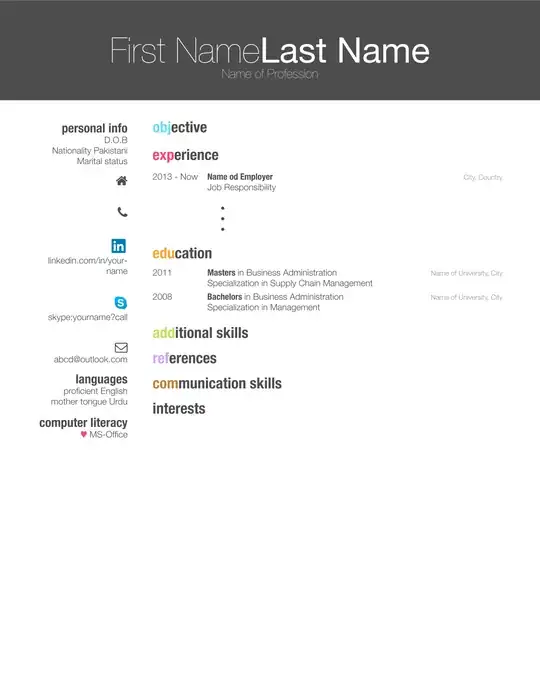
The complete example:
\documentclass[]{myfriggeri-cv} % Add 'print' as an option into the square bracket to remove colors from this template for printing
\usepackage{unicode-math}
\usepackage{fontawesome}

\definecolor{light-gray}{gray}{0.55}
\definecolor{skype}{HTML}{12A5F4}
\definecolor{html5}{HTML}{e34c26}
\definecolor{php}{HTML}{6c7eb7}
\definecolor{db}{HTML}{FF9900}
\definecolor{linkedin}{HTML}{1683BB}
%\addbibresource{bibliography.bib} % Specify the bibliography file to include publications

\begin{document}
\newfontfamily{\FA}{FontAwesome}
\header{First Name}{Last Name}{Name of Profession} % Your name and current job title/field

%----------------------------------------------------------------------------------------
%   SIDEBAR SECTION
%----------------------------------------------------------------------------------------

\begin{aside} % In the aside, each new line forces a line break
\section{personal info}
\emph{D.O.B}
\emph{Nationality} Pakistani
\emph{Marital status}
\section{{\FA \faHome}}
~
\section{\faPhone}
%+0 (000) 111 1112
~
\section{\includegraphics[scale=0.03]{linkedinLogo.png}} %or \section{\linkedInLogoTikz{0.4}}
{linkedin.com/in/yourname}
~
\section{\includegraphics[scale=0.03]{skypeLogo.png}}
{skype:yourname?call}
~
\section{\faEnvelope}
{abcd@outlook.com}
%\href{http://www.smith.com}{http://www.smith.com}
%\href{http://facebook.com/johnsmith}{fb://jsmith}
\section{languages}
\emph{proficient} English
\emph{mother tongue}  Urdu
\section{computer literacy}
{\color{red} $\varheartsuit$} MS-Office
\end{aside}

%----------------------------------------------------------------------------------------
%   Objective SECTION
%----------------------------------------------------------------------------------------
\section{objective}

%----------------------------------------------------------------------------------------
%   WORK EXPERIENCE SECTION
%----------------------------------------------------------------------------------------

\section{experience}

\begin{entrylist}
%------------------------------------------------
\entry
{2013 - Now}
{Name od Employer}
{City, Country}
{\emph{Job Responsibility} \\
\begin{itemize}
\item
\item
\item
\end{itemize}}
\end{entrylist}
%------------------------------------------------
%----------------------------------------------------------------------------------------
%   EDUCATION SECTION
%----------------------------------------------------------------------------------------

\section{education}

\begin{entrylist}
%------------------------------------------------
\entry
{2011}
{Masters {\normalfont in Business Administration}}
{Name of University, City}
{Specialization in Supply Chain Management}
%------------------------------------------------
\entry
{2008}
{Bachelors {\normalfont in Business Administration}}
{Name of University, City}
{Specialization in Management}

%------------------------------------------------
\end{entrylist}

%----------------------------------------------------------------------------------------
%   AWARDS SECTION
%----------------------------------------------------------------------------------------

\section{additional skills}
\section{references}
 %

 %----------------------------------------------------------------------------------------
 %  COMMUNICATION SKILLS SECTION
 %----------------------------------------------------------------------------------------

 \section{communication skills}

%%----------------------------------------------------------------------------------------
%%  INTERESTS SECTION
%%----------------------------------------------------------------------------------------
%
\section{interests}
%
%\textbf{professional:} data analysis, company profiling, risk analysis, economics, web design, web app creation, software design, marketing \textbf{personal:} piano, chess, cooking, dancing, running
%
%%----------------------------------------------------------------------------------------
%%  PUBLICATIONS SECTION
%%----------------------------------------------------------------------------------------

%%----------------------------------------------------------------------------------------

\end{document}


fontawesome. Don't know what "Linken" is. – LaRiFaRi Jul 17 '14 at 14:09tikz-pgf? – Jul 17 '14 at 14:10properlyis relative. Well defined questions tend to be answered quickly andproperly;-) – Jul 17 '14 at 14:57