6

Problem

I am trying to create a document where a box of text will float on the right side. The rest of the text within the document should flow around the box. My searches have lead me to wrapfigure, but it doesn't seem to work the way I expected.

In my first example below I use wrapfigure without specifying a number of lines and the page doesn't wrap at all. It essentially creates two columns because there is a large gap for the rest of the document. The second page isn't showed, but it has a gap the whole way down.

The second example shows the same code except I specify the number of lines on wrapfigure. It only wraps for 3 lines which is what I expect, but it does it for every paragraph in the document. Again, the second page isn't shown.

I want all text to be the full width of the document except for the areas where the box is. This seams like it shouldn't be too difficult, but I haven't figured it out yet.

wrapfigure (default number of lines)

Code

\documentclass[10pt]{article}
\usepackage[margin=0.5in]{geometry}
\usepackage{float}
\usepackage{wrapfig}
\usepackage{framed}
\usepackage{lipsum} % for dummy text only
\usepackage[alpine,misc]{ifsym}
\textheight=9.0in
\pagestyle{empty}
\setlength{\tabcolsep}{0in}

\usepackage{hyperref}

\newcommand\invisiblesection[1]{% \refstepcounter{section}% \addcontentsline{toc}{section}{\protect\numberline{\thesection}#1}% \sectionmark{#1}}

\begin{document}

\begin{wrapfigure}{r}{2.1in}

\footnotesize \begin{framed}

\invisiblesection{\textit{Side Bar}} \subsection*{Side Section A}

\lipsum[1]

\end{framed} \end{wrapfigure}

{\Huge Title}\ \textit{\small subtitle}

\pagebreak[1] \section*{Section 1}

\lipsum[1-4]

\pagebreak[1] \section*{Section 2}

\lipsum[1-4] \end{document}

Example

Example with default number of lines page 1

wrapfigure (3 number of lines)

Code

\documentclass[10pt]{article}
\usepackage[margin=0.5in]{geometry}
\usepackage{float}
\usepackage{wrapfig}
\usepackage{framed}
\usepackage{lipsum} % for dummy text only
\usepackage[alpine,misc]{ifsym}
\textheight=9.0in
\pagestyle{empty}
\setlength{\tabcolsep}{0in}

\usepackage{hyperref}

\newcommand\invisiblesection[1]{% \refstepcounter{section}% \addcontentsline{toc}{section}{\protect\numberline{\thesection}#1}% \sectionmark{#1}}

\begin{document}

\begin{wrapfigure}[3]{r}{2.1in}

\footnotesize \begin{framed}

\invisiblesection{\textit{Side Bar}} \subsection*{Side Section A}

\lipsum[1]

\end{framed} \end{wrapfigure}

{\Huge Title}\ \textit{\small subtitle}

\pagebreak[1] \section*{Section 1}

\lipsum[1-4]

\pagebreak[1] \section*{Section 2}

\lipsum[1-4] \end{document}

Example
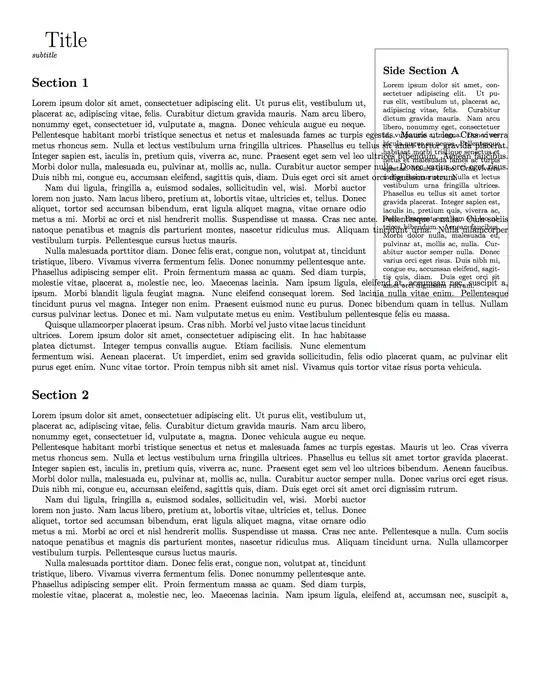
Example with 3 number of lines page 1

pgreen2
  • 163
  • Should the box of text b – Bernard Jul 22 '14 at 09:16
  • Should the box of text have to break across pages? – Bernard Jul 22 '14 at 09:17
  • In the second example you told wrapfig to leave 3 lines for the figure and then gave it a figure of over 30 lines so it's not surprising that it got confused. – David Carlisle Jul 22 '14 at 09:31
  • Sorry if the second example was confusing. I realize that it won't wrap correctly due to the size differences. What was unexpected to me was that every single paragraph in the document was doing it. I would expect the first, maybe all paragraphs that "touch" the floating box, but not the whole document. – pgreen2 Jul 22 '14 at 10:52
  • @Bernard, the box of text should be confined to the first page. – pgreen2 Jul 22 '14 at 10:53
  • @pgreen2 the underlying parshape mechanism only allows the shape of a single paragraph to be altered. The fact that wrapfig can do multiple paragraphs (by internally re-calculating the required shape for the later paragraphs) is something of a feat, but you should be impressed when it works, not surprised when it doesn't:-) putting headings and lists in the text that is wrapping makes it much more difficult and likely to go wrong. – David Carlisle Jul 22 '14 at 11:56

2 Answers2

9

wrapfig works best if there is just plain text that is wrapping round the figure:

enter image description here

\documentclass[10pt]{article}
\usepackage[margin=0.5in]{geometry}
\usepackage{float}
\usepackage{wrapfig}
\usepackage{framed}
\usepackage{lipsum} % for dummy text only
\usepackage[alpine,misc]{ifsym}
\textheight=9.0in
\pagestyle{empty}
\setlength{\tabcolsep}{0in}

\usepackage{hyperref}

\newcommand\invisiblesection[1]{%
  \refstepcounter{section}%
  \addcontentsline{toc}{section}{\protect\numberline{\thesection}#1}%
  \sectionmark{#1}}


\begin{document}

\part{Title}
\textit{\small subtitle}


\section*{Section 1}

\begin{wrapfigure}{r}{2.1in}
\vspace{-4cm}
\footnotesize
\begin{framed}

\invisiblesection{\textit{Side Bar}}
\subsection*{Side Section A}

\lipsum[1]

\end{framed}
\end{wrapfigure}
\lipsum[1-4]


\section*{Section 2}

\lipsum[1-4]
\end{document}
David Carlisle
  • 757,742
  • I see where your code is different than mine, but the subtly is lost on me. Can you better define "just plain text is wrapping the figure" with respect to the change you made? – pgreen2 Jul 22 '14 at 10:50
  • @pgreen2 I moved the section headings and pagebreak commands out of that area (and also of course didn't specify that only 3 lines should be indented for teh figure) – David Carlisle Jul 22 '14 at 11:17
4

Not sure this is what you want. It uses the generic macros from insbox.tex. This set of macros defines \InsertBoxL and \InsertBoxR commands that allow to insert any kind of ‘box’, and can work when wrapfig does not (I recently used it for insertion in a list environment).

Syntax: \InsertBoxR{number of fullwidth lines before insertion}{inserted box}[optional corrective number of lines].

    \documentclass[10pt]{article}
    \usepackage[margin=0.5in]{geometry}
    \usepackage{float}
    \usepackage{lipsum} % for dummy text only
    %\usepackage[alpine,misc]{ifsym}
    \textheight=9.0in
    \pagestyle{empty}
    \setlength{\tabcolsep}{0in}

    \usepackage{hyperref}

    \newcommand\invisiblesection[1]{%
    \refstepcounter{section}%
    \addcontentsline{toc}{section}{\protect\numberline{\thesection}#1}%
    \sectionmark{#1}}

    \input{insbox}
    \usepackage[x11names]{xcolor}

    \begin{document}

    {\Huge Title}\\
    \textit{\small subtitle}

    \pagebreak[1]
    \section*{Section 1}

    \InsertBoxR{0}{
    \footnotesize\setlength\fboxsep{10pt}\setlength\fboxrule{1pt}
    \fcolorbox{IndianRed3}{AntiqueWhite1!30}{\begin{minipage}{2.1in}
    \invisiblesection{\textit{Side Bar}}
    \subsection*{Side Section A}
    %
    \lipsum[1]
    \end{minipage}}
    }[10]
    \lipsum[1-4]

    \pagebreak[1]
    \section*{Section 2}

    \lipsum[1-4]
    \end{document} 

enter image description here

Bernard
  • 271,350